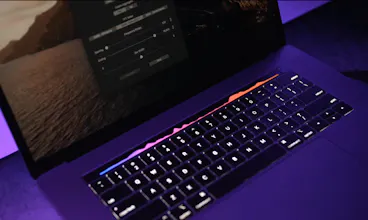
AVTouchBar is an audio visualizer for the touch bar. AVTouchBar will automatically create an aggregate device when needed. It includes features such as custom gradients, touch bar gestures to change colors, enter full screen mode, and adjust the volume.
No reviews yetBe the first to leave a review for AVTouchBar
Love the finished product and the gestures. Now it's time to go after Sound Spectrum, who haven't done squat with their apps for years and their apps no longer respond to audio or music. Time for AVScreen? After you've enjoyed your vacation, of course.
I've heard rumors that Apple might drop the touch bar on newer models. I hope you can get this on the Apple App Store soon (and charge for it), so more Apple people will see it and fall in love with it, and lobby internally to add the TouchBar to all Apple models.
@iamsebj Thanks Seb! For me the process was very difficult initially, but I would imagine it would be for anybody who is not a moderate level MacOS/iOS dev. When I started this project, I had taken a few Python classes in college so I understood the basics like variables and functions. But obviously, there is not much documentation in terms of developing for the touch bar, especially doing stuff the apple doesn't want (ex. animating on the touch bar). And audio visualizers on mac are generally quite painful because Apple does not provide an API to get the internal system audio.
So I just tried to take it one very small step at a time, and if I ended up hitting a road block that was way over my head, I would end up hiring a freelancer to help finish that aspect, or guide my workflow in the correct direction.
Hey all - my name is Jake Fishman and I am the creator of AVTouchBar. Ever since I saw the touch bar, I wanted an audio visualizer on it. Four years went by and it still hadn't been created, so I decided to look deeper into it.
My "real" job has nothing to do with tech. I am a minor league baseball player and my season was cancelled last year. I decided to take that time to learn how to code and start building this app. I spent many months learning a lot, and invested some of my own money to get this app to where I wanted it to be.
I'm beyond happy with how it turned out. I can truly say it's one of a kind and there is nothing like it out there. I know not everybody enjoys the touch bar, but hopefully this will give you a reason to enjoy it.
Some headline features:
-Works with internal microphone
-Works with system audio (just download and install a third party audio driver like soundflower, blackhole, loopback, boom3d audio etc.)
-Automatically creates an aggregate when needed
-Deletes aggregate when closing the app
-Create custom gradients
Touch Bar Gestures Include:
-Tap to change color
-Double tap to mute
-Long press to toggle full screen mode
-Single finger drag to adjust volume (will work even if using an aggregate which disables volume adjustment)
Would love to answer any questions you have or hear any feedback you have!
Best,
Jake
Works great, finally a more passive visual use for the touchbar since I don’t use it much otherwise!
A few first thoughts: when the app is open my system volume buttons are disabled/greyed out. I’m happy to remove them from my touchbar’s control strip altogether since AVTouchBar has gestures to control volume, but would still appreciate a setting to show or hide custom volume control buttons and fullscreen toggle with the visualizer (I know I will forget which gesture does what if I don’t interact with them often). Also when scrubbing to control volume it’d be nice to see the volume level, either as a small volume slider or simple numeric indication :)
@brianlsf Hi Brian - thanks so much for the feedback! I can definitely look into a setting that will show/hide the volume control buttons, since you don't necessarily need them when using AVTouchBar. That may be a great potential full screen option to replace the whole control strip with custom buttons and allow the user to determine which ones they want there/don't want. I'm always working on allowing the user to set which action they want to happen for each gesture, so that should help with the remembering (and can always recheck for a reminder). I'll also check out if I can show a little volume indicator when changing the volume - which I totally agree would be nice :).
Thanks again for all the suggestion Brian!
PitchLab
Daybridge
PitchLab
PitchLab
PitchLab
PitchLab
Should I Exchange Now
PitchLab
Automagical.ai
PitchLab
Product Hunt
PitchLab
PitchLab