Caply

Caply

Visually collaborate on top of any website

1 follower

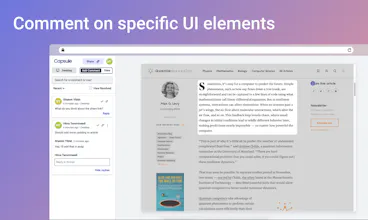
With Caply you can collaborate and leave feedback directly on top of any website. Just one click to comment, and another to share it with the world! We automatically organize your feedback in the dashboard. Click —> Comment —> Share & repeat!
Caply gallery image
Caply gallery image
Caply gallery image
Caply gallery image
Caply gallery image
Free
Launch Team
Anima - Vibe Coding for Product Teams
Build websites and apps with AI that understands design.
Promoted

What do you think? …

Hima Tammineedi
Hey Hunters! We’re hyped to bring you Caply (formerly called Capsule) - making it so you never ever have to give UI feedback over email or Slack again. We’ve built a lot of products and we know how annoying it can be to manage design and website feedback, especially when it’s all over the place - email, Google Docs, and heaven forbid, Whatsapp. That’s why we built Caply. Our goal is to change the way people give, receive, and organize feedback on websites and bridge the gap between designers and developers. Difficulty in managing feedback should never stop you from building a great product. With Caply, you can capture any website, and then click on any UI element to leave a comment. The best part? Every Caply you send or interact with is automatically saved to your own dashboard. So anytime you want to go back and revisit feedback you’ve received, you know exactly where to go. We also notify you whenever someone leaves you a piece of juicy feedback. 🍉 TLDR: 1. Use the chrome extension to take an interactive screen capture of any website 2. Click on any part of the website and drop a comment 3. Share your Caply with the world (or just your team) 4. Check out the dashboard to view previous feedback and Caply recordings you’ve interacted with! 🚀 You can leave feedback on the Product Hunt landing page yourself here! (no account needed): https://capsule.click/commentary... Maybe @rrhoover will update the UI based on your comments 😉 Huge thanks to @thetylerhayes for hunting us!
Vladimír Seman
@himat wow, i really like the simplicity! it reminds me commenting in figma over design 😉
Lee Fuhr
?makers I love seeing products in this space. How does Capsule compare to Bubbles or MarkUp, both of which are already in my bookmarks? :)
Hima Tammineedi
@lee_fuhr Thanks for asking Lee. For Bubbles - the captured pages are only images/videos, whereas in Capsule, we capture the HTML of websites directly. So the benefit with Capsule here is that you can actually interact with the original website by scrolling, and can add comments to a specific HTML element on the page. MarkUp on the otherhand has this same ability to comment on specific HTML elements. But, MarkUp always shows the current live page of whatever URL you captured. So if you used MarkUp to capture and comment google.com, your comments may go out of date when google.com's UI is updated later. With Capsule however, we store a snapshot of the website at the time you captured it. So even if google.com changes later (or even goes down completely), the Capsule screenshot of the site will continue to work and always look the same!
Johan
Just tried it. Really simple to get started. And I love you can just comment without creating user as well :) Will use with my team for sure on upcoming projects
Abhishek Bhargava
@johan_duus_terkelsen Thanks Johan - appreciate the kind words :) Would love any feedback you have as you guys use it!
Welly Mulia
Great tool. Love that you don't have to create an account to use. How do you plant to monetize this later?
Hima Tammineedi
@welly_mulia Thanks Welly! We wanted to make this tool as easy to use as possible. We're already monetizing it - we offer pro accounts that let you make private capsules, get a shared team dashboard, and offer priority support. Feel free to email me hima@capsule.click to talk further.
Jim Engine
Simple but powerful. All I need 👌🏻
Abhishek Bhargava
@officialexaking Appreciate it, Jim!
Moksh Jawa
Just used it -- nifty tool that's functional and smooth. good work!
Hima Tammineedi
@mokshjawa Thanks for trying it out Moksh!
Omar Mohamed
One of those tools that's just so obviously necessary!
Hima Tammineedi
@o__mohamed Thanks Omar!
123
Next
Last