Channel Tools for Slack

Invite and export all channel or team members on Slack

3 followers

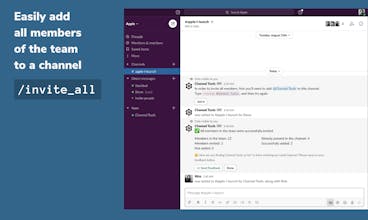
With Channel Tools for Slack, you can bulk invite all members of a Slack team, or a channel, to another channel. It also helps you quickly export all members from a channel. It comes with handy utility commands for clearing the screen and picking a random user
Channel Tools for Slack gallery image
Free
Launch tags:ProductivityMessagingRobots
Launch Team
Intercom
Intercom
Startups get 90% off Intercom + 1 year of Fin AI Agent free
Promoted

What do you think? …

Jai Pandya
Hello Product Hunters 👋, If you have spent any time managing a decently sized Slack channel, you know the pain of creating a new channel with all existing members of another channel. Unfortunately, this is something that Slack doesn't do natively. We have all wasted numbers of hours looking for workarounds. When I went to look for a solution, the internet was flush with requests asking for a quick method. All answers involved cryptic steps with some workaround which half the time didn't work 🤷🏼‍♂️ The same problem arises when a channel admin wants to export all members of a channel (not the whole team). You have to go through the long process of workspace exports, parsing through complex JSON files, etc. There is no quick method. Channel Tools solves all those problems and provides channel admin with a toolkit of useful commands. It supercharges your Slack workspace with the following slash commands: 1. #️⃣ invite_all - Invite all users in the workspace 2. #️⃣ invite_channel - Invite all users of a particular channel 3. 🧳 export_members - Exports members of the current channel 4. ☀️ clear - Sends a blank ephemeral message to the channel (only visible to the user) that covers the height of the screen. 5. 🔀 random_user - Shuffles through all users in the channel and picks one of them. Game on! Very excited to hear everyone's thoughts! -Jai
Paul Hart
Nice work. A necessary product. 👍
Jai Pandya
@snakecharmer Thank you, Paul.
Vivek
good product, with useful features
Jai Pandya
@vivekweb2013 Thank you, Vivek.
Vishu
An excellent set of tools that save a ton of time and headache associated with creating channels, plus the random_user command comes in handy for fun channel conversations. Well done!
Jai Pandya
@vishu17 Thank you, Vishu. You are right there. Initially I wanted to solve this pain point for myself, it turned out there was enough interest in Slack users to have a product like this one. Our favourite users are universities across the globe who have to manage their cohorts every now and then. Thanks again, for you feedback.
Anthony Castrio
Channel Tools adds some really key missing functionality to Slack and it's made my life easier.
Jai Pandya
@anthonycastrio Nothing comes stronger than a user's testimonial. Thanks a lot for all the support, Anthony. Also, I love the community you have built.
Ievgenii Popov
Wow! Why is this feature is not in slack out of box? Great tool!
Jai Pandya
@eugene_2pv I wondered the same, which is why I decided to build this tool. Thank you for you kind words.
Muhammad Jamshaid Munir
Great and excellent product, rightly made for the market