Grapic

Grapic

Use your real whiteboard and notebook in hybrid meetings

3 followers

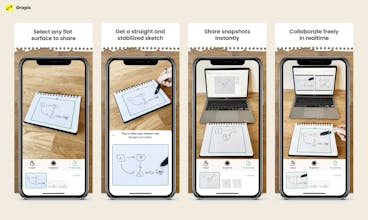
Do you miss being able to use the whiteboard in the new hybrid world? We too, that is why we made Grapic. Share your real whiteboard or notebook directly into your Zoom meeting, FigJam session, or any browser, using just your iPhone.
Grapic gallery image
Free
Launch tags:iOS•Productivity•Augmented Reality
Launch Team
Anima - Vibe Coding for Product Teams
Build websites and apps with AI that understands design.
Promoted

What do you think? …

Niklas Lavrell
Thanks for the hunt @vikasreddy! Hi Product Hunt, Niklas from Grapic here šŸ‘‹ Me, @nikolaus_west and @tingstam worked on a related product idea when the pandemic hit. We quickly found ourselves having a hard time to collaborate and brainstorm together through video meetings. We tried a few online whiteboards but realised that we felt constrained in our creativity. The idea of Grapic came to life to solve this. For the last year we have been experimenting with this solution and got to a point where we think this is really useful. This is how it works: āœļøĀ  Whenever you have a thought to share, scribble directly on your favourite notebook, open the Grapic app and just select the area you want to share. Any flat surface works fine, even your whiteboard. With the help of ARKit and image processing, we keep the video stream straight and stable, so hold your phone however it feels comfortable. Use a tripod for longer sessions. šŸ”—Ā  Share your presentation directly in a Zoom meeting or to any browser with a simple link. šŸ“øĀ  Grab a snapshot before starting on a new sketch to quickly save your thought. Access them anytime. šŸ§‘ā€šŸŽØĀ  Are you already brainstorming with your team in FigJam by Figma? Use our Grapic for FigJam widget to make it super easy for your team member to join your presentation, and get your snapshots added to the FigJam file automatically. Convenient when you continue to work asynchronous later on. We are super excited to let you all give Grapic and try and let us know what you think šŸ’› Cheers, Niklas and team
Aleks Bochkov
@vikasreddy @nikolaus_west @tingstam @niklaslavrell Looks nice! Congrats on the launch šŸš€
Nikolaus West
Thanks @bochkovaleks, really appreciate it!
Vikas Reddy
I've known the Grapic team for a while now and I'm very excited about this launch. They've done some great engineering including some subtle details to make it possible to bridge real whiteboards and paper to Zoom and FigJams.
Nikolaus West
Thanks @vikasreddy! Really appreciated your support and feedback along the way!
Hanna Sƶderquist
Nice! Looking forward to try the Grapic FigJam widget in the next design workshop!
Olle Tingstam
Thanks @hannasoderq. Let us know what you think about the widget 😃
Dan Siepen
This is pretty neat! Nice work :)
Nikolaus West
Thanks @dansiepen!
Niklas Lavrell
@dansiepen thank you! It took quite a few iterations to get the details nice, let us know what you think if you try i out!
Jacob MorƩn
Amazing team and amazing product!
Olle Tingstam
Thanks @jacob_moren 😊
Eli Schleifer
I love the idea of not having to spend tons of money on an intelligent board. Can the extra screen participate as another actor in a Google Meet call?
Nikolaus West
Thanks @elischleifer! Currently it only works that way with Zoom but we hope to ship more integrations going forward
Alper Aydemir
Sweet! Excited about this launch! Niko and the team think deep about usabilitiy and user experience.
Nikolaus West
Really appreciate it @alper_aydemir! For sure it took a lot of thinking and obsessing over a lot of details to get an AR productivity app like this to be as usable as possible
12
Next
Last