Hummingbird

Hummingbird

Make macOS window management a breeze

2 followers

Easily move and resize windows. Hold modifier keys and drag the mouse to adjust size and position. Hummingbird is a macOS utility that makes window management a breeze.
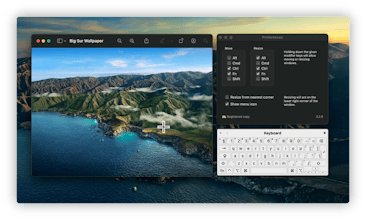
Hummingbird gallery image
Launch tags:MacMenu Bar Apps
Launch Team
AssemblyAI
AssemblyAI
Build voice AI apps with a single API
Promoted

What do you think? …

Chronikey
Great App! The way it is made to be click-less is amazing. Good work! A few suggestions: 1. A better hummingbird logo. 2. Pixels information is not useful, remove or place it in preference menu. 3. More features such as removing the icon from menu, start with system start-up.
Sven A. Schmidt
@chronikey Thanks for your feedback! Those are definitely on the list 🙂
Chronikey
@_sa_s Also a "Check for Updates" option in the settings please.
Sven A. Schmidt
@chronikey There were some issues around notarisation and the Sparkle auto-update framework but I'll definitely revisit this as soon as possible!
Chronikey
@_sa_s Thank you. Now that this app is getting so much attention, it is a good time to update the app. Let us know when the update is ready so that we can manually install for the last time.
Sven A. Schmidt
@chronikey Actually - I completely forgot to mention that if you are a Homebrew user you can already get semi-automatic updates by installing Hummingbird via homebrew cask: "brew tap finestructure/Hummingbird && brew cask install Hummingbird"
Colin Smith (EzChile)
Very slick! I've tried lots of window managers (BTT, Magnet, et.) but this seems really intuitive. Good work!
Sven A. Schmidt
@colin_smith_ezchile_ Thanks a lot, Colin! 😊
ivanyc
I never ever bought any app so fast after trying. This is Amazingly Great app. THANKS
Sven A. Schmidt
@ivanyc Oh wow, thanks a lot! 😊🙏
Michael The Geek 
Spoke with the dev via Twitter. I like what I see and will be testing.
Vitalii Spasiuk
Looks very interesting
Alex Conway
This looks cool, well done Sven! I use BetterTouchTool for window management and have keyboard shortcuts like: "` then 1" to snap window to left 2/3 of screen and "` then 2" to snap to right 1/3 of screen etc. Have you considered integrating window snapping of some kind?
Sven A. Schmidt
@alxcnwy Thanks for your kind words! I'm a huge fan of tiling and snapping as well - and I use Moom for that. I find it works very well in conjunction with Hummingbird. In fact so well, that I'm not sure what exactly I could add at this point. But never say never! :)
Alex Conway
@_sa_s ah cool, i used to use moom before i switched to BTT. i like being able to customize touchpad actions with BTT eg 2 finger turn circle to adjust volume like a DJ 😎
Sven A. Schmidt
@alxcnwy That's wild, I'd be worried to accidentally blast myself out of my chair with a clumsy gesture 🤣
Alex Conway
@_sa_s hahaha well the 4 finger sequential tap (pinkie then ring finger then middle finger then pointing finger) starts playing hardcore gangsta rap which sometimes does make me half eject myself if i do it by accident 😅
Raj Mahal
I currently use Spectacle but the one thing that would be super useful (that Windows has but Mac doesn't) is a show desktop button that minimizes all windows.
Sven A. Schmidt
@parag_r Interesting idea, thanks for your feedback!
12
Next
Last