
Kamua
Video resizing, edits and captions for social using AI
141 followers
Video resizing, edits and captions for social using AI
141 followers
Resize, Reframe, Cut and Caption videos from Horizontal to Vertical/Square for TikTok, Instagram, Snapchat, YouTubeShorts and more using AI Automation. Make high quality video GIFs. All in your browser.




 TinyVid
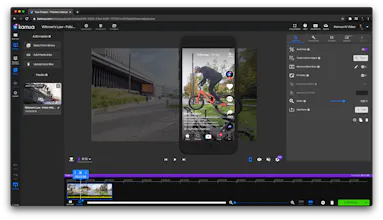
 While Kamua is a great tool for editing videos one-at-a-time, our secret power is Kamua’s Automation AI that intelligently re-sizes and crops video based on the most interesting or relevant parts of the video AND automatically adds closed captions that adapt to whatever aspect ratio you need.
 One reason why this is important: in order to address the widest audiences, video content needs to offer accessible closed captioning and not only does Kamua do this, but it also gives you control over the size, positioning, and readability of captions. We've had great feedback from people who suffer from hearing loss — and @sharonfeder, (our newest advisor!), will share more below.
Real examples of Kamua in the wild
Offbeat Media Group: https://www.instagram.com/reel/C...
Roam Media https://www.instagram.com/roam/?...
Shelly Palmer https://www.tiktok.com/@shellypa...
AfroLandTV https://www.instagram.com/afrola...
Natalie’s Outlet https://www.instagram.com/reel/C...
How is Kamua different?
Browser & cloud based so you can work from anywhere
Work up to 90% faster (we have a customer who went from a 16 hours workflow to 15 mins)
No video editing experience required
Automated captions in 60 languages that you can easily edit
AI automation of “Hard and Boring Tasks“ 👈🏻 🔑
Let me just dig in here for a moment. What are “Hard and Boring Tasks”? Think about all of the things that prevent you from making your videos great and/or better for various social networks, like TikTok, Snapchat, Instagram Reels, Stories and IGTV, YouTube Shorts, Facebook, Pinterest Stories, LinkedIn Stories, Triller, Twitter (see why this is a challenge?)
To celebrate our return to Product Hunt, we’re offering a special discount just for you ➡️ use code ‘KITTY’ for $20 off our $25 tier!
One last thing - we were supposed to launch last week but some kind of glitch happened and we only ended up being listed for a short while in the afternoon. That's why some comments are from last week.
I’ll be around all day — supported by my team (@eek @jimh @arthur_sempebwa) and would love to hear what you think — or if you have any complex video tasks that you’ve been unable to tackle recently!
-Paul
One reason why this is important: in order to address the widest audiences, video content needs to offer accessible closed captioning and not only does Kamua do this, but it also gives you control over the size, positioning, and readability of captions. We've had great feedback from people who suffer from hearing loss — and @sharonfeder, (our newest advisor!), will share more below.
Real examples of Kamua in the wild
Offbeat Media Group: https://www.instagram.com/reel/C...
Roam Media https://www.instagram.com/roam/?...
Shelly Palmer https://www.tiktok.com/@shellypa...
AfroLandTV https://www.instagram.com/afrola...
Natalie’s Outlet https://www.instagram.com/reel/C...
How is Kamua different?
Browser & cloud based so you can work from anywhere
Work up to 90% faster (we have a customer who went from a 16 hours workflow to 15 mins)
No video editing experience required
Automated captions in 60 languages that you can easily edit
AI automation of “Hard and Boring Tasks“ 👈🏻 🔑
Let me just dig in here for a moment. What are “Hard and Boring Tasks”? Think about all of the things that prevent you from making your videos great and/or better for various social networks, like TikTok, Snapchat, Instagram Reels, Stories and IGTV, YouTube Shorts, Facebook, Pinterest Stories, LinkedIn Stories, Triller, Twitter (see why this is a challenge?)
To celebrate our return to Product Hunt, we’re offering a special discount just for you ➡️ use code ‘KITTY’ for $20 off our $25 tier!
One last thing - we were supposed to launch last week but some kind of glitch happened and we only ended up being listed for a short while in the afternoon. That's why some comments are from last week.
I’ll be around all day — supported by my team (@eek @jimh @arthur_sempebwa) and would love to hear what you think — or if you have any complex video tasks that you’ve been unable to tackle recently!
-Paul


 Polymet


 Wispr Flow


