Meet Volume Control

Meet Volume Control

🚀 New Extension: Google Meet Volume Control 🔊

6 followers

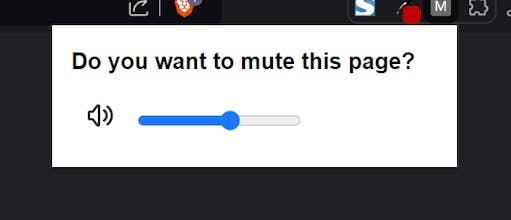
Take control of your Google Meet audio with a simple volume slider. Adjust meeting volume in real-time without affecting your device's sound. Easy to use, client-side control, perfect for multitaskers. Customize your audio experience in just one click!
Meet Volume Control gallery image
Free
Launch Team
AssemblyAI
AssemblyAI
Build voice AI apps with a single API
Promoted

What do you think? …

Ángel García
🚀 New Extension: Google Meet Volume Control 🔊 📣 Struggling to adjust the volume in your Google Meet meetings? Not anymore! With our new Google Meet Volume Control extension, you can easily manage the audio of your meetings directly from your browser. 🎯 What is it? A simple yet powerful tool that lets you adjust the volume of your Google Meet calls in real-time without changing your device’s overall sound settings. ✨ Key Features: 🔊 Real-time volume control: Quickly adjust the volume of any Google Meet meeting with an intuitive slider. ⚡ Easy to use: Just click the extension icon during your call and take full control over the audio. 🎧 Client-side control: Customize your own listening experience without affecting the other participants. 🔄 Perfect for managing multiple meetings: Adjust the volume independently for each call. 🖱️ Effortless setup: No complicated configurations—just install, click, and control. 🛠️ Who is it for? Professionals who attend multiple meetings a day and need to manage audio levels without fiddling with system settings. It’s ideal for frequent Google Meet users who want a smooth and personalized audio experience. 🚀 Download now and take control of your Google Meet audio! 📈 Why should you try it? - It makes managing Google Meet volume super easy. - You’ll save time by adjusting only what you need without affecting your entire device's sound settings. - It boosts productivity by providing quick, efficient audio control.