Moss

Moss

A collaborative canvas built for creative teams.

133 followers

Moss takes the busywork out of creativity. Share your work and keep it in-sync without stopping to source, export, and compress along the way.
Moss gallery image
Moss gallery image
Free
Launch tags:Design ToolsSaaSMaker Tools
Launch Team
AssemblyAI
AssemblyAI
Build voice AI apps with a single API
Promoted

What do you think? …

Aiden
Maker
📌
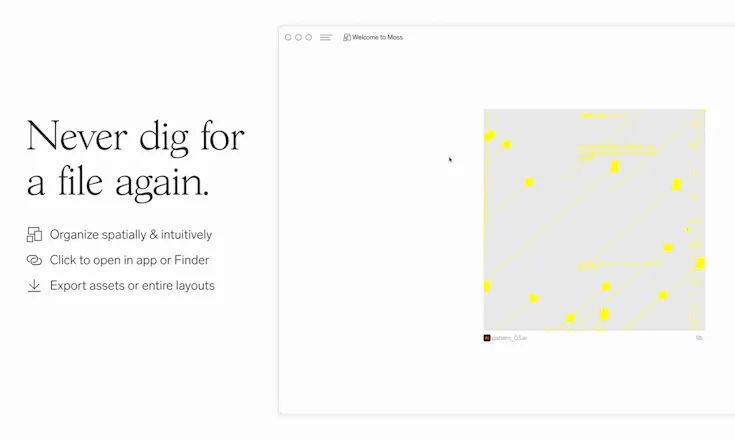
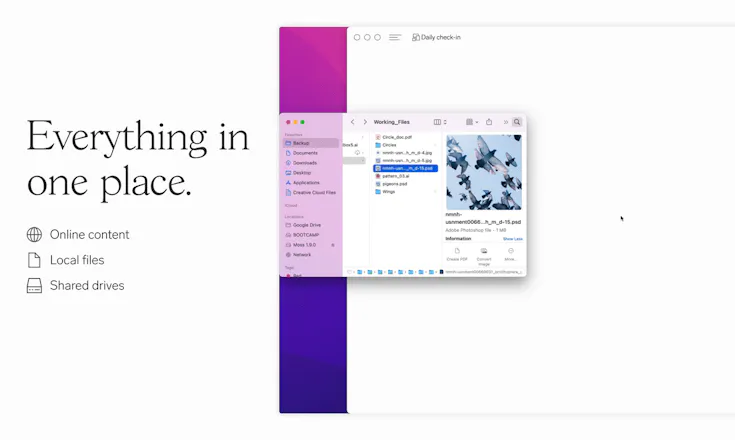
Hey Product Hunt, I’m Aiden from Moss. We started Moss after years of working in design studios & agencies where we wasted hours each day on non-creative tasks like exporting & compressing files just to email an image for review. Moss is a collaborative canvas (think Miro or FigJam) with a few key differences for creative teams: - Automatic file conversion. 200mb Photoshop file? No problem, Moss handles compression and gets eyes on your work in seconds. - Links to source files. Every asset dropped into Moss is tethered to the source—just click to open in app or reveal in Finder. - Automatic updates. Once you tether a file to Moss, updates are shown on the canvas for your team to see. No more exporting JPEGs for every time you make a change. We’re still in beta, but we’re already working with some great creatives. If your output is visual, we think Moss could be a great fit. Check out our site to try the beta or hop in our Discord to chat. We’d love to hear your thoughts and see what you make with Moss!
Anna Filou
@aidensymes sounds like you found an amazing solution to a problem that seems almost unsolvable. 👏🏻 Also, LOVE your branding and illustrations! A question that occurred to me (before trying Moss our myself) relating to this feature: “Links to source files. Every asset dropped into Moss is tethered to the source—just click to open in app or reveal in Finder.” If I work from multiple computers and the source file originated from PC 1, can I download it on PC 2 and have the online asset be “tethered” to the file on both PCs? Hope that makes sense. Tethering sounds super amazing in theory but I find myself wondering how well it'd work in my real life scenario.
Aiden
@anna_0x Thanks! Great question—in general, if you have access to the source file on the PC you're using then you can open it. File sharing/storage is pretty well solved for at this point, so we integrate with different sharing solutions (Dropbox, Google Drive, local server) to maintain access across PCs. Moss keeps a "one-way-street" relationship to source files, so we never move or edit the originals. This idea is really at the core of the Tethering system—prioritizing speed & flexibility instead of transferring bulky source files. I'd love to hear your thoughts once you've had a chance to try it out though!
Anna Filou
@aidensymes OK, let me rephrase: I have two computers. Let's say I'm working on a PSD file saved on Google Drive. Thanks to Drive, the file is available locally on both of my computers. From PC 1, I upload the PSD to Moss. If I click on the file in Moss from PC 1, it will open Photoshop, since the file is tethered to the local instance. What happens if I click the file in Moss from PC 2 though? The file is locally saved on PC 2 too (synced via Google Drive) but the directory will be different (due to a different user name or Google Drive location).
Aiden
@anna_0x Sorry, I think my explanation was a little unclear. In the case you described, you'll still be able to access the file on PC 2. We have some more in-depth info on how that works here: https://m0ss.notion.site/How-do-... Basically, Moss lets you configure your shared drives (like Google Drive) so it can account for different paths across different machines. Let me know if that helps to clarify!
Anna Filou
@aidensymes that's wonderful! (Maybe you should highlight it on the marketing site since I'd imagine it'd be a common concern!) I'll give it a go ASAP ^^
John
Would love to test this on windows, are there any plans for it? If I can buy a standalone offline version for a one-time fee I probably would! I'm using different kind of apps for this but I like that I can place more file formats and that it feels more native to the operating system with automatic updates and the option to work offline (or do you need to stay online?) cause uploading feels like a waste and takes too much time.
Aiden
@pregenun Awesome questions! We're still in beta, so there's a lot more to build but Windows support and full offline capabilities are on the roadmap. As far as uploads go, it's worth mentioning that the we handle assets with a unique system we call Tethering. One of the major benefits is that upload times are very low, even with large files. That said, offline support is definitely something we're building out. The one-time fee for an offline version is interesting—in that case, you'd just use it alone without any collaboration?
John
@aidensymes Thanks for your answer! Yes indeed, I really see the benefit of sharing but I guess I would mainly use it offline (also for the good of the environment) and find the need to buy a subscription for the server costs not worth it. I really like how Obsidian.md sets the offline and online options apart for example. And I can imagine how great it would be to be able to use this as a kind of explorer for file folders and the option to export it as a zip or folder. btw: I just remembered that I was thinking about something like this before: https://twitter.com/pregenun/sta..., that's why I'm so stoked about your dope project.
Aiden
@pregenun Thanks for the info—the Obsidian setup is pretty interesting, definitely worth looking into for us. We're still figuring out what exactly Moss will look like after the beta, so this is really helpful. Cool that you were thinking along the same lines—we're obviously not the first people to think about spacial desktops. A little while ago, we wrote an essay on some of the people who inspired us and how we started to form the ideas that turned into Moss. If you're interested, you can check it out here: https://m0ss.substack.com/p/the-...
John
@aidensymes Good read!
Anna Filou
@aidensymes @pregenun I second the offline mode! Even people with no need for sharing features would benefit from a spacial desktop and “tethered” files!
Aliaksei Saskevich
Hey, congratulations on your 🚀 launch! Am I right, that your primary competitors are Figma and Sketch? Anyway, keep doing! Nice product screenshots!
Aiden
@asaskevich Thank you! We wouldn't really consider Figma or Sketch a competitor since those are very focused on asset creation. Moss is a workflow tools that integrates assets from many sources, so we'd love to offer a Figma or Sketch integration in the future. Moss compares more directly to collaborative whiteboards & DAM solutions, since we use pieces from both of those models.
Aliaksei Saskevich
@aidensymes thank you! Wish you success!
Olga Neudakh
How's it going, ? 🤙 Great job on getting your project on Product Hunt! 💪 It looks great! What inspired you to create it?
Aiden
@olga_neudakh Thanks! We were working in creative studios & agencies and just found ourselves spending tons of time doing non-creative, repetitive tasks—sorting through folders, exporting, compressing, etc. So, we decided to come up with a workspace that felt a little more like a creative studio and less like an office
Denis Galka
Hi-ya hunters! Well done on getting Moss on PH! 🤗 You have achieved a remarkable result! I'm going to give this product a whirl. Can I ask you something? How did you come up with this idea?
Aiden
@denis_galka Thanks! Nick & I spent years working in design doing mostly branding & motion work. Moss was something we kicked around between freelance gigs until we decided to take the plunge and go full time
Frank Gonzalez
Congrats on the launch! The only thing that I can think of that compares is Milanote. But I don't recall if they automatically updated files or compressed files. If you really can solve those issues, that puts you ahead in my eyes! All the best.
Aiden
@frank_from_bullnose_design Thanks! Yeah, Milanote is definitely in a similar space, but Moss's tethering system really opens up the workflow. Especially for people working with files that are normally hard to share (psd, ai, video, etc.)
Frank Gonzalez
@aidensymes Yup! Definitely the difference that I noticed.
Dynokiller
what about windows and android machines?
Aiden
@study_rishishah The beta is Mac only, but windows support is definitely on our roadmap
Dynokiller
@aidensymes waiting for windows, congratulations on your launch 🥳
123
Next
Last