Omni

The all-in-one tool to supercharge your productivity

255 followers

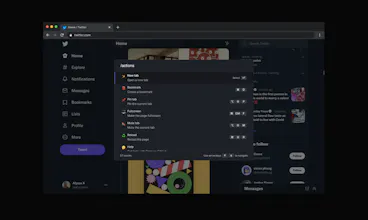
With Omni you can use Chrome like a pro. Manage tabs, bookmarks, your browser history, perform all sorts of actions and more with a simple command interface.
Omni gallery image
Omni gallery image
Omni gallery image
Free
Launch Team
Anima - Vibe Coding for Product Teams
Build websites and apps with AI that understands design.
Promoted

What do you think? …

Alyssa X
Hey Product Hunt 👋 Over the holidays I've been thinking about all the time I lose doing menial tasks: finding the right tab in Chrome (I have far too many :P), starting meetings, creating tasks, clearing cookies and cache to help debug problems in websites, looking through my browser history to find a site I forgot about, etc. So I decided to build Omni as a tool to do it all through an omnisearch interface. With just one click (or key press) you can perform any action or browse through all sorts of data in Chrome. No need for your mouse anymore. Here are some of its features: 🗄 Switch, open, close, and search your tabs 📚 Browse and manage your bookmarks 🔍 Search your browsing history ⚡️ 50+ actions to improve your productivity 🔮 Special commands to filter and perform more actions 🧩 Integrations with Notion, Figma, Docs, Asana... ⌨️ Shortcuts for actions such as muting, pinning, bookmarking... ⚙️ Advanced settings to help troubleshoot browsing issues 🌙 Dark mode ...and much more - all for free & no sign in needed! The code is available on GitHub if you'd like to contribute to Omni, self-host it, or build your own omnisearch extension.
Marie Denis
@alyssaxuu Installing right now, looks amazing!
Alyssa X
@marie_dm_ Thank you Marie! :)
Julie Chabin
@alyssaxuu Once again, Alyssa creates a great product. Good job!
Uladzimir Yankovich
@alyssaxuu It's incredible! Did you do it alone? I'm delighted!
Alyssa X
@yankovichv Thank you! Yes I tend to do it all solo :P
Connor Jewiss
This is incredible. Takes one of the best features from many productivity apps, and brings it to the browser. Absolutely needed, and will get using it right away.
Alyssa X
@connorjewiss Thank you Connor!
Connor Jewiss
@alyssaxuu No worries! Can I be cheeky and ask if a Safari version in the works?
Alyssa X
@connorjewiss I'd love to expand to other browsers for sure! Will look into it :)
Sharlene from Bannernote
Thats super helpful, love the product! How big is your team?
Alyssa X
@sharlsz I'm glad to hear! The team is just me, I build all my products solo :)
Bogomil Shopov - Бого
any plans for a Firefox port?
Alyssa X
@bogomep Technically it shouldn't be hard to do, I will look into it!
Akash Hamirwasia
@bogomep While @alyssaxuu creates a port, you can try my UnTab extension till then 😛 https://getuntab.now.sh (also open-source)
Alyssa X
@bogomep I've just ported it over to Firefox, if you want to check it out: https://addons.mozilla.org/en-US...
Bogomil Shopov - Бого
@alyssaxuu Whohoo! Thanks a lot!
R. Gurung
@alyssaxuu This is amazing as always, I struggled a little with Ctrl+K because in my system (Ubuntu) it was focusing on search bar but changing to Ctrl+Shift+K did the job. Thanks for making it.
Alyssa X
@gurrrrung Thanks! I wasn't sure which shortcut to set for default, there's several websites that can conflict with it (or OSs in your case). Might try to see if there's a better way.
Shahadat Shemul
@alyssaxuu Ctrl+/ should be good as it is used by Figma also. :D
Alyssa X
@shemul Ha but then if Omni used it also it would overlap Figma's search bar :P
Carolina Rio Branco
It was about time! What an amazing product. Congrats to the makers :) Just installed and can't wait to start using.
Alyssa X
@carolina_rio_branco Thanks Carolina!
Erifili Gounari
Impressive as always! :D @alyssaxuu
Alyssa X
@erifili_gounari Thanks Erifili :P
123
•••
Next
Last