Post Uploader for Instagram

Post Uploader for Instagram

Upload post to Instagram from your PC

8 followers

Post uploader for Instagram™️. Upload photos and videos to Instagram. Support uploading in the next formats - MP4, MOV, JPEG, JPG, PNG, SVG, GIF on Instagram from PC. Upload post with visual image effects or filters, caption and location.
Post Uploader for Instagram gallery image
Free
Launch Team
Universal-3 Pro by AssemblyAI
The first promptable speech model for production
Promoted

What do you think? …

Natalie Karakina
Thomas, hi! Instagram is testing the uploading of posts via the web version among its employees. What alternatives has your product? 😊
Marvin Hassan
?makers would this work with carousels containing multiple images as well?
Thomas MacGibbon
Dear @mento_coach, Thank you for your response. This feature will be added in the next major product update. If you require any further information, feel free to contact me. Yours Sincerely, Thomas MacGibbon.
Todd E Jones
@mento_coach @tom_gibbons1 that was the one thing I saw I was wondering about, posting multiple images in a post. Sounds like you will be adding it. Thanks!
Thomas MacGibbon
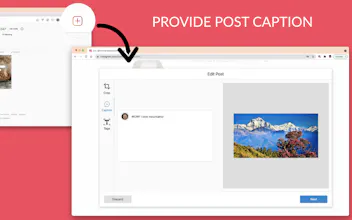
Functionality: ⭐️ Upload Instagram photos and videos. Extension support all popular photo and video formats - MP4, MOV, JPEG, JPG, PNG, SVG, GIF. ⭐️ Delete posts. Remove unnecessary posts from your account; ⭐️ Rotate, move, crop picture while posting; Straighten image with the adjust tool; ⭐️ Add post caption (while creating); ⭐️ Tag people (if you're not able to tag someone, they may have changed who can tag them in their privacy settings); ⭐️ Add post location (while creating). 💁 How to use it? 1. Install Post uploader for Instagram™️. 2. Once the extension is installed, "+" icon will be added to the Instagram menu navigation bar. 3. Click on the icon. You will see the modal where you can select videos or images which you want to upload. 4. Modify your images (not videos). Once you've taken or uploaded a photo, you can add effects or filters into your image - rotating, scaling, cropping (according to social platform crop sizes), moving. 6. Provide post caption (optional). 7. Tag peoples on the post (optional). Click a person in the photo and start typing their name. Select the full name of the person you want to tag when it appears. 8. Post and add locations. Start typing location name and select the location in the suggestions list. 8. Click Submit button. Wait a few seconds and your post will be successfully uploaded! Additional: 👍 Removing post. Hover on the post and you will see the extension icon at the top-left side of the post. Click on the icon and the post (removing process start working) will be deleted. Feature functionality: 💪 Editing and removing location of an existing Instagram post; 💪 Adding extra large videos, more than Instagram 60s time limit; 💪 Uploading stories from web Instagram; 💪 Adding hashtags into your posts that have already been posted; 💪 Tagging photos that have already been posted; 💪 Uploading Videos to IGTV; 💪 Add a caption to a photo or video you've already shared, or edit or delete the caption you originally included. Important note! Instagram™ is a trademark of Instagram Inc., registered in the US and other countries. This is an independent project developed independently and not affiliated with Instagram ™ or Instagram Inc.
Aditya
@tom_gibbons1 Hey 🖐 We have scheduled your post for May 21st, 2021 12:01 AM PDT so that your post can get full 24 hours coverage and a better opportunity to engage with the community :)
sulyman moyo
@adityavsc Is this the new way it would be? How many hours is the threshold?
Aditya
@repreneur If there are a lot of posts already on the homepage, then our team re-schedules posts which launch a bit late. As you know, makers do not want to miss even a minute of those 24 hours of the launch day 😉
sulyman moyo
@adityavsc Fantastic!!
Lee Rickler
You've been able to post to insta from desktop for a while. I even published a 'How to' a while ago. https://pointandstare.com/how-to... Of course, there's no image editing, but ...
Thomas MacGibbon
Hi @pointandstare , Thank you for your response. Yes, you can do that, but with a lot of difficulties and only with images: 1) You have to change view mode and use "mobile view" while uploading (I used to do that, and in my opinion, it is not comfortable). Our app provides you this feature without this manipulation with your view mode. 2) The solution which you proposed can upload only images. Our app allows you to upload - images (with all formats, not only JPEG as the original Instagram web version provides you), videos, and stories (this functionality will be added in the next minor product update which comes in the next couple of days). 3) Our app extends the default images OOTB Instagram functionality with effects and filters (you have already mentioned that). In the future, we plan to finish all features from the list that we described in the "Functionality" section. If you require any further information, feel free to contact me. Yours Sincerely, Thomas MacGibbon.
sulyman moyo
Been looking for something like this thanks
Thomas MacGibbon
@repreneur Thanks!
Vivek
Nice set of features. Will try this
Thomas MacGibbon
Felipe from Chile
This support multi image post?
Thomas MacGibbon
Dear @felipeph, Thank you for your response. This feature will be added in the next major product update. If you require any further information, feel free to contact me. Yours Sincerely, Thomas MacGibbon.
123
Next
Last