Redline

Redline

Minimal Menubar Todo

255 followers

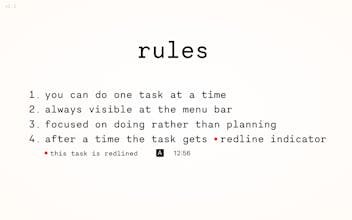
A Mac application to keep a to-do list at the menu bar. It focused on doing instead of planning. It is always visible and respects your attention.
Redline gallery image
Free
Launch Team / Built With
Wispr Flow: Dictation That Works Everywhere
Stop typing. Start speaking. 4x faster.
Promoted

What do you think? …

Chris Messina
I love this — it's so clear and focused, and always easily visible from the corner of your eye. It's your task list haunting you! 👻
Ace
😹 LOL
I am s simple man, I just upvote to every to-do apps. Congrates on the launch!
Ivan D
@oldmann As I'm a simple man too, I just upvote every comment I see!
Ivan D
Yo! I was prepared so badly for the launch, kind of ironic when you're developing a productivity tool. Anyway. I want to highlight some features of Redline, that make sense for me. 1. The obvious one, I was exhausted from managing complex to-do lists and wanted something simpler. 2. I wanted something visible all the time—focus was a priority. Focus without distractions like reminders or timers. 3. Even the input is handled right in the place where the task is visible. Often similar apps create a separate window for this, it's too much for me and I want to create cool UX for the app. 4. The shortcuts must be cool too: so I added support for "double tap" shortcuts. You don't need to type some complex keys or find an unused combination. You can read more about philosophy and premises behind the app in Redline's Manifesto (https://vanka.me/redline-manifesto) Also shout-outs to @chrismessina for hunting the app, thank you!
Yohann BAUZIL
💡 Bright idea
So I get the idea of making things simple but I'm kinda wondering if people really need another to-do list app, especially one without any real features? I mean we already have so many tools that do more than just sit there on the menu bar, at this point isn't it more about having functionality than just having fewer options? Maybe you could think about adding at least one or two features that make it stand out
Ivan D
@cyberrobin Hey, thanks for the feedback. I'll have some features added soon, but for now I'm completely content with my feature set. "Simplicity and speed are the actual features." About what will come next: I'm thinking about stack-based to-do list, for example I'm working on a task, and suddenly I decided that I need to switch to something related (i.e a subtask), I'll do this one, and after I finish it, I will pop back to the parent task, making it work like a stack. I hope it makes some sense! It might help ADHD folks and make switching between tasks less cumbersome—you will always know where you stopped.
Richard Song
Super sleek and effective design, @vanka! The focus on doing rather than planning is refreshing and much needed. I'm particularly intrigued by the "double tap" shortcuts. Any plans to integrate with other productivity tools or calendar apps for a more seamless experience?
Ivan D
@renchu_song Hi! Do you have some concrete ideas? Redline has some automation https://vanka.me/redline/faq#aut... which can be included in calendar events I guess. You can launch this automation from scripts, simply firing a link. Also there's a neat trick to open a link from a .url file. Create a file with the .url extension, say Hey.url, and put this in the contents: [InternetShortcut] URL=redline://v1/do?value=Hey
Marian Vovk
A to-do list that respects your attention is just what we need in a world full of distractions! How does Redline complement other productivity tools you use? Any tips for maximizing its potential?
Ivan D
@marian_vovk Hi! I'm not super strict about when and how I use Redline. Mostly I use it when I need to be super focused on some big task. So my advice is, don't make it your goal to use Redline every time, or any productivity tool. It will be most useful when you "get" when to use it. I don't use other tools to complement Redline, but one can find useful automation it provides. Automation is done via simple links, so you can insert them into calendar events or scripts.
Marian Vovk
@vanka Thanks for sharing your approach! It makes sense to use Redline when you really need that extra focus. I agree that understanding when a tool is most beneficial is key to maximizing its effectiveness. The automation feature sounds intriguing—I'll definitely explore how it can be integrated into my workflow. Appreciate the insights!
Michal Byers
Surprised! This took is eazy to use and with a simple interface, I like shortcut to change my task, is make me happy thank you!
123
•••
Next
Last