Screely

Instantly Turn a Screenshot into a Beautiful Mockup.

4.0
โ€ข2 reviewsโ€ข

239 followers

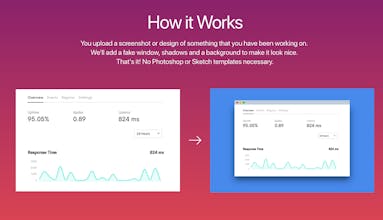
The Screely extension lets you instantly create a screenshot of the current webpage and opens it in Screely Screely is an online tool that instantly turns your screenshots and designs into beautiful design mockups. The extension helps you skip the manual uploading of files and saves you time and frustration.
Screely gallery image
Launch tags:Design Toolsโ€ขSocial Mediaโ€ขMarketing
Launch Team
Auth0
Auth0
Start building with Auth0 for AI Agents, now generally available.
Promoted

What do you think? โ€ฆ

Pete Sampras

You have to 'copy' all functionality of

https://app.prntscr.com/

1. NATIVE Application for MAC or Windows

2. click on Printscrn button and auto upload.

3. Edit on screenshot mode, TEXT, FONT, Squares, ARROWS, etc

4. Share with small links.

5. Share with media (this is the unique task you seems to want to acomplish)

6. SUPPORT VIDEO recording.

7. Private and shared storage.

9. VOICE recording for screenshots or video.

10. GROUP set of screenshots or videos.

Try app.prntscr.com (I dont work there, however as company we use this as basic tool)

Pros:

None, awful!

Cons:

Uploading manually like in the 90's

wojtek
dude fuck off back to HackerNews
Fabian M.
Your comment is not helping in any way. Could you please explain what's "awful"?
Pat Walls
Whoโ€™s mans is this?
levelsio
You make Product Hunt worse
Charles Magnuson
Lightshot looks horrible. It app looks clunky and slow and uploaded images appear to have ads plastered all over the page. You ought to give CloudApp a try. It's lightyears better than Lightshot.
Jurn
Maker
Hello Product Hunt๐Ÿ‘‹ Doing my very first product launch today.๐Ÿ˜ฑ I regularly want to share what I've worked on with others on Twitter or Slack/Telegram. However, sharing a simple screenshot always was a bit too bland for my taste... I wanted to make it look better. Give it a background, put it in a fake window with some shadows etc. You can do this in Photoshop or Sketch with some templates but that takes a lot of time if you just quickly want to share something with friends or coworkers. That's why I build Screely. With Screely you can instantly generate a beautiful image from a simple screenshot without needing to dive into Photoshop or Sketch first. Upload an image, choose your background color and hit that download button so you can share it with others. I have many more features I want to add like gradient backgrounds, ability to generate an image without the fake window, adjusting the padding and size and much more customization options. But I first wanted to ship the MVP and get some feedback from others and hear their opinions. PS. I only started to learn programming pretty recently so if you find a bug or something weird. Let me know and I'll try to fix it as fast as possible.
Armin Ulrich
@jurn_w good job! ๐ŸŽ‰๐Ÿ™Œ
Nicolas
@jurn_w Awesome work Jurn ๐Ÿ‘ Looking forward to seeing it evolve!
Jurn
Maker
@ndethore Thanks Nicolas! Will be posting a lot of updates on Telegram/WIP chat the coming weeks :)
Venkatapathi Raju Mandapati
@jurn_w Simple yet so beautiful
Travis Johnson
A Screely Chrome extension that allows me to take the screenshot of the current tab and automatically opens Screely in a new tab would be super dope.
Jurn
Maker
@travis_johnson1 That would be a cool feature! adding it to the list of potential ideas for the future :) EDIT: Got so many requests for a Chrome extension that I've decided to build one! stay tuned :)
Pascal Briod
@travis_johnson1 @jurn_w I agree, this is what this product needs to be really useful!
Jurn
Maker
@travis_johnson1 @pbriod It has been requested so often today that I'm going to build one :D
Product Pearson
A really cool feature of this would be the ability to make them diagonal like they do on Behance images. Oh and and eyedropper tool to pick the colour of a part of the screenshot. Really cool though. I am always sharing screenshots in emails as I do the "how to" guides for new products and features in our company, and this will be a great addition. I like the way when you choose white, it adds a shadow around the image.
Jurn
Maker
@productpearson Thanks for your feedback, really appreciate it! You're actually not the first person to suggest an eyedropper tool to pick a colour from the screenshot so I'm definitely putting this on the product roadmap. Do you mean something like this for a diagonal background? https://www.behance.net/gallery/...
Product Pearson
@jurn_w I'm struggling to find an example now, as Behance seems to have changed how they do things, which is understandable. Basically it was a flat screenshot, but diagonal so that you could see more of the screenshot in portrait, so like, say I want to share a screenshot of a webpage, to see anything under the fold, it would ideally be diagonal so you can see more of the image. This is the closest example I could find: Sorry if that's not a very good example, haha.
Jurn
Maker
@productpearson ah, now I understand! Difficult to really look at the design of the page this way because you can't read most of it but does give a good feel for the lay-out of a full page. Will keep this in mind, thanks for your input!
Product Pearson
@jurn_w Yeh sorry it's not the best example. There have been times where I've tried to show in a landscape 1920x1080 image how a website looks, but half the page is missing and I have to send two screenshots or merge them together as a PDF.
wojtek
This can be the product that saves Dribbble.
Graeme
thank you for making this!! excellent, currently using it like an animal
Jurn
Maker
@graeme_fulton Glad to hear you like it!
Graeme
Jurn
Maker
@graeme_fulton Wow! that is awesome, cool to see you using it so much! ๐Ÿ˜Š
Graeme
@jurn_w haha here's the blog post: https://blog.prototypr.io/30-bra... I'll add it to this week's newsletter, and it will go into the next prototypr toolbox monthly update ๐Ÿ‘๐Ÿš€
Jurn
Maker
Dre Durr๐Ÿ’ก
Incredible job @jurn_w What is in your stack? How did you stay motivated to finish your first launch? It looks like you have been building it for a month... Dope๐Ÿšฌ
Jurn
Maker
@dredurr Thank you Deandre! My stack is full Javascript. Plain javascript (no frameworks) on the front-end, NodeJS for back-end development. Motivation has never been a problem for me. I make something a habit that I do every day and I slowly get to where I want to go. You can see that some days the tasks that I did were very minor. But even working on it for 10 minutes is better than not working on it at all. Also don't try to make the MVP perfect. Strip out as many extra features as possible and launch fast so you can get feedback from users and improve your product with their feedback
Dre Durr๐Ÿ’ก
@jurn_w Wow! No frameworks for your landing page. I am even more impressed :-)
123
โ€ขโ€ขโ€ข
Next
Last