With ShareTheBoard you'll never lose board contents again and can easily share your whiteboard with remote viewers. Content is hyper-legible and auto-saved, obstacles are made to appear transparent, and remote viewers can contribute directly to your board.
Thank you, @chrismessina for the hunt!
Hello, Product Hunt community!
My name is Marcin, I am the co-founder of ShareTheBoard - the most familiar, engaging, and human-centric remote learning and collaboration solution.
Many of us are remote today. If you are, harken back to your in-office/school days. Imagine what collaboration looks like, what brainstorming looks like, what communicating a complex concept looks like. Are you at any time imagining yourself hunched over a laptop?
I've been working remotely for over ten years. I love it. The move home wasn't without its drawbacks though. For me, one of the biggest pains was a near total halt in shared brainstorming or impromptu/unstructured exploration. It's just not easy or comfortable to accomplish when I and my colleagues are sitting in front of our screens. It's unnatural.
I looked for solutions. And after trying just about every whiteboard look-alike or alternative out there, I decided to flip the question: instead of making something whiteboard-like online, why not just, like, bring the whiteboard online?
We shared this flipped question with a number of companies and the answers almost always fell into three buckets:
- we don't use whiteboards because the folks joining remotely can't see/read them
- ...or because they're not interactive
- ...or because getting content off of them is a hassle
If you've ever used a whiteboard, you probably know all about these issues. We figured there had to be a better way! We looked for one... we couldn't find it... we decided to make it. That's the origin story of ShareTheBoard.
Here's how ShareTheBoard brings the board back to remote scenarios:
1. It uses some crafty ML, CV, and math to identify and vectorize handwritten content in real time, while making obstacles (like people) appear transparent. Effect: legible and unobstructed content.
2. It gives remote viewers the ability to contribute digital content overlaid onto the shared whiteboard in real time. Effect: remote viewers can interact with your board.
3. It automatically saves and organizes everything written on the board as (editable) vector graphics. Effect: your board is now your scribe.
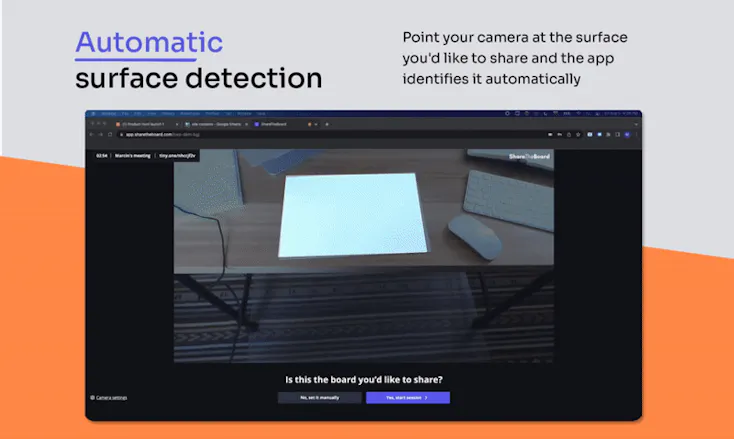
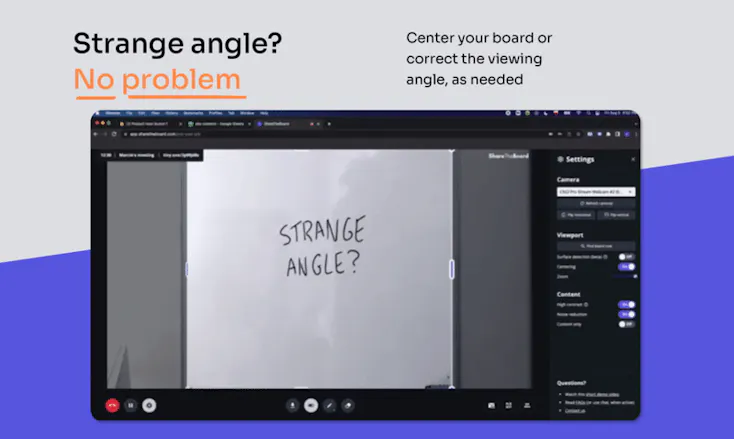
But that's not all. To make it easier on everyone, ShareTheBoard is also smart enough to identify writing surfaces. Point your camera at a board or a piece of paper and... you're good to go. And if you're sharing a writing surface from a difficult angle (often the case in smaller conference rooms), you can easily adjust it right there in the app.
Though our intention was to solve the lack of unstructured collaboration in our remote lives, we soon found another massive use case; or rather, it found us. In our early alpha days - which, coincidentally, were the early Covid days - we started getting requests from Universities worldwide interested in using our app. Yes, it took a pandemic for us to realize the obvious application of remote/hybrid learning! It's since become one of, if not our main, use case. Focusing on education allowed us to clarify a few other critical benefits:
- ShareTheBoard requires zero training: all teachers are experts at it from day one. Effect: instant adoption.
- ShareTheBoard requires no fancy or specialized hardware. Odds are, you already have a laptop and maybe an external camera in your classroom. Good news: your existing infrastructure just learned new tricks.
- ShareTheBoard is categorically more cost effective than hardware alternatives. Effect: just about any school system worldwide can afford it.
- ShareTheBoard captures your board contents which means your students can focus on you, the teacher, not on note-taking. Those board contents are so valuable -- can you believe every professor in every university is just throwing them away? Every day?!
And perhaps the most important part - applicable to both education and collaboration: ShareTheBoard puts people, not files/apps, front-and-center again. The pandemic showed just how detrimental the sudden shift from such a human-rich interaction like learning to a digital-first experience can be: learning loss, social and mental health issues, and disengagement. It's the same in business: when we removed whiteboards we cut off the human element: all of that body language, gesticulation, getting up and down that helped the juices flow, kept the discourse alive, and the experience more human. And this, ultimately, is the mission underlying our app: delivering a more familiar, truly engaging, and human-centric remote experience.
We have a lot of exciting updates in our roadmap but I'll save those for comments, since I've written a book already. We hope you enjoy our app and help us bring back a bit of the familiarity and body-language underlying our shared collaboration to an increasingly remote world.
****
BTW: I'll be available all day today for questions and will do a few live demos and Q&A sessions - stay tuned for details. But if you have any questions at any time, please join in the discussion below!
****
Happy whiteboarding!
@chrismessina@martin_demkowicz Congrats on the launch! You've found a great way to easily bring organic conversations and idea sharing to virtual or hybrid meetings. I understand why you're going after the Education space first - looks like low-hanging fruit - but every meeting participant who likes to share their thoughts organically on a board will love your product. Good luck!
@tanguy_leborgne Thank you, Tanguy! You're absolutely right: ultimately, anyone longing for the instantly-intuitive interface of the board is who we're hoping to help. Thank you for the words of encouragement!
Report
I LOVE this so much!!! Can you add a record feature? I had to open a Zoom and screen share to record (which is fine, but native recording would be awesome!)
@liz_lathan Thanks, Liz! Recording is on the list, for sure. That said... it's a bit tricky. The reason might not be obvious: it's about human behavior, CPU performance, and to an extent... law.
To back up a bit: our app is actually sort of blind. It doesn't "see" the video you see as it only identifies and digitizes content. We do this for a few reasons but the two biggest ones are to be kind to your processor and to avoid privacy concerns often exhibited by educational institutions. Schools have to be very careful about who is recorded and when.
As for performance: all real time video processing requires some intense work by your processor and/or graphics card. The problem is that our app is seldom used alone: if you're already using Zoom, for example, you wouldn't want a second graphically-intense program running alongside it. And since we see ourselves as a complementary solution to video conferencing, we made the decision to do everything to play nice with it.
We actually toyed with the idea of including some "basic" video conferencing in our app but our tests showed that users were very attached to their conferencing app of choice. Again, the conclusion was clear: play nice!
Finally, the good news:
1. The app auto-saves everything you write on the board. So, even though it's not recording the video, it is recording your work....and, as an editable vector graphic, so you can continue working on your masterpiece long after your whiteboarding session.
2. We're beginning to see use cases in which we ARE the only video-related app running. Your example of recording a demo is perfect. Another would be flipped lectures at universities or any lecture capture, for that matter. We're trying to ascertain how big this need is to determine how high it should appear on our roadmap. But rest assured, it's there!
Thank you for your fantastic comment!
Report
I wish my kids had had this when they had to do hybrid in-person/virtual school! Trying to see what the teacher had written on the board was a disaster, and the teacher didn’t know who to teach to! This product is also perfect as we continue to grapple with ever-rising technology needs being implemented by users of wildly varied technological abilities. Share the Board is easy enough to use by anyone!
I wonder how sports teams could benefit from this technology?? Many of their pre-and-post game sessions rehash plays on a whiteboard - even if they’re all together in the same room, saving these screenshots to study later would be a huge help, especially for those new to the sport or team!
Congrats on launching some amazing tech!
@mgoertz Well said, Marynia! We didn't touch on it much today but the lessons learned from the sudden-global-virtual-school-fiasco definitely play a role in both the mission and makeup of ShareTheBoard.
Sports whiteboards: definitely! Step one capture, step two analyze. Along with appropriate context those could make for some very powerful artifacts.
Thanks for the support!
Report
I've been following this product for a long time and I'm glad it's still alive and growing.
I am Engineering Manager in SW dev area and since the pandemic working almost 100% remote. And one of the things I missed the most was the chance to draw architecture diagrams/process flows on a board/piece of paper during quick sessions with my devs. If you've ever tried to explain in words the design having more than 4 options, you know my pain.
Using a virtual board and create diagram from set of boxes takes to much time (killing flow of a normal conversation), using boards and drawing with mouse - nightmare, and ad-hoc Remarkable/Tablets setup requires to much effort (you know, we live in times of laziness)
With ShareTheBoard I am finally able to at last imitate the experience of working in the same office, do creative work, lead refinement. I would say it is still not perfect, but from perspective of time - going into the right direction.
Note:
If you haven't tried it yet, I would recommend to do it now - play and see how the detection algorithm works, how it manages to ignore humans. If you don't have a physical board it's fun even with just a pen, a piece of paper and an external webcam
@jerzy_nowinski1 Well said, Jerzy - good and candid stuff. And thank you for everything you do for ShareTheBoard!
Digital-first tools have their uses... but for unstructured or quick exploration, it's hard to find something more frictionless than an analog writing surface.
I use it mainly for tutoring (when teaching math to my nephews). I point to my desk with a camera and simply write on paper. My nephew sees everything clearly and follows me while solving a math problem.
The best thing is that I can use my pen or pencil to do that. No need to plugin anything additional.
I've searched for such tools and - besides Share The Board - never found something that enables such a teaching process. Thanks for that!
It's great to be a small part of this unique project. It's very needed in this "remote world" and at the same time it's so easy to use that anyone can start "remote" whiteboarding from now!
@aleksander_bejma Thanks for all your contributions, Olek! And, yes, we need to get people out of their seats and return some semblance of humanity to our remote interactions!
Report
Absolutely phenomenal and definitely a very innovative product!
Congratulations on the launch to the whole ShareTheBoard team!
ShareTheBoard
ShareTheBoard
ShareTheBoard
ShareTheBoard
ShareTheBoard
ShareTheBoard
ShareTheBoard
ShareTheBoard
ShareTheBoard
ShareTheBoard
ShareTheBoard