Sqriblr

Sqriblr

Add Images to ChatGPT Responses With a Simple Command.

4.8
β€’4 reviewsβ€’

296 followers

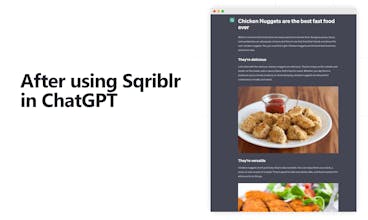
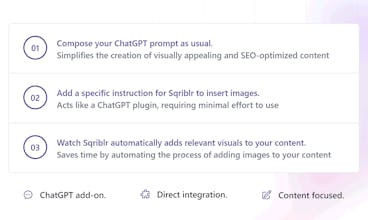
Generate full blog articles with images directly in ChatGPT in seconds with a single command. No manual image sourcing, it's all done "automagically" from a direct integration in ChatGPT. Cut down your Draft-to-Publish time and easily create appealing content.
Sqriblr gallery image
Payment Required
Launch tags:Productivityβ€’Artificial Intelligenceβ€’Tech
Launch Team
NMI Payments
NMI Payments
Don’t Integrate Payments Until You Read This Guide
Promoted

What do you think? …

Hugo Hamel
Maker
πŸ“Œ
πŸ‘‹ Hey Product Hunt-ers! I'm Hugo Hamel, maker of Sqriblr. I've been experimenting with all kinds of things and hacking things together since my youngest years. (Built my first website in 2006, at 12.) Despite all my failures, build solutions (digital products, automation or SaaS) has always been a part of me. Wanting to make a positive impact in the world, I've been helping founders and creators be more productive and 2x their operations. πŸ“– About a month ago, I came across a Reddit post where someone used a ChatGPT prompt structured to use Tarot cards images from WikiMedia. I thought it was clever, but with quite limited usage at the same time since it was for only one specific use case. This is when the idea of Sqriblr, started to come alive. The idea of being able to add relevant images directly into a ChatGPT response, based on the context of the generated content. ChatGPT already has the capability of describing images and choosing where this image should be in the content generated, but it is incapable of displaying any images as it doesn't have web access. Having the description of an image is great, but it still adds extra necessary steps to get these images. Now, these limitations from ChatGPT are removed and you don't have to search images or have an AI image generator do it for you. With Sqriblr, ChatGPT can automatically insert visible images into its content rather than simply describing it textually. Now that ChatGPT responses can have images, this simplifies by a lot how you can create content using AI. You can simply ask to generate content, and all you'll have to do is copy-paste the entire content in other external platforms like Google Docs or else. For those using ChatGPT to generate full blog articles, or any type of publishable content, this makes it extremely easy to generate multiple SEO-oriented pieces of content quickly, cutting down your time for you to go from Draft to Publish. πŸ™ I'd love to hear your feedback to potentially improve it, and understand how useful this ChatGPT add-on is for you. I'm excited to hear your feedback, and I'm happy to answer your questions.
Ekta Gupta
This is a game-changer! Congrats on the launch of your product. I can already see it making a huge impact in the industry.
Hugo Hamel
@ekta_gupta5 Thank you for your kind work, it means a lot! Let me know what you think if you give it a try :)
GaΓ«l de Mondragon
Ohhh interesting! Do you need to have chatGPT plus? (I guess not but it would be nice to be extra sure before buying :) , maybe something to add to the FAQ?) Congrats Hugo!
Hugo Hamel
@gael_de_mondragon No you don't need ChatGPT Plus :) You can even use it in any other AI interface such as TypingMind, Halist, etc. since they all have the same response structure as they are all OpenAI wrappers.
Khairul Hisyam
I understand what it does, but what is it exactly? Is it an add-on? Do you need to install an .exe file or something? I don't really get it. Could you please help me understand? Thanks.
Hugo Hamel
@khairul_hisyam Great question! Just to make sure, did you have a look at the video? But to answer your question it's not a plugin, it's an external service that you use directly within ChatGPT. By using the right prompt (command), ChatGPT will know what to do to activate Sqriblr and provide you with images directly in its response. Let me know if that clarifies. :)
Khairul Hisyam
@hugohamelcom I did look at the video. From what I understand, it's like an extended prompt to tell ChatGPT how to activate the Sqriblr. It's actually an extended prompt to tell ChatGPT to output a certain character/pattern so that it will output and preview images correctly. I'm not sure if I get it right. Thanks for your reply.
Hugo Hamel
@khairul_hisyam That is an excellent summary! Glad to see that the video seems to explain well enough how Sqriblr works :) (yet, if you have feedback to improve it, I am all ears!)
Dan Mindru
πŸ”Œ Plugged in
this is a brilliant idea & *I will* use this in one of my products if it’s the last thing I do! Fantastic work Hugo!
Hugo Hamel
@dan_mindru Thank you for having been our very first beta (even alpha) user, truly appreciated your support πŸ™
Daniela
you know I love what you've created with this Sqriblr 🀩 keep killing it Hugo and congrats on the launch!
Hugo Hamel
@daniela_s Thank you for the kind words, appreciate it :)
Nuno Reis
Looks quite interesting. Congrats on the launch! 😊
Hugo Hamel
@nuno_ms_reis Thank you so much!
Hugo Hamel
@nuno_ms_reis Let me know if you try it out, would love to know what you thought :)
123
β€’β€’β€’
Next
Last