

Substage
A natural language command bar for your Mac's Finder window
160 followers
A natural language command bar for your Mac's Finder window
160 followers
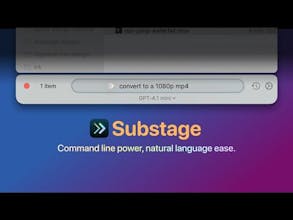
Substage is a natural language command bar that docks neatly underneath your Finder windows. Tell it what you want to happen, and it takes action: "convert to a 1080p mp4", "word count", "zip these up", "author of this PDF?" and more! Free to try!




Substage
Hey everyone! 👋 Super excited to be launching Substage on Product Hunt today! It’s a natural language command bar that sits just under your Finder windows and lets you interact with your files and folders using plain English. You can say things like:
Convert to webp
Word count?
zip these up
I think I gave this image the wrong file extension. What file type is it really?
Download this here: <some file url>
Make a new readme.txt
It’s fast, context-aware (uses your current Finder selection), and smart enough to suggest safe Terminal commands — with built-in risk assessment (for example, it'll never `rm` anything, only `mv` to Trash if you ask it. By default it works with popular AI providers, but you can choose to use it with local LLMs too.
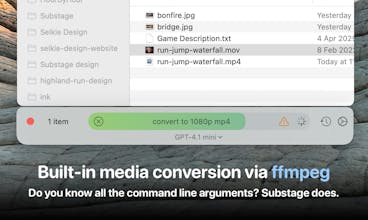
During my day job as co-founder of indie game dev Inkle Studios, I’ve found it super useful for converting videos and images, checking metadata, and more. Although I’m a coder, I’ll avoid using the command line whenever I can 😅 So although I understand that there’s a lot of power beyond the command line, I can never remember the exact command line arguments for just about anything.
It's free to try, so I’d love to hear what you think!
Joe
@joethephish Congratulations on the launch of Substage, Joe!
The context-aware command processing is the best feature to me as it will help users to streamline their file management without digging into the command line. To enhance creativity you can consider integrating a way to create custom commands or shortcuts for frequently used tasks.
Wishing you and your team all the success with this innovative tool!
Substage
Thanks@shadmannazim ! Yup, the groundwork is laid for custom commands since in the past week I have added the ability to cache existing commands in history for immediate re-running instead of asking AI again. So it's absolutely something I want to add!
Raycast
This is a super savvy gesture towards what the future of Computer Use can look like... like an OS-level Clippy without the irritation!
It's like when the CLI reaches up to help Finder tackle everyday chores.
Substage is a game-changer for Mac users! The natural language command bar seamlessly enhances Finder's functionality, making file management more intuitive. Kudos to the team for this innovative tool!
PulpMiner
The UI is looking good, seamless with mac design. I think i will be using the terminal commands feature. Congrats on the launch Team!
Substage
Thank you!
Superhero Workout
Congrats, this looks super polished and actually useful!
Substage
Thanks @adrianhon ❤️
Love the idea! However, I just downloaded it and tried to make it sum up a couple PDFs into one file, and I get the message "command not whitelisted, so implications are unkow..." Apparently there's no way to see the full error message, it cuts off at the "...". Also, how do I whitelist the command? Would be helpful if error message are further explained or if there'd be a way to ask the AI to help fix it.
this is a really cool starting point for what could be a game changing product. imo, it's worth giving for free for now given all you would be able to do with it in the future to upsell. getting this onto someone's cpu is incredible valuable