Tabbs

Tabbs

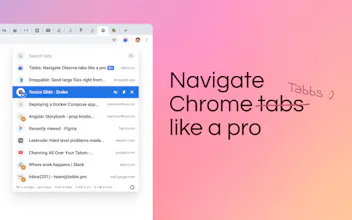
Navigate Chrome tabs like a pro

6 followers

Tabbs is the fastest and simplest way to get around in Chrome.
Tabbs gallery image
Tabbs gallery image
Tabbs gallery image
Tabbs gallery image
Tabbs gallery image
Tabbs gallery image
Launch tags:Chrome Extensionsβ€’Tech
Launch Team

What do you think? …

Julie Chabin
Hi Hunters! This morning, I stumbled upon this amazing Chrome extension. I first saw the website and was very pleased by its designs, awesome presentation, the interactions were pretty nice and, as a designer, obviously, I was drawn to it. Now for the product itself: if you use Chrome (or another Chrome-based browser) and you often have too many tabs open, it might help you navigate between them. You can easily view the full title of a tab with this exention but you can also search within the pages themselves and that's a big change. You also know how Chrome is memory-hungry and Tabbs helps pause tabs to free up memory so that's also a big plus. I'm giving it a try today.
@syswarren Thanks so much for hunting, Julie! Looking forward to knowing more about your experience with it πŸ˜ŠπŸ’œ
Ackman
I like what I see but there's certain things that annoy me: - No shortcut for sleeping tabs - The font is huge and so is my monitor - I wish I could resize it - The popup is too small and I wish I could resize it as well - There's no tooltips. I couldn't tell the pin button was a pin because the icon is too stylized. - Custom shortcuts would be a +1 but that's a minor complaint
@ackman Great attention to detail! 1. Do you mean you'd like to manually suspend tabs, or open the "Tab Nap" settings page? 2. it's 16pt, which is great for readability. We should consider customization here - good point. 3. Unfortunately, native Chrome extension windows don't offer too much customization (we hate that). We could go a different route, and embed the whole window into the code of each page, and some extensions do that, but it would negatively impact the performance. So the lack of window customization is a sacrifice we had to make 4. We should have tooltips - missed that one! Will fix in the next update 5. You can actually do that by going to "Manage extensions" -> "Keyboard shortcuts" (in the hamburger menu) Thanks for this detailed feedback πŸ™πŸΌ
@ackman You can also navigate with ctrl j/k - we only added this in the latest version πŸ˜… I agree that the Tab key should work as well, we should definitely add that. Thanks so much for all the new ideas! You're contributing a lot to this project and we really appreciate that πŸ™πŸΌ We'll try to add as many of these as we can over the coming weeks ☺️
Ackman
@ackman @roman_tesliuk @batmot Gmail and others have this "density" settings which controls font size, padding and icon sizes all at once. Having this kind of option would be the best alternative imho.
@ackman @batmot That's a great Idea! Will definitely include that in our upcoming updates. We're planning to revamp the Settings page to include more options, this could definitely be one of them. Thanks a lot for the feedback πŸ™πŸΌ
Ryan Hoover
I like the design and simplicity of the landing page. But it's hard for me to kick my bad tab habits. πŸ˜‚
Benjamin Saks
@rrhoover yeah, my tabs have tabs πŸ˜‚
@rrhoover πŸ™πŸΌπŸ’œ It doesn't take away the chaos - It helps navigate the chaos πŸ˜‚ I'm a mess myself 😁
Robert Loustau
I really like it but had to remove it because it hogged chrome memory and made it unusable, Using 2.2.4 on Windows. Shame because i really liked it!
@rdlou known issue, and we're already working on it. The fix will likely come with an update next week. If it's okay to ask, how much RAM do you have and how many tabs did you have open? Thanks so much, this will help a lot πŸ™πŸΌ
Robert Loustau
@rdlou @roman_tesliuk I had about 8 tabs open and I have 16GB of RAM. I really liked the extension so please do let me know when a fix is released!
@rdlou Thanks so much Robert! We're working on the fix already, will let you know once it's live :)
Robert Loustau
@rdlou @roman_tesliuk Hi Roman, how's this going? has an update been released?
@rdlou Hey Robert, sorry for not getting back to you. Yes, it's already live. Have you noticed any difference? Make sure you're on version 2.2.5, sometimes you have to update it manually
Tem Nugmanov
Love this! Been using it for a few months. I'm super heavy on cmd + k in slack and superhuman, so this works perfectly for my workflow
@temirlan music to my ears πŸ’œ
Tem Nugmanov
@temirlan @roman_tesliuk hell yes! one thing I NEED is a whitelist. this does not work well with obvious command + k culprits like superhuman and airtable.
@temirlan @roman_tesliuk You can change this shortcut by going to "Manage Extensions" -> "Keyboard Shortcuts"(top left corner). And we're definitely adding a Whitelist soon ;)
Younghwi Cho
I love this extension! Installed and wrote a review on the webstore too :D Will share more thoughts later after I using this for more weeks. Good luck!
@andrew_cho Glad to hear you're giving it a try πŸ˜„ We really appreciate you taking the time to write a review as well! I'll be responding to the question you asked there in a minute :)
Brian Chou
Love the design, but is navigation limited to only a single window? I have many tabs on several windows, so it would be great to have a full view of tabs open across windows
@brian_chou Great point! We'll add it in the next couple of updates :)
1234
Next
Last