Trackingplan

Monitor your analytics without the hassle

4 followers

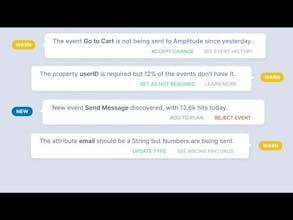
Get a living snapshot of all your analytics. Just copy and paste a single line of code to your Website or App and, within minutes, all your events will be monitored and automatically added to your tracking plan.
Trackingplan gallery image
Launch Team
Anima Playground
AI with an Eye for Design
Promoted

What do you think? …

Oleg Kozynenko
Many thanks for the hunt @Kevin! As a team we've been working with data and analytics a lot in the last 10 years, we've seen how data is managed at startups with millions of users, at big corporations and even at Google (@AlexandrosAndre). And we've come to a conclusion: you can't simply trust the data you collect, you have to double-check. Here is how Trackingplan was born. Our main requirement for the solution was: it has to be a one-line implementation, as we understand that anyone with a big codebase won't have time or resources to rewrite the code. Why do I need that? Have you ever found out that your analytics code was wrong way too late? Have you ever made a decision based on incomplete or wrong data and lost money? If the answer is yes, then you are like us and Trackingplan is for you. How does it work? Just add one line of code and Trackingplan will analyze all requests to your analytics providers and alert you in real-time if something is wrong. It provides automatic monitoring across multiple platforms: Web, iOS, Android, and Backends. And analytics providers: Google Analytics, Tag Manager, Segment, Amplitude, Mixpanel, and others. As a result, Trackingplan isn't only providing a health monitor for your analytics, but seamlessly documenting the specs of your events in order to find implementation bugs and create a single source of truth for your analytics. Your plan can be managed by a team and shared. Say goodbye to outdated spreadsheets that don't match your current plan and aren't in sync with your implementation! We will be here for the discussion all day!
Nazim @Koinju
The project looks great, very helpfull. I will give it a try ! Does it detect GA event configuration automatically or do you have to provide it with some setup ?
Josele Perez
@nazim_m It detects all the configuration. You only have to copy and paste your list of custom dimensions if you want see the aliases at the dashboard instead of the custom dimension index.
Jacobo Vidal
This would have saved me lot of time debugging analytics implementations: fixing data types, someone removes an event by mistake, etc. Amazing product and congratz for the launch! :)
Alexandros Andre
@jacobo_vidal Thanks for the nice feedback, hope you find it useful!
Juan Uceda
Good luck guys!! The project looks amazing and it's going to be very helpful!
Oleg Kozynenko
@juzafra Thanks Juan! I've suffered the problem myself, hope this approach is the best way to fix it.
Jose Padilla
@juzafra Thanks for your comment :)
Glen Creaser
All of the integrations with existing analytics platforms is what sold me. Great job.
Alexandros Andre
If it's not there yet, we'll code it for you. That's the deal. Thanks @glen_creaser.
Oleg Kozynenko
@glen_creaser Ofc, no need to change your analytics (we don't do analytics). Just trying to help with monitoring and remove errors and surprises. Please try :)
Gabriel Aldamiz-e...
Looks like a great tool to trust our analytics, so much work is always done there. Super useful!
Oleg Kozynenko
@aldamiz the best part is that you can integrate us with no hassle, no need to change anything, we will analize your requests/traffic to analytics platforms and tell you whats wrong.
Josele Perez
Thanks for the hunt! I found that I spent years using internal solutions and protocols for solving a simple problem: trusting my analytics. Even at Hooks , with a small team, we had to doublecheck every time we had to make a decision based at our data, we did things like: - Comparing with our internal database the numbers - Comparing among different analytics - Going to check the code. - Check if there was a network problem some day. And that for almost every report, round, or A/B test. We also found that adding “a new analytics” didn’t solve the problem, but made it bigger. After talking with dozens of users, during the last year, we found that we were not alone, that there was a massive problem out there. We also discovered that we needed a solution with 4 conditions: - Don’t change how to people do analytics: it was counterproductive to make people change their analytics code to fix a analytics code problem. Doing that you are just adding another layer of complexity to the problem, another stuff else to check - Make it proactive: The problem around analytics happens when you need the data, not when you define or deploy it. You have to notice the problems before you go to check. - It has to fit with the modern analytics stacks (tm). - It has to cost just a small portion of what you currently pay for analytics That’s why we built Trackingplan around there main features: - No need to change anything! You can keep using support all analytics SDKs. You can see how it works at https://github.com/trackingplan/... - Receive real-time alerts if something is wrong: misspelled events or missing properties, type mismatches, volume drops, and many more. - Align your teams by sharing an always up-to-date tracking plan. Everyone will know what is currently being tracked. I hope you test it and tell us what you think!
123
Next
Last