

TranslateAir
AI-Powered Translation & OCR for macOS
219 followers
AI-Powered Translation & OCR for macOS
219 followers
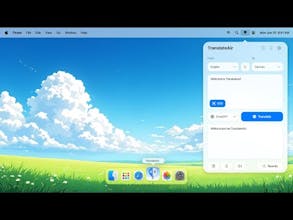
TranslateAir is an AI-powered translation and OCR tool for macOS. Instantly translate text from any app without switching, with floating bar and multiple AI models for seamless productivity.


TranslateAir
Hey everyone! 👋 I’m Hasan, a Product Designer and Indie Maker passionate about building tools that boost productivity and simplify daily workflows.
Today, I’m excited to introduce you to TranslateAir — an AI-powered translation and OCR app crafted specifically for macOS users who want fast, seamless translations without switching between apps. 🚀
My goal with TranslateAir was simple: make translating easier by eliminating app-switching friction and help you work across languages effortlessly.
With TranslateAir, you can:
Instantly translate selected text with a floating bar
Capture text from images, PDFs, and videos with advanced OCR
Pick from top AI models like ChatGPT, Gemini, DeepL, and Google Translate
Fine-tune translations using the new Rewrite feature (make it more friendly, formal, concise, or detailed)
Customize your workflow with personalized keyboard shortcuts
Would love to hear your thoughts, feedback, or questions! Feel free to reach out. 🙌
Check it out here: https://translateair.com
Filo Mail
Really like this design — clean, sharp, and having it right on the top menu bar is such a smart move. Feels like one of those tools that just quietly makes your workflow better. Looking forward to using it!
TranslateAir
@justin_bao Thanks a lot, Justin! That’s exactly what I was aiming for. Hope you enjoy it! 🚀
simple and awesome. love it
TranslateAir
@jason_chernofsky Thanks a lot Jason! Making it simple but effective was a big focus for me.
Telebugs
Congrats on the launch! Is it BYOK?
TranslateAir
@kyrylosilin Thanks Kyrylo! Not yet. right now it uses built-in model options, but BYOK support is definitely something I’m considering for future updates. 🚀
Elisi : AI-powered Goal Management App
This looks incredibly useful, Hasan — especially for macOS power users juggling multilingual content! The floating bar and OCR from images/videos sound like huge time-savers, and I love that you included multiple AI model options plus tone adjustment via Rewrite. That’s thoughtful UX.
Curious:
Are you planning iOS support or cross-app syncing in the future? Would love to use something like this on mobile too.
TranslateAir
@williamrobertscott Thanks so much William! Really appreciate the kind words. 🙏
At the moment, I’m fully focused on building the best possible experience on macOS, but if there’s strong interest, expanding to iOS is definitely something I’d love to explore!
Milestone Content Studio
TranslateAir
@siddharthpereira Thanks so much, Siddharth! 🙌
You’re absolutely right, but that’s exactly why TranslateAir exists.
Instead of classic rigid translations, we use advanced AI models to make the translations feel more natural and nuanced.
And with floating bar access, it’s always right there when you need it. 🚀