Tulr.io

Tulr.io

Lego kit for tables, screen recordings, calendars, & forms

4 followers

Tulr lets you combine Videos, Tables, Forms, and Calendars, and apply powerful automation to suit your workflows. With minimum or no help, anyone can create powerful apps such as Applicant Tracking, Email Marketing, Video Pitches, and many more.
Tulr.io gallery image
Free Options
Launch tags:Productivityβ€’SaaSβ€’No-Code
Launch Team
Unblocked AI Code Review
High-signal comments based on your team's context
Promoted

What do you think? …

Shardul Lavekar
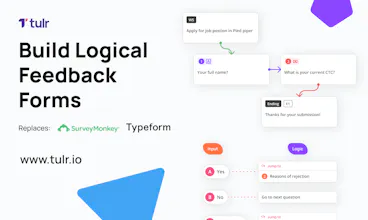
Hello Product Hunt! πŸ‘‹πŸ‘‹ This is Shardul - I am the founder of Tulr.io Why Tulr: 🀦🏻😒 In my earlier Avatar, I worked in several small, medium and large companies and found out that SaaS solutions don’t talk to each other. For example, we used Greenhouse for recruiting and Servicenow for assigning/managing hardware devices. The problem was once a candidate was recruited using Greenhouse, someone had to manually create a device assignment in Servicenow. That created a lot of operational overhead. We expected flexibility from such SaaS providers to suit our workflows. Chasing SaaS vendors for flexibility was a nightmare. Also, we spent considerable money on all these apps together. That inspired us to start Tulr.io. Solution: πŸ”₯πŸ€˜πŸ½πŸš€ With Tulr, anyone can create apps to suit their workflows. Tulr offers all the necessary building blocks to put together and let users create powerful apps and workflows. 1. Spreadsheets with Super Powers πŸ¦ΉπŸ»β€β™‚οΈ a. Create tables with 20 different column types b. View your data in Table, Kanban or Calendar View c. Apply powerful filters d. Public & Embeddable Sharing for Social Media and Websites 2. Instant Screen Recording πŸ“ΈΒ πŸ–₯️ 🀳🏽 a. Record any screen with Tulr Extension b. Draw attention to specific details with our pencil tool. 3. Supercharged Calendar βš‘πŸ’¬πŸš€ a. Sync your Gmail calendar. b. Create a policy for scheduling meetings & share the Tulr Calendar link c. Track Meeting transcripts for every Google Meet. 4. Instant Embeddable Forms πŸ”†πŸ’‘ a. Create forms from the data model b. Embed Logic in the forms 5. Automations πŸ’‘βš‘πŸ€–πŸ’₯ a. Triggers & Actions (when something happens then something will happen) b. Define Automations with Email Sending, Meeting Scheduling, Form Sending, and more Application Templates: ⚑ With these building blocks, we have built the below templates. You can customise these templates as you want. 1. [Applicant Tracker](https://tulr.io/templates/173) - Helps HRs automate their grunt work in recruiting. 2. [Video Pitch](https://tulr.io/templates/164) - Helps Marketing people send their personalised video pitches to customers. 3. [Email Marketing](https://tulr.io/templates/174) - Helps Marketing people send bulk emails. 4. [Bug Records](https://tulr.io/templates/162) - Helps QA record bugs and share with developers [Here is the link to our templates.](https://tulr.io/templates) Go ahead and give it a try!
Bharat Shetty
I liked the feature where it allows one to capture the transcripts of the meetings. I have a hearing impairment and I need this feature all the time to refer back to the meetings in social setups or public interactions or professional work place interactions. Tulr Meetings with transcripts just made it super easy! I'm totally impressed by how clutter less UI/UX has been provided in this product. Would love to use this product further!
Shardul Lavekar
@bsbarkur Man, you made all our efforts worthy! Thanks a lot :)
Pratik Mandrekar
I used Tulr for applicant tracking. I really liked the feature where the call transcripts get recorded and are tracked alongside all the interviews taken by different members of my team in an intuitive calendar view. I was also able to seamlessly automate the process for job application and scheduling interviews. It all just worked out of the box and saved our team a lot of time!
Shardul Lavekar
@pmandrek thank you so much pratik!
Rajagopal Natarajan
Loved the fact that there were a few common use cases working out of the box. That was a good touch vs most no code platforms. An approach of a "one internal app" for every company gets noticed first. The power of the no code platform comes in to extend the functionalities or to create use cases which aren't already setup off the shelf.
Shardul Lavekar
@rajagopal_natarajan Yes, in the coming few days, we will launch all the most common use cases for startups. Thanks for the feedback!
Shubham Ghogare
I have used video QA app under turl as QA. I really liked the features it is providing. It is providing all the features we need to track stories, bugs or issues of any product. The feature which i liked most is screen recording. In this application we record screen while we are working in that story or bug and then recording will get upload as attachment under that task which will be accessible to everyone. Also it provides automation, means if something changes in any if the task we can trigger automated eamils to all stakeholders so that everyone will be aware about it. You guys really made an awesome application...!!
Shardul Lavekar
@shubham_ghogare Thank you Shubham!
Musthaq Ahamad
This is amazing! I really think this will help a lot of individuals and organization to build numerous internal tools from problem to solution lightning fast⚑!
Shardul Lavekar
@haxzie Thanks Mushtaq! Use it for locale.ai :-)
Shyamnaik Guguloth
I tested Tulr for my product design tasks and their statuses 1. Its easy to setup custom flows for each usecase and send email to users in the flow 2. I Love the video module where you can record the errors and directly implement it straight to your workflow 3. The personal calendar lets me send it across people for make or schedule calls to me All the best to Shardul for making this awesome software.
Shardul Lavekar
@shyamnaik_guguloth Thank you so much man!
1234
Next
Last