I used to work with an engineer that would never touch his mouse, using the keyboard to navigate the web. I'm not sure what tool or settings he used at the time.
Curious to hear from people that do this. Do you find it dramatically more efficient?
@rrhoover It does increase efficiency, but some people may need time to get used to it. if you have multiple monitors switching between them, using the keyboard control will be more efficient
@rrhoover It looks like quantum physics before starting to work on it, but you can do it with a keyboard that supports mouse keys (UHK v2 or any software), and a keyboard controlling app (Shortcat, Homerow, and Wooshy). I'm more productive and focused since I don't switch contexts so often.
I really really need something like this. I check if VIM keymap is supported in all code-related services.
Huge thanks for your work. Congrats on your launch 🚀
OK, I gonna press "Comment" button with f-bv :)
Hey, do you plan to support drag-and-copy action in future? It's very great to move quickly and hit the button with keyboard, but I hope we can copy text via Vimkey!
OK. I'm big fan of this product. Another request :)
You will know "Saved page" in the result of Google search. However, I can't cancel after I click the dropdown button for "Saved page". Do you have any idea?
@haojen Perfect! It was needed when trying to copy code snippets at Stack Overflow.
Report
Oh, I had an experience with other extensions which provide vim-like interaction with the browser. Need to say, It's much more productive than using mouse or touchpad. Congrats on the launch!
Report
I was thinking about the same thing today and wondering how to build it. Was going to search for something like this when I saw this on PH. Not going to search now, excited to use this
Report
This is awesome thing i see on PH. I will try it for sure. While doing a code i also need mouse most of the time for fast point targets but i think it cut out my mouse uses. Good luck.
Report
Please add custom keyboard shortcut or make all website search bar shortcut “CMD + L”
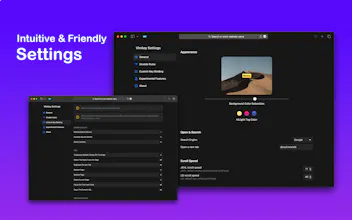
@alioraqsa Vimkey already supports the feature, you can go into settings to see the custom keyboard item.
also supported search and open, press "o" or "T" and you will see it. :D
Report
This looks awesome! Would love to see this ported over to Firefox someday!!
Product Hunt
Vimkey
Thinkbuddy AI
WIDTH
WIDTH
WIDTH
Vimkey
Vimkey
WIDTH
Vimkey
Vimkey