Weather Screen brings real-time weather effects to your Mac desktop with 15+ customizable visuals, like rain, snow, and sunshine. Stay updated with detailed weather info and forecasts in the menu bar.
Hey everyone! I just launched my first Mac app—Weather Screen!
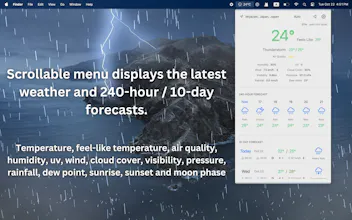
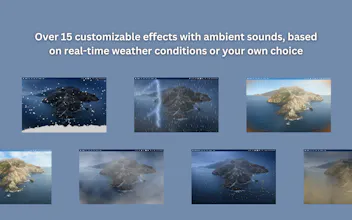
Weather Screen brings the weather directly to your desktop, turning your Mac into a dynamic, weather-powered display. With 15+ captivating real-time weather effects—like rain, snow, sunshine, and clouds—your desktop will seamlessly reflect the current conditions, bringing the outside world to life right on your screen. Stay up-to-date with a menu bar that displays detailed weather information and an extended forecast.
**Key Features:**
- Over 15 customizable weather effects with ambient sounds, based on real-time conditions or your own choice.
- 3 battery-saving modes to optimize energy usage.
- Comprehensive weather details, update every 10 minutes.
- Temperature display in Celsius or Fahrenheit, with color-changing text based on value.
- Wind speed options: km/h or m/s.
- Hourly forecasts for up to 240 hours.
- Daily forecasts including sunrise, sunset and moon phase for up to 10 days.
- Automatic location detection with the ability to store unlimited locations.
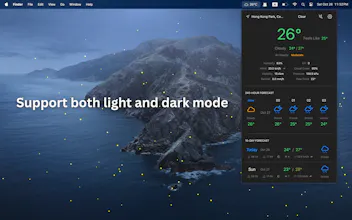
- Menu bar widget with light and dark mode support.
- Support multiple displays.
**Subscription Information:**
Weather Screen requires a monthly or yearly subscription to access all features. New users enjoy a 7-day free trial.
Data sources: Weather data from Apple Weather (previously known as Dark Sky) and air quality data from OpenWeather.
i know this is maybe insane feedback, but I feel like I'd quite like to have weather effects OVER my screen content not just on the desktop... not all the time, just for like, some cosy writing time with the rain pouring.
@jonnymiles That’s actually a great suggestion! I’ll definitely consider ways to make the effects overlay on the screen content in a subtle way, so it creates that cozy ambiance without interfering with your work. Thanks for sharing this idea—it really sparks some creative possibilities!
@sgroiga Thank you for your question! Currently, the effects are made based on the weather conditions provided by Apple WeatherKit, which do not include tornado. However, I appreciate your feedback and may consider adding it as a custom effect in the future!
Report
Congratulations to the Weather Screen team! 🌦️ What inspired you to create weather effects for Mac desktops?
@ihuzaifashoukat Thank you! The idea came from noticing that macOS already has dynamic wallpapers that change with the time of day and the built-in weather app looks a little boring—so I thought, why not take it a step further and create effects that respond to real-time weather conditions? It felt like a natural way to add a touch of nature and ambiance to the workspace!
Love how this brings life to my otherwise boring desktop! Been using it for a few days during the trial and those ambient rain sounds are surprisingly calming while working. The battery-saving modes are a thoughtful touch since I'm often on the go. Quick suggestion though - would be cool to have some seasonal themes like autumn leaves or cherry blossoms in future updates! 🌧️💻
@_ivan1 Thank you for the feedback—I’m thrilled to hear you’re enjoying the effects! Actually, both autumn leaves and cherry blossom 🍁🌸 effects are already available in the app, though they currently need to be selected manually. We’re considering adding automatic seasonal transitions in future updates to make the experience even more immersive. Appreciate the suggestion!
Congrats on the launch of Weather Screen! 🌤️ This is a brilliant way to make the weather feel more immersive on Mac. Love the real-time effects and ambient sounds—such a unique feature to bring the outside world indoors! The battery-saving modes and detailed weather info are great touches, too. Wishing you lots of success with your first app! 🚀
Another Dock
PicLooks Avatars
Another Dock
Bookmer
Another Dock
Another Dock
Lensmor
Another Dock
Elisi : AI-powered Goal Management App