

Claude by Anthropic
A family of foundational AI models
5.0•637 reviews•37K followers
A family of foundational AI models
5.0•637 reviews•37K followers
We're an AI research company that builds reliable, interpretable, and steerable AI systems. Our first product is Claude, an AI assistant for tasks at any scale.
This is the 28th launch from Claude by Anthropic. View more

Claude Import Memory
Launching today
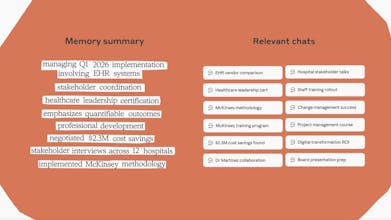
Transfer your preferences, projects, and context from other AI providers into Claude. With one copy-paste, Claude updates its memory and picks up right where you left off. Memory is available on all paid plans. Switch without losing what makes your AI useful.


Payment Required
Launch tags:Artificial Intelligence
Launch Team


As @busmark_w_nika reported, People are switching from OpenAI to Claude following Sam Altman's announcement today.
Now you can switch from ChatGPT to Claude without starting over!
What’s possible now
Claude has a Memory feature that lets it retain user preferences, context, project details, and personalized information across conversations (so you don’t have to re-explain everything each time). This memory is available on paid plans (e.g., Pro, Max) and is similar to ChatGPT’s memory feature.
How you bring ChatGPT context over
There isn’t a literal “one-click” automatic transfer between ChatGPT and Claude yet. You can export or copy your memory/context from ChatGPT (e.g., ask ChatGPT to summarize what it knows about you) and then import it into Claude’s memory by pasting it into a new chat or using Claude’s memory settings.
In short
Claude can use prior context from ChatGPT if you bring it over manually. It effectively lets you continue where you left off without starting your workflow from scratch, as long as you import the summary/context.
Have you made the switch to @Claude by Anthropic yet or you prefer staying with @OpenAI?
Let us know in the comments! :)
RiteKit Company Logo API
What I'd really like to see, as a heavy paid user (tier 2 of Pro) of Clausde, is when a chat gts full, the hand-off doesn't lose so much;; I have train each new chat for 30 mins before I can continue getting things done.
This is actually a very interesting shift.
The real switching cost between AI tools isn’t UI — it’s memory.
Context is the moat.
Once your AI “knows” your projects, decisions, and thinking patterns, you’re not just using a tool — you’re building a cognitive extension of yourself.
Curious question:
Do you see portable memory becoming an industry standard?
Or will AI providers eventually compete on proprietary, locked-in context layers?
We’re building a product where structured probability and event context matter a lot — so the idea of transferable intelligence is fascinating.
The copy-paste transfer gets you the explicit memory layer — the facts Claude now knows about you. The harder problem is the implicit layer: how ChatGPT has calibrated to your tone, your pace, your reasoning style, the shortcuts it's developed for how you work. That doesn't copy-paste. Claude still has to infer all of it from scratch. The real test of this feature is whether a cold Claude + your imported memory actually feels like continuity, or just familiarity.
Has it actually worked for anyone?
Adjust Page Brightness - Smart Control
i know its product hunt but congrats to claude being #1 on Appstore i hope it will be top product of the day as well as number 1 on android playstore too