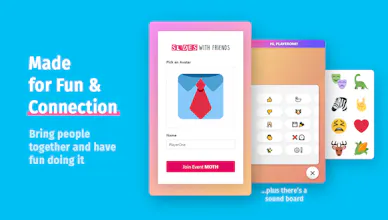
Create games and interactive presentations for online events. Share your screen, engage your audience, and bring your community closer together. ⠀ 💖 Team building games 🙌 Icebreakers & trivia 📈 live surveys & polls 👨👩👦👦 group events
No reviews yetBe the first to leave a review for Slides With Friends
Very cool. it would be interesting to see how to use this on a webinar to engage the participants. Have you done something like that?
Also, it would be nice if you can share a regular presentation and for some parts the slideswith. How would you do that?
@gilbert_mizrahi1 This is a great Q — yes! using this tool to run online webinars / talks has been great for us. Really increases engagement in events and community building group calls, etc.
I'm linking a video of an event I ran recently for Ness Labs to give you an idea of how you can use SlidesWith like an interactive powerpoint presentation / conference talk. The subject of the talk itself is actually "How to use games to increase engagement in online events" so hopefully it's useful for you! https://vimeo.com/user12968203
@gilbert_mizrahi1 You can switch between Slides With Friends and a Powerpoint pretty easily by just changing the tab/presentation during the same screen share. Your participants can even use the soundboard the entire time and if you have more than one monitor you can continue controlling the slideswith presentation in the background and have that provide phone-only content.
We're eventually going to be adding some more advanced display and design capabilities to make it a bit less necessary to use something like Powerpoint in the future, as well as building out the option to simple use this as a companion to another presentation altogether.
@masonhipp I was thinking about being able to share the screen, move Slides With Friends and the share screen again, type of thing. I don't like or use powerpoints in webinars as a file I upload to the webinar platform. I do share the screen with a presentation made with PP or Google Slides or Adobe XD
@gilbert_mizrahi1If I'm understanding you correctly that should work perfectly — Slides With Friends would be just another window in your screen share and you can flip back and forth between any of them as needed
@devin_alldrit1 That's a great question. We are definitely not completely dissimilar from a Kahoot or an Aha Slides type tool. I think the main difference is our goal, and how we're executing it as we build.
I'd say Kahoot is more simple trivia / games focused, while we're more connection and interaction focused. We have slides types like pass the mic, photo sharing, "quiplash" type game play, as some examples, that none of the others do, to help foster more and better connection.
@corey_haines Thank you! It's very cool to have made a structure / framework that people can use to create pretty much anything.
We've had people making honestly incredible decks and events that I would have NEVER thought to build. Like Sibi from Founder Summit built a full-on Dungeons & Dragons game? (https://slideswith.com/deck/1728) Amazing and hilarious.
@corey_haines thanks Corey! We're seeing tons of people come up with all sorts of fun uses. On the other hand, that flexibility is making our marketing quite tricky: it's tough to decide exactly which markets and applications to focus on.
Report
LOVED using this in a new member onboarding, it went really well and it was such a fun way to get new members excited about joining the community!
@brandon_miniman1 Yes! That's exactly the situation we were in when we started building this. It's really tough bringing a team together remotely and I think team leaders need as many tools at their disposal as possible.
Hey hunters! 😻
I'm thrilled to be sharing this with all of you — Slides With Friends is my third big PH launch and is by far the one I'm most excited about.
My co-founder @crazak and I are trying to tackle the enormous "make video calls not suck" problem that everyone has faced this year. I don't think online meetings will ever reach real-world quality, but I do think we're only scratching the surface of how to make remote interactions really good.
With this product, Slides With Friends, I think we've created another great tool for teams and communities to use. We're not another video call platform (you can use this on any of them) and all we need is a screen share to work. Using our interactive group slides you can create all sorts of fun things: imagine a cross between Powerpoint, Jackbox Games, and Kahoot where you can design and build whatever interactive events you can imagine.
Plus, like all good products, there's a sound board 🔊
We've mostly been used by corporate teams, teachers, groups of friends, and community managers: but there's really no limit to the flexibility and I'm always seeing new uses.
I'd love to hear what all of you think, and a sincere thanks for reading this far and checking us out 💖
Report
Used this a few weeks ago and the response was pretty fantastic for our remote meeting. Excited to see how this develops out!
Slides With Friends
Slides With Friends
Slides With Friends
Afino Puzzles 1.0
Slides With Friends
Afino Puzzles 1.0
Swipe Files
Slides With Friends
Slides With Friends
Slides With Friends
Slides With Friends
Slides With Friends
Slides With Friends