

Meet Stitch, your AI-native vibe design partner. Create, iterate, and collaborate on high-fidelity UI using natural language, voice, and context-aware agents. Design across images, code, and text in one canvas, generate instant prototypes, and maintain consistency with built-in design systems and DESIGN.md. From idea to interface in seconds — faster, smarter, and more intuitive than ever.

 Figma
Figma
 Figma
Figma
Curious how Stitch handles the gap between generated UI and production code. With most vibe design tools I"ve tried, the output looks great in isolation but falls apart once you drop it into an existing design system - wrong tokens, hardcoded values, etc. Does Stitch have any awareness of existing component libraries or is it starting fresh each time? Also wondering about responsive behavior - generated from a single viewport or does it reason about breakpoints at generation time?
@mykola_kondratiuk Responsiveness is reasoned at generation time. It creates mobile-first code with fluid grids and implied breakpoints for multiple viewports, not just one.
That mobile-first with fluid grids approach makes sense - better than the tools that just output fixed px values. The component library question is really the harder one for us. We have a design system and every new tool we try generates code that looks right but ignores our token names. Curious if there is any import/config mechanism coming for that.
@mykola_kondratiuk That is some great point. In my experience of using Claude, the designs do not come out 100% perfect. You have to reprompt and tweak things to arrive at what you want. This might be the case with Stitch, but overall, they get better with time.
I have owned VibeDesignAI.com and I expected this direction. Happy to connect with any founder building something great in the space.
Thanks! I really enjoyed using Stitch — it helped me improve what I already felt was a promising UI.
That said, one thing I (and other iOS engineers I’ve spoken to) found frustrating is the lack of visibility into what Stitch is doing. For example, when I point out issues or explain what I don’t like in a design, Stitch starts making changes without confirming whether it actually understood my concerns. It would be really valuable to have more communication and feedback — especially asking clarifying questions before jumping straight into a solution.
Another issue is that it sometimes seems to hang indefinitely. The only way to recover is to refresh the page or rerun the prompt, but there’s no indication of whether it’s still working or stuck. Some kind of status feedback would make a big difference here.
Lastly, I often find it confusing to choose between Gemini 3.1 (Pro) and NanoBanana. When I’m making small refinements to an existing UI, it’s not clear which option is more appropriate. It can feel like Gemini 3.1 would give better results, but at the same time, NanoBanana seems more suited to iterative tweaks — making the choice unclear.
Congratulations!
@jose_martinez_fernandez I feel you on the "getting to work" part, I think having a "Plan" mode for UI design would be really handy. Just like we have for coding agents.
This feels like a shift from “design tools” to “design systems that generate themselves.”
What I’m curious about is the boundary between generation and control.
At some point, especially in production, teams don’t just need good output - they need predictability and constraints.
If Stitch keeps evolving layouts and structure across iterations, how do you prevent drift from the original system over time?
Sounds like a lot of "inspirations" from https://www.wenderapp.com/ 🫣
I had hunted Stitch by Google almost a month ago. The Stitch team is back with some major updates to Stitch, thereby making it your AI-native vibe design partner! :)
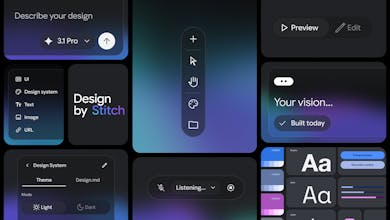
Here is a quick walkthrough of everything new in Stitch:
🎨 The AI-native canvas can hold and reason across images, code, and text simultaneously. The new agent manager helps you design in parallel. (PS … light mode!)
🧠 A smarter design agent now understands your entire canvas context. You can swap images, generate product briefs, or mix mobile and desktop screens on the same canvas.
🎙️ You can vibe design with your voice (in Preview). Stitch can ‘see’ your canvas and your selected screens. You can ask for design critiques, variations, or navigate your canvas.
⚡️ Instant prototypes. Just hit the play button to see a prototype or preview your app in seconds. Stitch can imagine the next screen based on your mouse click.
📐 DESIGN .md and consistency. Every new design automatically starts with a cohesive design system which vastly improves consistency. The new DESIGN .md file can be used to export or import your design rules.
Read more about the updates here. Stitch is perfect for designers exploring variations or founders shaping new products. If you’re into the future of AI + design, this is worth checking out!
I hunt the latest and greatest launches in tech, SaaS and AI, follow to be notified → @rohanrecommends
@mykola_kondratiuk Google's latest AI announcement triggered a 10% plunge in Figma's stock price, erasing roughly $2 billion in market value in a single day.
Anthropic and OpenAI have similarly hammered cybersecurity companies (down 30%), legal firms (down 35%), financial analysts, and software engineers through rapid feature rollouts.
A handful of tech giants, often just 2-4 players are systematically consuming entire professions at breakneck speed.
Venn.ai
I am often trying to marketing assets with product UI. Is this something that can help me with that?
Tested it without giving any UI hints, just described the core functionality, and Stitch inferred a layout I would have probably landed on myself after a few iterations. Impressive how it picks up context implicitly.
Curious: how does it handle design consistency when you iterate heavily and go back and forth with prompts? Does DESIGN.md help keep things stable or does it drift?