

ZenScreen
Track and limit screen time
0 followers
Track and limit screen time
0 followers
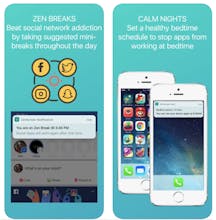
ZenScreen.ai helps you regain control by letting you track screen time and set sensible rules to limit app and screen use. ZenScreen works great for individuals as well as parents with kids. ZenScreen learns from your app use, monitors unhealthy usage, suggests breaks, and intelligently restricts access to apps in evenings and early mornings.


As a tech-savvy parent of digital munchkins, I jumped at the chance to join the Zenscreen early access program, and have been a happy user ever since.
I'm impressed with the visual design, and that I can see what my child is doing on their iPhone from my Android device, anywhere, not just on my home network. Plus it makes it easy to have a good conversation with them about what's acceptable use, and then monitor it, and enforce it when necessary.
That I can monitor my own activity and set healthy limits (that's enough, Facebook!) is a definite plus.
Pros:See what your kid is doing on their phone
Cross platform (iOS & Android)
Works anywhere (wifi & mobile data)
Easy setup
Manage your time too
Cons:Two step installation process (your phone, kid's phone)
Excellent app. Easy to install, easy to configure, lots of options. While for the kids this is great to instill responsibility and make them aware of their screen time, but what was eye opening was analysis of my own usage after installing the chrome extension. I had no idea how much time is wasted on non-work related browsing during working hours. It also made it quite apparent for me I have a screen addiction especially first thing in the morning. Highly recommended.
Pros:Easy to install, easy to configure, lots of options.
Cons:None that I can think of
great solution for both parents and kids. it helped me self-discipline in screen usage especially Smart mornings feature. saved precious productive hours of the beginning of my day.
Daily time limit is a must have feature in managing 10-year old's entertainment apps and the best part is it covers his mobile, ipad and chrome on laptop usage.
no more hiding devices .. No Kidding !!!
Pros:1. can be used for self and kids
2. smart mornings for me
3. Daily time limit for my kid
Cons:little friction from the kid for first few days - which kid likes less youtube !!!
Me obsessed with phone, zenscreen helps me keep an eye on the usage and most importantly keeps my mornings distraction free!!!
Pros:Great Help in managing the screen time
Cons:can't think off. Works just fine for me
Opera VPN for Android
Disclosure: I do not work for ZenScreen, nor have I been incentivized for this review.
I have been using ZenScreen for a long time now as a volunteer tester (previously iOS, now Android and Chrome extension). I do not have kids (does my cat count?): I have primarily used it as a way to see my own device usage (apparently I use Reddit more at night than I do any other app combined on my phone during the whole weekday - 2nd close is either Spotify or GPM depending on the day).
I like the extra focus on simplicity in the app. Instead of telling me the top 20 apps I use daily, it focuses on the top few most-time-consuming ones. While I also use the Chrome extension (home & work), I realize I have more control over what I can do in my mobile usage than my laptop/desktop usage (which is a different topic).
I would love for some regular reports or syncing with other health trackers, or syncing with Google Fit & Apple Health somehow. For example, if in Sleep Cycle I note that I didn't sleep well, I would love to go back regularly and check if MyFitnessPal shows I ate junk food more during those days and if I was spending too much time during that week/time-frame.
I would also like for it to, optionally, alert me if I don't open the app for a few days. Sometimes I forget to check the usage for a few days in a row. Suggestions would be great also ("Hey Agha, you're on Reddit every night for 2 hours. How about reducing it to 90 minutes three times a week?").
Overall, I like the idea and the features so far. Looking forward to using this further going forward (please bring a native Win or Mac app).
Pros:Simple, forces you to focus on fewer things even when you're looking at the problems list, Chrome extension, Screen Sense graph is clear
Cons:Chrome extension icon looks as if it's disabled, no Win/Mac app (for non-browser apps). Would like warning alerts in addition to Zen Breaks