Launching today

Agnos
Clean documents for AI, and see what was removed
41 followers
Clean documents for AI, and see what was removed
41 followers
Agnos cleans PDFs, Word, Excel, PowerPoint and web pages before they go into an AI chatbot, a RAG knowledge base or training data. It removes repeated headers and footers, page numbers, cookie banners, boilerplate and duplicates, and keeps tables, code and numbers. It names the rule behind every removal; keep a piece or switch its rule off. Exports JSONL chunks, cleaned text or training data. Runs on your Windows PC; nothing is uploaded. From the Microsoft Store: 14 days free, then $99 once.



Free Options
Launch Team

DropwhatTurn photos into listings with AI built for resellers
Promoted
Hi Product Hunt. I'm Michael, and I make Agnos at Gidion.
I built it after watching chatbots quote page footers back at their users. Company documents are full of text that confuses AI: the same header and footer on every page, "Page 3 of 10", cookie banners saved with web pages, duplicate passages. It all gets chunked and retrieved like real content.
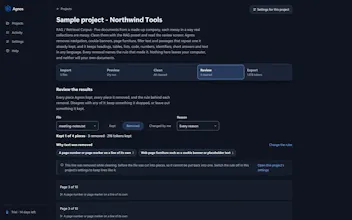
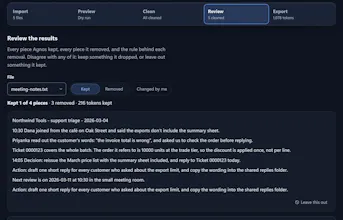
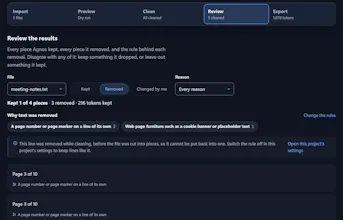
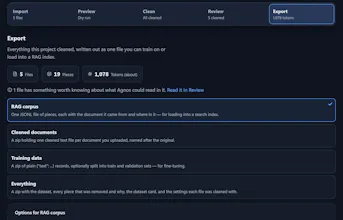
Agnos takes that out on your own Windows PC (nothing is uploaded, and it works with the network off) and keeps headings, tables, code and numbers. The part I care about most: it never removes anything silently. Review lists what it removed, with the rule behind each piece. You can keep a piece in one click where its rule allows, or switch the rule off. Then it exports JSONL chunks for a vector store, cleaned documents, or training data.
It installs from the Microsoft Store. Honest limits: Windows 10 and 11 only, and no OCR, so scanned pages are skipped and named rather than cleaned badly.
Pricing: 14 days free with everything, no card and no account. Then $99 once, or $399 once for up to five people at one company. No subscription.
It's for people building chatbots, RAG or custom GPTs on real company documents, especially for clients whose files can't go to one more cloud service.
Before launch I measured 25 US government PDFs (1,342 pages). Agnos removed 2,063 lines as page furniture, and 200 of them look like content to us. The method, the data and what it got wrong: https://agnos.cloud/guides/page-furniture-study/
What does your document cleanup look like today? I'd love to hear what Agnos gets wrong on your files.
Naming the rule behind every removal is the part that would make me trust this in a RAG pipeline — silent cleaning is exactly how useful context disappears. I am curious how it handles the borderline cases, like a repeated line that is also a real section heading: if I keep that piece, does it stay kept across similar documents, or is that a per-file decision?
@jcbuilds thanks, good question. Agnos only looks for page furniture at the edges of each page (the first and last couple of lines), and only short lines that repeat on 3 or more pages, so a heading in the body of the page isn't touched. The case it does catch is a section title printed at the top of every page.
On keeping: "Keep this anyway" is one piece in one file. Page furniture is removed before the file is cut into pieces, so those lines can't be kept one at a time. You switch "Remove page furniture" off in the project's settings, and that applies to every file in the project. There isn't an "always keep this line" list yet. Your question is a good reason to add one.