Since launch, your bots and agents can check a change before they apply it.
Aperture is now an MCP server. Grok Bot, Claude Code, Cursor or any MCP client can call check_change before it applies a change. It checks that the files parse, the imports resolve, and the TypeScript compiler finds no new errors, including in files the agent never opened. It also flags a change that skips or cuts short the tests. Nothing the agent sends is run or kept. Setup takes three steps at https://aperturesais.grok.me/agents
Aperture Agent Check runs the same checks on every pull request, as a CLI or a GitHub Action. Red lines get annotations right on the diff. If a failure was already there in the base branch, it shows as amber, not blamed on the PR. Your code never leaves the runner. Aperture's own PRs go through it.
Honest numbers: in the benchmark, the editor catches 27 of 33 bad edits, with 1 false alarm in 15 good ones. check_change stops 20 of the 33 without running anything. The other 7 only show up when tests run, so keep running them. Every miss is listed at https://aperturesais.grok.me/ben...





Hi Product Hunt, I'm Witchayut.
AI code editors are good at writing edits that look right. Whether the edit parses, whether its imports point anywhere, whether the tests still pass: you usually find that out after you've applied it. I built Aperture so the editor checks before you do.
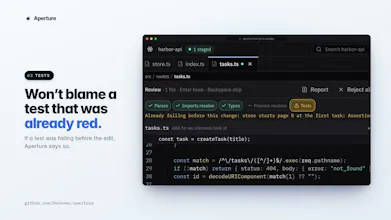
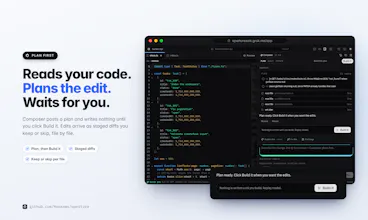
Composer reads the code, posts a plan, and waits for you to click Build it. Edits arrive as staged diffs you keep or skip file by file. Nothing touches your files until you apply. Each staged change gets five checks: it parses, its imports resolve, the types check, the preview renders, and the project's tests run. A check that couldn't run says why. It never shows as a pass. If a test was already failing before the edit, Aperture says so and doesn't blame the edit.
The tests run in a sandboxed Worker in your browser tab with no network access, so they cost nothing and take about a second. It handles node:test, Vitest and Jest. A new failure goes back to the agent once to fix.
There's also a design mode: click an element in the preview to edit its CSS or the page's theme tokens. The demo plays recorded runs. To use a real model, self-host with your own key for Grok, OpenAI, Anthropic, Gemini, DeepSeek or a custom endpoint.
It's MIT-licensed. The demo asks you to sign in before you can run a plan. It plays back recorded runs, so it costs nothing. You can also run it locally in a minute without an API key; the commands are in the README.
What I'd like to hear:
- Do the checks catch the mistakes that actually bite you? What's missing?
- Where does the in-browser test runner fall over on your projects?
- Anything that confused you in the first five minutes.
Thanks for taking a look.
@hankaws Stopping after the second miss and leaving the failed diff visible is the right boundary. One thing I would test next is verifier drift. If the agent edits after a green check, does the old result expire automatically, and is the passing command bound to the exact staged tree? That distinction matters once three background runs are producing nearby diffs.
Thanks Keesan, honestly I haven't thought this through enough yet. Right now each check runs on the staged change itself, but I haven't properly tested what happens when the agent edits after a green check, or how it holds up with three background runs making nearby diffs. How would you handle it? Should a passing result be tied to an exact snapshot of the staged files and expire on any later edit, or is there a better pattern you've seen? I'd really value your take before I build it.
Thanks Keesan, this is really helpful. Today each background run does work on its own copy of the files from when it started, so they're not sharing one working tree. I haven't built the immutable evidence snapshot you described yet, where a green check is tied to a hash of the base, the staged contents, the verifier command and config, the lockfile and the runtime. How far would you take that before it becomes too heavy for a browser-tab editor? And do you think the rebase-and-reverify step before a diff lands is the part people miss most, or is it the expiry on any later edit?
Thanks Keesan, that's a clear line to build to. Right now each background run works on its own copy of the files from when it started, and if you've changed the same lines in the meantime it stops and asks you to run it again. What's missing is your point: nothing ties a green result to those inputs yet. If you want to try it, the repo is https://github.com/Hankaws/aperture — I'd love a PR that hashes the base, the staged files, the check config and the lockfile into one verification ID, recomputed before Apply, with a rerun if it changed. Would you count the project's stage hooks as part of the verifier config, or keep them separate?
What changed in Aperture after your launch feedback
Hi all. Thanks again for the comments on launch day. I made every piece of feedback into a GitHub issue, and all seven are now closed:
- Verification id (thanks Keesan). It hashes the staged text, the base, the package.json scripts, the lockfile, .aperture/hooks.json, the hook script bodies and the verifier version. Apply recomputes it and waits if anything moved. A staged edit that only rewrites a hook's script, with hooks.json untouched, also makes Apply wait. The test is in src/lib/workspace/verify-id.test.ts.
- Vercel Sandbox: a run that would reach a host outside the registry allowlist, or put a secret in the environment, waits for approval.
- When a fix is sent back and is still red, attempt 1 is shown next to it.
- Large repos: /benchmark counts nestjs/nest (2,111 TS files) and states the limits honestly. The editor's compiler stops above 600 files. Agent Check still reads it.
- Agent Check can cache the base test result per commit (baseline: cache). Recomputing is still the default.
- A short clip of a caught failed fix.
Since then: TypeScript tools in the editor (live errors, F2 rename, references, quick fixes, refactors), agent tools that move, rename and delete files, and safer MCP handling of a project's .mcp.json.
Not built yet: the reason line that names which input moved, with its old and new hash. That's the next thing I'll build.
I'd really appreciate help with two things:
1. If you try the demo (https://aperturesais.grok.me) or run it locally, where did you get stuck?
2. What would a check need to show before you'd trust it enough to press Apply?
Code: https://github.com/Hankaws/aperture
Since launch we shipped Background Composer.
You used to wait on one Composer turn. Now hit the clock button (or Ctrl/Cmd+Shift+Enter), keep working, and open the run when it’s ready to review — up to three background runs at once. Checks still run on the result (parse, imports, real tsc, tests) before you keep anything.
Also new since launch:
Checks benchmark: how often the checks stop a bad edit before Apply — https://aperturesais.grok.me/ben... (18/18 visible mistakes stopped; 0/8 false alarms on correct edits)
Editable plans before Build, plus an agent board for every run
Real TypeScript type-check in the strip (not the light check)
Same product idea: plan first, exact lines, then checks — now it doesn’t block you while the agent works.
Try it free: https://aperturesais.grok.me
the "a check that couldn't run says why, never shows as a pass" line is the detail that'd actually make me trust this over other editors - that's exactly the kind of silent-pass failure I worry about with Claude Code when I'm not watching closely. one thing I'm curious about: the new failure goes back to the agent once to fix - what happens on the second miss? does it surface the diff to me with the failing test attached so I can see what it tried, or does it just drop the change and tell me it couldn't do it? that's the moment where I'd want maximum visibility, not a clean failure message
Thanks Gal, that's exactly the failure I was worried about too.
On the second miss it stops. No loop, no silent drop. The change stays staged as a diff with the red checks on it. Click the failing check to jump to the line, and expand the test output to see what broke. Nothing touches your files unless you keep it.
The agent also has to rate its fix. Below 0.8 confidence the fix is thrown away and the turn stops, rather than piling a shaky fix on top.
What I don't show well yet is the first attempt and the fix side by side. That's a good push, I'll look at it.