Assistly is a live meeting assistant for macOS and Windows. No bot joins your call β it works from your computer's audio and puts guidance on your screen the moment a question lands, in a private overlay that never shows in screen shares or recordings. Every speaker tracked, dozens of languages, and notes with action items after every session.
We built Assistly because we kept running into two frustrating problems with AI assistants during meetings:
First, nobody wants an awkward AI bot joining their call or sending sensitive conversations to another participant. Second, when something important comes up, you often have to stop the conversation, dig through notes or documents, and switch between different AI tools to get the context you need.
Assistly is built to help in that moment β and keep that context useful after the meeting:
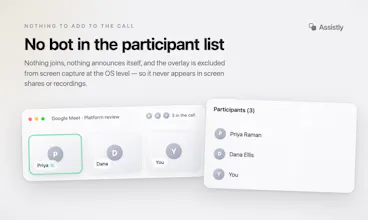
No Meeting Bots π€: Assistly captures system audio locally, so thereβs no AI bot joining your Zoom, Google Meet, or Teams call.
Real-Time Assistance β‘: Assistly detects questions and important moments as they happen and surfaces relevant context and assistance on your screen, so you can stay focused on the conversation.
Private Overlay β¨: Your Assistly workspace stays on your screen without appearing in screen shares and recordings.
MCP, Both Ways π§ : Assistly can connect to other MCP tools to pull in relevant sources and context while you work. And after your meetings, your existing AI tools can connect to Assistly through MCP to query your meetings and bring that context into your everyday workflows.
The idea is simple: Assistly understands your conversations in real time, brings in context when you need it, and makes your meeting knowledge available to the AI tools you already use.
Give Assistly a try on macOS or Windows and let us know what you think. We'd love to hear your feedback and see how you use it. π
Report
the no-bot angle is smart, most meeting assistants get blocked or flagged specifically because of the visible participant. one thing I'm not clear on though: since it's transcribing system audio locally without a bot joining, how does consent work for the other people on the call? some places require all-party consent to record a conversation even if nothing shows up as a visible participant, and "no bot" might make people assume nothing is being captured when something actually is.
@galdayan Really good callout β appreciate you pushing on this. One thing worth clarifying: assistly isn't a meeting recording tool. It's an assistant for you. It captures your meetings so you can ask it questions during or afterwards, pull out action items, and share notes with your AI or teammates.
That said, you're absolutely right that consent still matters here. Even though the output is yours, audio is being captured during a conversation other people are part of, and some jurisdictions require all-party consent regardless of who's keeping the notes. That responsibility sits with the host β we'd never claim otherwise β but it's something we take seriously and surface clearly in onboarding.
If you (or anyone in this thread) has thoughts on what that consent flow should look like, genuinely want to hear them.
@galdayanΒ Really good question. We don't store call audio, only the transcript, and that stays in your account. But you're right, consent laws apply regardless of how the tool works. We tell users to treat it like any note taking tool: if your jurisdiction or company policy requires disclosure, disclose it. The no bot design is about not disrupting the meeting, not about hiding that anything is happening.
Report
@khizeryounas nice, this is genuinely a way to solve the bot in meeting problem, I don't think this can be blocked
@warrenmoΒ Thanks Warren! Yeah, that was the whole idea. No bot joining means no waiting room approvals, no extra participant on the grid, nothing to set up. It just runs on your side of the call.
Assistly
Hey Product Hunt! π
We built Assistly because we kept running into two frustrating problems with AI assistants during meetings:
First, nobody wants an awkward AI bot joining their call or sending sensitive conversations to another participant. Second, when something important comes up, you often have to stop the conversation, dig through notes or documents, and switch between different AI tools to get the context you need.
Assistly is built to help in that moment β and keep that context useful after the meeting:
No Meeting Bots π€: Assistly captures system audio locally, so thereβs no AI bot joining your Zoom, Google Meet, or Teams call.
Real-Time Assistance β‘: Assistly detects questions and important moments as they happen and surfaces relevant context and assistance on your screen, so you can stay focused on the conversation.
Private Overlay β¨: Your Assistly workspace stays on your screen without appearing in screen shares and recordings.
MCP, Both Ways π§ : Assistly can connect to other MCP tools to pull in relevant sources and context while you work. And after your meetings, your existing AI tools can connect to Assistly through MCP to query your meetings and bring that context into your everyday workflows.
The idea is simple: Assistly understands your conversations in real time, brings in context when you need it, and makes your meeting knowledge available to the AI tools you already use.
π Get started for free: https://tryassistly.com/
Give Assistly a try on macOS or Windows and let us know what you think. We'd love to hear your feedback and see how you use it. π
the no-bot angle is smart, most meeting assistants get blocked or flagged specifically because of the visible participant. one thing I'm not clear on though: since it's transcribing system audio locally without a bot joining, how does consent work for the other people on the call? some places require all-party consent to record a conversation even if nothing shows up as a visible participant, and "no bot" might make people assume nothing is being captured when something actually is.
Assistly
Assistly
@galdayanΒ Really good question. We don't store call audio, only the transcript, and that stays in your account. But you're right, consent laws apply regardless of how the tool works. We tell users to treat it like any note taking tool: if your jurisdiction or company policy requires disclosure, disclose it. The no bot design is about not disrupting the meeting, not about hiding that anything is happening.
@khizeryounas nice, this is genuinely a way to solve the bot in meeting problem, I don't think this can be blocked
Assistly
@warrenmoΒ Thanks Warren! Yeah, that was the whole idea. No bot joining means no waiting room approvals, no extra participant on the grid, nothing to set up. It just runs on your side of the call.