Launched this week

AwaitIO
Write a TypeScript function, get an admin screen
45 followers
Write a TypeScript function, get an admin screen
45 followers
Turn async TypeScript functions into internal tools. Every await io.input shows a form in the browser and waits for the answer. Build a secure, self-hosted back office in minutes with zero frontend code and zero telemetry. Free for up to 3 users.






Free Options
Launch Team / Built With


CloudflareYour next app belongs on Cloudflare Workers. Deploy for free
Promoted
Hi Product Hunt, I'm Petr Homoky, the maker of AwaitIO.
I've been building systems and products for 15 years, and every one of them ends the same way: it needs a back office. Someone has to refund an order, extend a trial, fix a user's account.
That's why I built AwaitIO: to get your back office up and running in under 5 minutes. The UI is already done, a handful of components are ready to use, it runs on your own infrastructure, and you can add your own components as you go.
Backstory
For years I wrote my own back office solutions. Then I found Interval, and it won me over: you wrote a tool like any API handler, except it could await input from a person. Ask, await the answer, carry on. I had a back office running in no time, and every new action was a few lines. In 2023 Interval shut down.
I'd been in touch with the Interval team, gave them a lot of feedback and built my own layer on top, with Next.js-style routing and typed redirects between actions. I still had a list of things I wanted, but I didn't want to fork their repo and maintain it myself. So one day, on my way home from the office, I tried a proof of concept: everything runs in one instance, and you can replace any component with your own. It worked, and it became AwaitIO.
It isn't a fork. I wrote it from the ground up. But the core of Interval, how you call it and what it does, felt brilliant and flawless to me back then, and it still does today. So I took it as my inspiration, and that made moving my existing back offices from Interval to AwaitIO dramatically faster.
It runs on your own server and needs no database: install the package, initialize it, start your server. You own it, you run it.
How it works
AwaitIO is for TypeScript, and it's a Node app of its own. Create an AwaitIO instance, list your users, write at least one action and call listen(), just like you'd start an Express server. Every action is a plain async function. Have a look at the quickstart at docs.awaitio.com/quickstart to see how short that is.
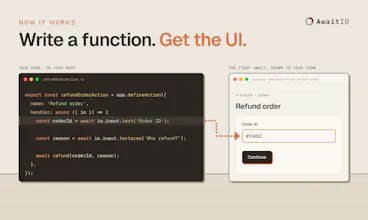
Write a function. Every await io.input.{text,number,email}() shows a form in the browser and waits for the answer.
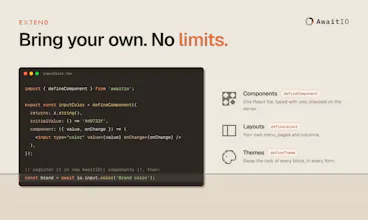
Use your own code. Call your database, ORM and services directly. Nothing to wire up.
Run it on your server. One Node process serves the UI and runs your actions. Nothing is hosted by us.
Use ready components, or your own. 20+ inputs, selects, tables, displays and a confirm. Missing one? It's one React file.
This is a whole refund screen:
And this is what your team sees when they use it:
They open your back office and click Refund order.
A page asks for the order ID. They type it and click Continue.
Your function loads the order from your database. A loader shows for a moment while it does.
The next page asks why to refund that exact amount, say $120.00. They write the reason and click Continue.
The refund is saved under their email, and they see the result: Refunded $120.00. Done.
That's the simplest example. You can put actions into folders, which become the navigation, and give a folder its own page with its own layout. One step can also ask for several things at once, say a plan and a note on the same page.
Demo
If you want to see it in action, log in to the back office of a made-up store at demo.awaitio.com. It starts as simple as the example above and grows from there: actions split into folders and subpages, and more and more complex actions. Click through whatever you like.
Link: https://demo.awaitio.com
Email: demo@awaitio.com
Password: demo
Pricing
I didn't want AwaitIO to be a SaaS, where your back office depends on me to manage your users or keep a service running. So it's source-available: the code is public, and it runs on your own servers.
It's built so a small team never hits a limit: every feature, any number of actions. The only thing that counts is how many people log in to your back office. Up to 3 users it's free, commercial use included. Larger teams pay one flat monthly price for the same software. No telemetry.
What's next
Next on the roadmap: an MCP server, so AI agents work only through actions you wrote and reviewed.
Back to today, though. What's missing for you to try AwaitIO, on your current back office or the next one you build?
I was one of the original developers of Interval + Petr was one of our earliest true believers, so I'm thrilled to see the idea live on with a fresh perspective.
I love that you've taken the time to improve on some of the things we never quite got to, like custom methods. Great name too :)
When we started AI agents weren't a thing + MCP definitely wasn't. Not sure how much you've thought about this, but I'd be curious to see this extended so that the actions can be used over MCP by an agent.
Oh, and congrats on the launch!
@alexarena Alex, this genuinely made my day, thank you. Coming from one of the people who built Interval, it means more than any upvote.
And yes, MCP is exactly where I want to take it. Agents do more and more of my day-to-day work now, and when I ask one to, say, turn on a feature flag for a specific user, I end up either giving it database access or writing a one-off script for it. With MCP, I'd just give the agent my back office token. It would get the list of actions it's allowed to run, and when I say "do X for this customer", it would call the right one on my behalf and go through it one step at a time, answering each step just like I would, until the action is done. You wouldn't even need the server's code on your machine, so people on the support team could do the same with nothing but Claude and their own token.
What I find most interesting is that those actions are pre-approved. Someone had to write them, and they went through git and code review before they were deployed. So whatever an agent runs through AwaitIO, I don't have to worry it'll touch something I didn't want it to. That feels like a much saner way to give agents access to production than handing them the database.
If you ever have thoughts on how you'd have approached it in Interval, I'm all ears. And thanks again, to you and the whole team, for the idea this whole thing stands on.
Hey Petr, congrats on the launch, it looks very promising! I am very interested in the agent integration using MCP.
@josefdolezal Thanks Josef, glad that's the part that caught your eye!
The idea is that you don't have to give an agent direct access to your database just so it can change something, like turning a feature flag on or off for a user. That's the part that would worry me: one wrong query and it updates or deletes values it shouldn't.
With AwaitIO it only gets the actions you've already written and reviewed. If you have a "Toggle feature flag" action, that's exactly what it can do, with the same validation and checks as anyone on your team.
The await io.input idea is what sold me on this — turning a normal async function into a form that pauses for an answer feels like the least ceremony I have seen for an internal tool. I especially like that it runs on my own server with no database to babysit, and the MCP direction makes sense to me: if an agent can only call actions I have already written and reviewed, that is a much safer boundary than handing it raw database access.
@jcbuilds Thanks JC! "Least ceremony" is exactly the goal. MCP isn't there yet, but it's next on my list. I'd be really glad if you gave it a try!