Base UI Sketch Framework

Huge set of everything you need to design and prototype

6 followers

Base UI is impressive Design System consist of 180 screens, supercharged with nested Nested Symbols and Predefined Text-Styles. It’s a great tool for playing around with flow and ideas, that activates design thinking like nothing else. With a Base UI Framework you access a huge arrangement of everything you need to design and prototype in Sketch.
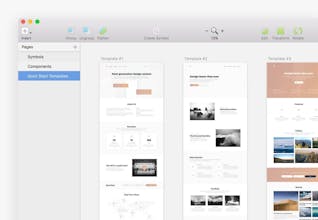
Base UI Sketch Framework gallery image
Launch Team
Tines
Tines
The intelligent workflow platform
Promoted

What do you think? …

Devin Rajaram
Simple and to the point. Nice job!
Robert Mayer
@devinrajaram Thanks man!
Csaba Kissi
Nice collection. I always prefer sketch over PS.
Robert Mayer
@csaba_kissi Thank, Csaba! Yep, Sketch is really killed Photoshop when it comes to web design, especially after features like libraries and nested symbols.
Ekaterina Kalanchuk

----

Pros:

Detailed and very well designed screens, cool symbols organization. and typography.

Cons:

None for me

Robert Mayer
Hi, Product Hunters and thanks @kwdinc for hunting! I’m Robert Mayer, creator of the Base UI Framework. Base UI is a Design System consists of 180 screens, supercharged with nested Nested Symbols and Predefined Text-Styles. It’s a great tool for playing around with flow and ideas, that activates design thinking like nothing else. With a Base UI Framework you access a huge arrangement of everything you need to design and prototype in Sketch: Custom Color and Typography setup, Headers, Content Cards, Blog Components and much more. Everything is accurately labeled and grouped, components are customisable through nested symbols. View all screens here: https://sketch.cloud/s/m1aPJ For Product Hunters, we’re offering special 30% discount code — “PHLOVE”, use it at checkout, but hurry up: there are only 50 of them :) Check the website and all details: https://getbaseui.com
Nathan Windsor
Hi Robert! I'm about to buy Base UI (awesome product man!), but what can this do with responsive layouts?
Robert Mayer
@nathanwindsor Hey Nathan! This framework does not have responsive layouts (at least for now), but you can add some responsive screens manually using the same symbols system. But don't forget that it's a toolkit for a Sketch App, not ready HTML blocks.
Nathan Windsor
@_mayerr got it, thank you for your great work. I suggest adding a section explaining how to do this on your medium post.
Robert Mayer
@nathanwindsor Yeah, actually entire “Getting started” post needs to be rewritten. Since its writing, I've launched several serious updates, definitely will do this until the end of the month. Thank you! Feel free to ping me if any questions occur.
Alex Hernandez
This color palette is quite pleasant. 🎨
Robert Mayer
@pori_alex Glad you liked it! I wanted to use the least trite colors. but the main point is that entire color scheme is super easy to customize, so it doesn't really matter which it has by default :)
Cassandra Beaulieu
Got a copy, looks great!
Robert Mayer
@cassandra_beaulieu Glad you like it :) Any feedback would be highly appreciated!
12
Next
Last