
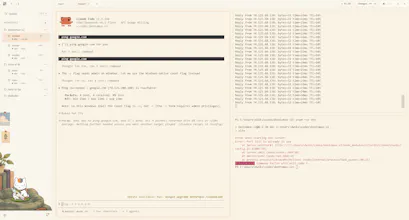
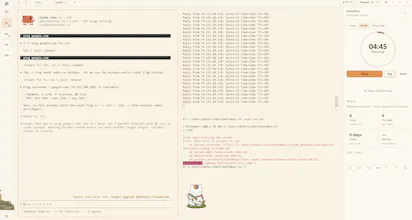
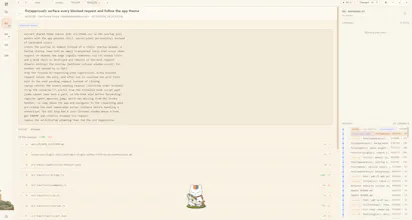
Bentomux is a calm desktop app for running coding agents side by side: project workspaces, persistent split-pane terminals, live agent state and approvals.


What's great
easy to use (1)remote access (1)calming experience (1)
As one of the developers working on Bentomux, I can honestly say the project was born out of the various frustrations I personally experienced while working with AI agents over the past year. You could say Bentomux is an application designed to make life easier for me as a developer, and I want to share that convenience with everyone. It offers features like splitting multiple panes within a single active terminal, sending notifications when an AI agent needs confirmation or has finished a task, and enabling remote access to a running terminal from a mobile phone anytime, anywhere. It truly offers a level of convenience that greatly helps developers like us as we adapt to the world of AI.
vs Alternatives
 Warp
Warp Ghostty
As one of the developers working on Bentomux, I can honestly say the project was born out of the various frustrations I personally experienced while working with AI agents over the past year. You could say Bentomux is an application designed to make life easier for me as a developer, and I want to share that convenience with everyone. It offers features like splitting multiple panes within a single active terminal, sending notifications when an AI agent needs confirmation or has finished a task, and enabling remote access to a running terminal from a mobile phone anytime, anywhere. It truly offers a level of convenience that greatly helps developers like us as we adapt to the world of AI.
Ratings
Ease of use
Reliability
Value for money
Customization
Report
15 views
Congratulations on the launch. I think the problem you describe is definitely real and one I feel. Have you considered setting default bindings to match Ghostty? Cmd+D to split etc are pretty much hardcoded in my brain at this point and learning new ones is a blocker to giving it a serious try.
Hii @simon_moxon , Good catch, and thanks for pushing on it you're right that this matters more than it sounds.
Straight answer: I've rebound Cmd+D → split on my own setup, but
that's a personal setting, not what a fresh install gets the shipped
default is still Cmd+\ / Cmd+Shift+. So your muscle memory would still
break on first launch. Fair.
I checked Ghostty's real defaults (Cmd+D split right, Cmd+Shift+D
split down), so a "Ghostty preset" is the right fix rather than making
people rebind five things by hand. Two honest caveats before I promise
it: Bentomux currently uses Cmd+Alt+arrows for splitting left/up where
Ghostty uses them for moving focus, and Cmd+[ / Cmd+] for history
where Ghostty uses them for previous/next split so a real preset has
to decide who wins, and it needs a couple of new "focus pane" actions
that don't exist yet.
It's on the list. Which bindings beyond Cmd+D would make or break it
for you?
@farasjibran The splits were what I first noticed, but yes moving focussed is pretty much muscle memory at this point too. I wonder if you could have a Ghostty config, an iterm config etc that users could pick based on where they are coming from. I think (for what it's worth) this will be the biggest barrier to adoption.
@simon_moxon Yeah, I think you're right. The bigger issue isn't only Cmd+D, but the muscle memory users already have from their current terminal.
A Ghostty config, iTerm2 config, etc. makes sense. Users should be able to choose where they're coming from and get the same split, pane navigation, and other keybindings without having to rebind everything manually.
Then they can customize from there if needed.
This is probably a bigger adoption barrier than I initially thought, so I'm moving it higher on the list.
"live agent state and approvals" is the thing that actually matters once you're past 2-3 panes. I run several claude code sessions in parallel and the failure mode isn't losing track of terminals, it's missing a permission prompt sitting in a pane I'm not currently looking at while I'm heads-down in another one. does bentomux surface that across panes somehow (a badge, a sound, something that pulls your eye) or is it still on you to tab through and notice a session has been sitting there waiting on an approval
Hii @galdayan , thank you for the comment. i will help you to answer this. So this is exactly the failure mode it's built around, so short version: it's not on you to tab through.
When a permission prompt arrives:
- A floating pill appears on top of whatever you're doing and
deliberately does not steal focus from your foreground app.
- It plays a distinct two-tone chime for a blocked request (a
different one when a session finishes).
- The pill has a Jump button that brings Bentomux forward and lands
you on the exact pane waiting for approval.
- Each pane has a status dot in the sidebar (blocked / working /
idle), and collapsed workspaces show their loudest state on the rail
so you can see something's waiting without opening the folder.
One deliberate detail: if you're already looking at that pane's tab,
it stays quiet instead of popping a pill over your own terminal with
chatty agents that just turned into spam.
Honest caveats: this leans on Bentomux's managed hooks, so it's a
one-time install (Settings › Notifications › Install hooks) that wires
Claude Code's PermissionRequest into the bridge. Today that's Claude
Code if you're running other CLIs in parallel, tell me which and
I'll look at what it'd take.