
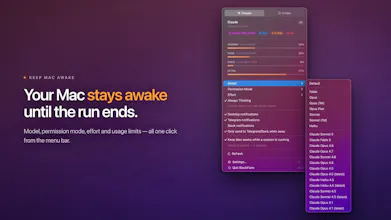
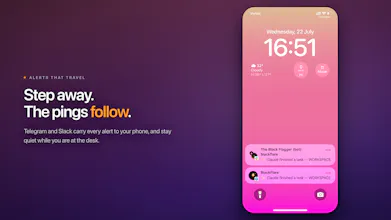
BlackFlare - a native macOS menu bar app for Claude Code and Codex. Keep your Mac awake during long runs, get notified when a session finishes or needs you, switch your defaults from the menu, and watch plan usage — all on-device.




What's great
Been running long Claude Code sessions overnight and it's genuinely nice not having to ssh back in every hour just to check if something finished or is stuck waiting on approval. The menu bar presence is unobtrusive and the notifications actually tell you something useful instead of just pinging you for no reason.
What needs improvement
The Codex side is coarser than the Claude Code side right now (approval-waiting and turn-complete both show as 'needs you'), and the away-detection timing isn't configurable yet. Both were already flagged in the comments though, so it sounds like it's on the roadmap.
vs Alternatives
Looked at just leaving Terminal open and setting caffeinate manually, but that gives you zero visibility into whether the agent is actually done or just paused waiting on you - you still have to go check.
Ratings
Ease of use
Reliability
Value for money
Customization
Report
7 views
The problem this solves is real — I have lost track of how many times I gave Claude Code a task, wandered off, and came back to find it had finished twenty minutes ago and was just sitting there. The notification routing to Telegram is the part I would actually use most. The thing I want to know upfront is how it distinguishes a session that is truly finished from one that is paused mid-task waiting on input — whether that is coming from parsing terminal output or from the agent explicitly reporting a terminal state, since those two behave very differently when something goes sideways halfway through.
@leo404 Thanks so much — and great question, it's exactly the difference that matters 🙂
Everything comes from the agent's own reported state. BlackFlare installs the proper hooks and quietly tracks your Claude/Codex sessions, so at any moment it knows which sessions are working, which are paused waiting on you, and which have actually wrapped up. Thinking, or a command that takes ten minutes, is just "working" — silence, no false alarm.
Worth being upfront about one limit: that separation is currently sharpest on Claude Code, which reports both states explicitly. For Codex, BlackFlare reads its session files today, and those capture turn completions but not approval prompts — so both land as "this session needs you." A bit coarser, though it fails in the safe direction: you still get pulled back at the moment it counts. Sharpening that is already on my list 🙂
Hooks over output parsing is the right call — session state is much more reliable than trying to interpret stdout. The Codex gap makes sense as an interim: failing safely toward "this session needs you" is exactly the right behavior when you cannot fully distinguish paused-for-input from completed. Curious what sharpening that looks like in practice — is there an API or session file format Codex could expose to make approval state explicit, or is this waiting on something from the Codex side?
@ark_y_k Thanks so much — and great question 🙂
Everything comes from the agent's own reported state. BlackFlare installs the proper hooks and quietly tracks your Claude/Codex sessions, so at any moment it knows which sessions are working, which are paused waiting on you, and which have actually wrapped up. Thinking, or a command that takes ten minutes, is just "working" — silence, no false alarm.
Worth being upfront about one limit: that separation is currently sharpest on Claude Code, which reports both states explicitly — waiting for your input and task finished. For Codex, BlackFlare reads its session files today, and those capture turn completions but not approval prompts — so both land as "this session needs you." A bit coarser, though it fails in the safe direction: you still get pulled back at the moment it counts. Sharpening that is already on my list 🙂
@theblackflagger Hooks over process-watching is the right call, and being upfront about the Codex gap rather than letting people discover it is worth more than the feature itself. "Fails in the safe direction" is the correct standard for that one — being pulled back unnecessarily costs a minute, missing an approval prompt costs the whole run.
Which is why the other default caught my eye. Silence means working, and that's right almost always — but it's also the one place where the failure direction flips. A session that died badly emits nothing, and nothing is indistinguishable from a ten-minute command. So the coarse case fails safe and the quiet case fails toward me sitting there with the Mac awake, waiting on something that ended twenty minutes ago.
Is there a ceiling on that anywhere — a point where continued silence gets flagged as "unknown" rather than "working"? Even a crude one would do, since the states don't have to be right, they just have to be honest about when they've stopped being sure.
the backup-before-edit habit is good practice, curious about the concurrent case though. if you've got two sessions running that both trigger a default change around the same time, is there any locking on the config file, or is it last write wins? menu bar tools like this tend to get used with multiple terminals open at once, so it seems like the kind of race that'd only show up occasionally and be genuinely confusing when it did
@raffay_sajjad You're right, and it's the boring answer: no lock, last one wins.
BlackFlare only writes when you click something in the menu, one at a time, so it can't trip over itself. The other writer is Claude Code editing settings.json on its own.
The file can't break — I rewrite only the setting you changed, check it still parses, then save a fresh copy and swap it in. There's a backup too. But if something else saves in the split second between me reading and me saving, that change gets undone. The menu re-reads right after, so you always see what's really on disk.
A lock only works if both sides take one. Easier fix: check the file again right before saving, and redo the edit if it moved. Putting that in.
@theblackflagger Rechecking right before the save closes most of the window, and building real locking for two writers that almost never overlap would be over-engineering it. The one case that survives: Claude Code writing in that gap between your recheck and the actual save, since that just moves the race one step later instead of closing it. Given how tight that window already is though, probably not worth chasing further.
the part that gives me pause isn't the notification logic, that seems well thought through in the replies above. it's that this edits config files directly, model, permission mode, effort, based on reading session state that Anthropic and OpenAI don't publish as a stable format. what happens the next time either of them changes how that session data is structured? does BlackFlare fail loud (stops editing, tells you it's out of date) or is there a risk it writes back a config edit based on a state it misread? backups before edits helps with the second case, but only if you notice something's off before you're relying on the wrong model or permission mode mid-run.
@galdayan Fair question. Those are two separate parts of BlackFlare, and they never talk to each other.
The part that reads your session files is the one with no stable format — you're right that nobody promises one. It watches Claude Code's .jsonl files and Codex's rollout files, and it's built to shrug off surprises: fields it doesn't recognize get ignored, and a line it can't read gets skipped. So if either of them changes that format tomorrow, what you lose is a notification. That part never writes anything.
The part that edits config is separate. It only touches ~/.claude/settings.json and ~/.codex/config.toml — your normal config files, not session data — and it only writes when you click a model or a permission mode in the menu. Nothing it reads from a session ever turns into a config change. For the case you're describing, the reader would have to feed the writer, and there's no path between them.
The writing itself is careful too. If your config file doesn't parse, it stops and tells you instead of writing. When it does write, it changes that one setting and leaves the rest of the file exactly as you had it — same formatting, same order, nothing reshuffled. Then it reads the result back and checks your setting actually landed where it should. If it didn't, the write is cancelled. Anything that goes wrong shows up as an alert. The .bak is the last safety net, not the first.
Where format drift does bite: if a new permission mode ships that BlackFlare hasn't heard of, the menu just won't show it as selected. Looks wrong, doesn't write wrong. That one's a version bump.
This solves a surprisingly real coding-agent problem :) I've definitely started long Codex runs, walked away, then returned much later only to find the session finished quickly or had been waiting on one tiny approval the whole time. Keeping the Mac awake, sending remote notifications, and showing plan usage from the menu bar feels like exactly the lightweight companion these tools need, without becoming another agent platform. Curious how reliably BlackFlare detects when an agent is genuinely stuck versus simply thinking or running a long command.
@andrasczeizel Thanks — that's exactly the gap I kept falling into myself 🙂
Fair question — and the honest answer is that BlackFlare never guesses.
Under the hood it installs the proper hooks and quietly tracks your Claude/Codex sessions, so at any moment it knows which sessions are working, which are waiting on you, and which just finished. Thinking and long-running commands are simply "working" — no ping, no false alarm.
One nuance worth being upfront about: telling waiting for input apart from finished is currently precise on Claude Code, which exposes both as distinct events. For Codex, BlackFlare reads its session files today, and those record turn completions but not approval prompts — so both cases surface as "this session needs you." Slightly less granular, but it errs on the safe side: you still get pulled back at the right moment, which is the part that actually matters. Making this more precise is already on my list 🙂
Nice one, already got it. Quick question though - how does "away" detection work?
@mlitwiniuk Thanks so much for picking it up — really appreciate the support!
"Away" = your screen is locked, or you haven't touched the keyboard/mouse for 2 minutes. That's it — just the macOS lock state and system idle timer, checked right when a notification is about to fire.
The 2 minutes is a default for now — I'm planning to make it configurable in a future update so you can tune it to your own rhythm.
@theblackflagger Perfect, thanks. This answers my question. I found it initially too loud (specifically when using Telegram integration), but now it's doing its job. Thanks. And congrats on the launch!
@mlitwiniuk Thank you so much!
Also, I just shipped a new version — you can grab it via Check for Updates in the app menu for the best experience.
Thanks again, and cheers! 🎉
@mlitwiniuk Good news — this is live in 1.0.1! You can now pick your own away time: Settings → Delivery → "Consider me away after", anywhere from 1 to 30 minutes. Locking your screen still counts as away right away. Just open the BlackFlare menu and click "Check for Updates…" — it updates itself in a few seconds. Thanks for asking for it 🙏