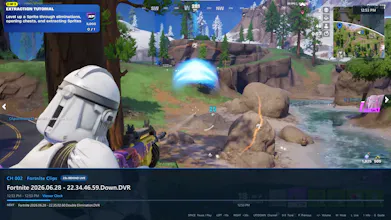
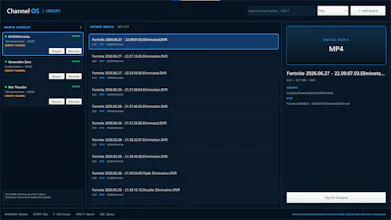
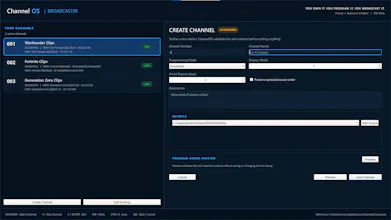
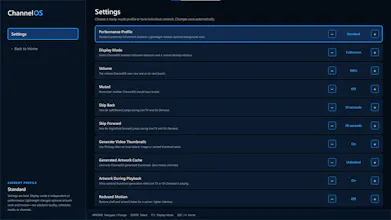
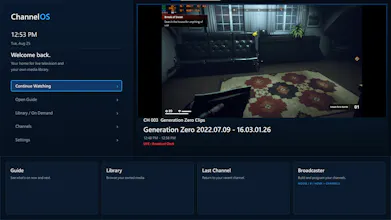
ChannelOS is a local-first Windows TV system that turns media you already own into persistent, programmable channels. Build your own stations, give them schedules, browse a live cable-style TV Guide, watch On Demand, and switch channels from a couch-friendly interface. No account, cloud service, or media upload required. The current alpha is free and open source under MPL-2.0.
Hey! I’m the guy who made ChannelOS. xD
It mostly exists because I got tired of the fact that I could own an entire library of movies, shows, and recordings, but actually watching them still meant digging through folders and choosing individual files.
I missed the feeling of television turning it on, seeing what’s already playing, flipping through channels, finding something halfway through, and just watching it.
So I kept coming back to one question:
If I own the media, why can’t I also own the television network?
That became ChannelOS.
The current Windows alpha lets you point it at media you already own, build persistent channels, give them schedules, browse a TV Guide, channel surf, and use the same library for On Demand playback.
It’s still early, and that’s part of why I’m putting it out now. If you try it and something breaks, feels awkward, or makes you think “why the hell doesn’t it do this?” I genuinely want to hear it.
Thanks to anyone willing to give this weird little television project a shot. :)
@yelyzaveta_kibets Right now ChannelOS doesn’t transcode files on the fly. It runs on the Windows PC and uses libVLC to decode the media locally, so if the PC is connected to your TV, the TV itself doesn’t need to support the original format if VLC can play it on the PC, ChannelOS generally can too. Direct streaming to another device with automatic transcoding isn’t in the current alpha, but that is one reason I’m exploring an optional Jellyfin backend. :)
@yelyzaveta_kibets Exactly! ChannelOS uses libVLC the playback engine behind VLC directly inside ChannelOS. You don’t have to open or control VLC separately; ChannelOS provides the channels, Guide, and interface while libVLC handles decoding the media underneath. :)
@yelyzaveta_kibets It also doesn’t run every channel’s video at once. ChannelOS uses the schedules and current time to calculate what should be airing and the exact playback position, then only loads the channel you actually tune to so it stays lightweight even with many channels. :)
ChannelOS
Softorino 💻📲
Half my local library is in formats my TV refuses, so I convert a lot. Does it transcode on the fly or does the file need to be right already?
ChannelOS
@yelyzaveta_kibets Right now ChannelOS doesn’t transcode files on the fly. It runs on the Windows PC and uses libVLC to decode the media locally, so if the PC is connected to your TV, the TV itself doesn’t need to support the original format if VLC can play it on the PC, ChannelOS generally can too. Direct streaming to another device with automatic transcoding isn’t in the current alpha, but that is one reason I’m exploring an optional Jellyfin backend. :)
Softorino 💻📲
@captainkoopa42 So the PC does the decoding and the TV only gets a picture. That covers my case, since VLC opens everything I have anyway.
ChannelOS
@yelyzaveta_kibets Exactly! ChannelOS uses libVLC the playback engine behind VLC directly inside ChannelOS. You don’t have to open or control VLC separately; ChannelOS provides the channels, Guide, and interface while libVLC handles decoding the media underneath. :)
ChannelOS
@yelyzaveta_kibets It also doesn’t run every channel’s video at once. ChannelOS uses the schedules and current time to calculate what should be airing and the exact playback position, then only loads the channel you actually tune to so it stays lightweight even with many channels. :)