
Claire Mail
Email, calendar and reminders, in one fast app
50 followers
Email, calendar and reminders, in one fast app
50 followers
Claire brings Gmail, Google Calendar and Apple Reminders together for Mac and iPhone, with AI that triages your inbox, writes your daily brief and preps your meetings.






Launch Team / Built With


Build your Framer site from Claude, Codex or CursorYour AI agent builds it. You review before it goes live.
Promoted
Hi Product Hunt,
Claire Mail brings Gmail, Google Calendar and Apple Reminders together in one app for Mac and iPhone.
We built it because mail, meetings and to-dos lived in three apps, and it was easy to miss the reply you owed or the meeting you needed to prepare for.
What’s in it:
Today: mail, meetings, reminders and weather together, plus a short brief every morning
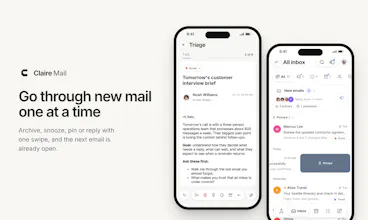
Triage: go through new mail one at a time. Archive, snooze, pin or reply with one swipe, and the next email is already open
Sort like Gmail: Primary, Updates, Promotions, Social and Forums, or Claire’s Primary, Other and Newsletter
Your Apple Reminders, with Triage: mark it done, snooze it, skip it or delete it, card by card
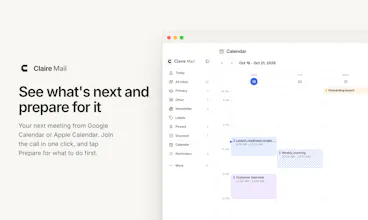
Your next meeting from Google Calendar or Apple Calendar, with Prepare for what to do first
Ask Claire about any email: key points, a next step and help with your reply
Your mail stays in Gmail. AI is optional: Apple Intelligence runs on the device with no key, or use your own key. Ask Claire suggests a step and waits for you to tap it.
It’s free during beta. The Mac app is a notarized download, and the iPhone app is on TestFlight.
What would keep you from switching from your current mail app? That’s the feedback we need most.
A week after launch, thank you for all the feedback here. A lot of it is already in Claire: Triage opens a whole conversation, you can act on one email inside a thread, a floating composer on Mac, quick reminders with #list and !!, signatures per account, Translate on iPhone and the Frame theme.
Next up is what you asked for most: actions in notifications and one inbox for all your accounts. Which would you want first?
Everything that changed: https://clairemail.app/releases
To answer your question: for me it's send-as aliases. I send from 3 different support addresses through one Gmail, so if Claire handles the From picker properly I'd give it a real try. Also curious how Ask Claire handles long threads with Apple Intelligence, the on-device model has a pretty small context window (about 4k tokens) and we had to trim a lot to make it fit in our own app.
@adriatic_dev Thanks, that’s useful. Send-as aliases work: the From picker shows all your verified addresses. One catch: replies start from your default address, not the one the email was sent to, so for now you’d switch it by hand. That’s next on my list.
On Apple Intelligence: yes, the window is small. Claire trims the thread before it goes in: it drops quoted replies, shortens very long messages, and keeps the most recent messages first. If a thread is still too long, Claire can hand it to a cloud model when you’ve added a key; otherwise it tells you. Curious how you handled trimming in your app.
What will it cost once the beta is over?
@mouadbenrahou Thanks for asking. I'm still working on the pricing to ensure it's fair for everyone. I'm currently focused on building something that covers most of the features people are looking for. Once it becomes an essential tool that everyone enjoys using on a daily basis, pricing becomes a natural next step. Early adopters who help shape the product will also have special treatment :) Let me know if you have any other feedback. Thanks!
I've tried every "email and calendar in one" app and gone back to Gmail every time, so convince me :) Does it work with Google Workspace?
@jean_bonnenfant_tinct Ha, same here. That's exactly why we built it. I tried every email client under the sun, and they always fell short, so I kept going back to Gmail too, then Apple Mail, then Gmail again..
Yes, it works with Google Workspace, and with several accounts side by side. It talks to Gmail directly, so your labels, categories and filters stay as they are, and nothing needs migrating.
What made you go back each time? That's the bar I want Claire to clear. We're focusing on bringing in a chaotic information overload.
are you saying i can uninstall gmail, mail, calendar, google calendar, and the reminder app?
@tamilselvi_ramasamy2 That's right :) And it all works seamlessly. Claire was built to help you get through your busy day without having to scroll endlessly. Check out the triage feature for mail and reminders. Thanks for giving it a try!
Giving email and reminders the same card-by-card treatment makes sense. It turns clearing the daily list into a series of small decisions.