
CrabTalk
The agent daemon that hides nothing. 5MB. Open Source
265 followers
The agent daemon that hides nothing. 5MB. Open Source
265 followers
A 5 MB daemon that streams every agent event to your client — text deltas, tool calls, thinking steps, all of it. Connect what you need, skip what you don't. One curl to install. Bring your own model.

CrabTalk
I write systems software. I looked at OpenClaw — 1.2 GB. Hermes — 40+ bundled tools. Why does your agent ship someone else's choices?
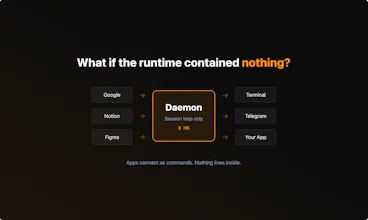
CrabTalk is a daemon. 8 MB. You put what you need on your PATH — your search, your gateway, your tools. They connect as components. They crash alone. They swap without restarts.
You could build any of those apps on top of CrabTalk. You can't build a CrabTalk underneath them.
Open source. Rust. One curl to install.
@clearloop What's a real-world workflow where CrabTalk's 8MB modularity saved you time vs. bloated agents like OpenClaw?
CrabTalk
@swati_paliwal
CrabTalk is Rust. One binary, 8MB, no dependencies to install. It's running before your prompt returns, why it stays that small: native I/O, minimal allocation, no GC.
For the real-world cases, let's just talk on JSON, JSON encoding and decoding are extremely important in LLM-based applications — often one of the most critical reliability bottlenecks in production systems.
Every agent request is JSON in, JSON out — over a few hundred requests, Rust's serde spends seconds where a Node.js runtime spends minutes on encoding alone. ~8MB resident, no runtime heap bloat, no OOM at 3am.
When you're running always-on agents in production, that predictability is the difference between infrastructure and babysitting:
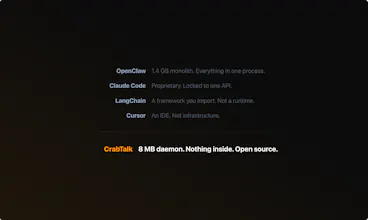
OpenClaw is a personal AI assistant — 20+ channels, massive ecosystem, great for that.
CrabTalk is production agent infrastructure.
DMs open if you want to dig in.
Amazing product, @clearloop. Congratulations on the launch! The 8MB size and hide nothing promise is refreshing.
I think caught my attention on your page.
Your homepage says “Other apps decide what your agent should be.” Then it lists features like your search, your gateway, your tools, Skills & MCP, light memory, and Cargo-style commands.
That part is clear.
But the real story is that CrabTalk is a foundation... not a finished product. A person who visits your page sees daemon and 8MB, but does not clearly understand what they can build with it. The examples are missing.
No section that shows “Here’s what people are building on top of CrabTalk.” No use cases like this: You can build a search agent, a dev tool, or a monitoring bot. Only the concept is shown.
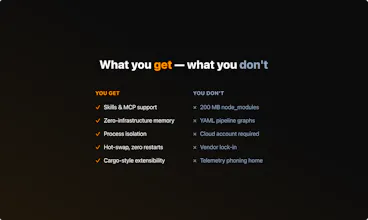
The “What you get. What you don’t” section is superb. But the DON'T list is mostly negative things. It says what you avoid (no 1GB, no 40+ tools, no vendor lock-in, etc.).
A developer knows what they are not getting, but not what they are gaining.
Noticed a couple more small things that could make the messaging clearer.
Just sharing my honest feedback with you. Attaching a screenshot with you:
CrabTalk
@taimur_haider1 This feedback hit home — you saw the exact problem I'd been struggling with.
CrabTalk is a foundation, not a finished product. I knew that, but the page wasn't saying it. You articulated what I couldn't: the concept was there, the examples were missing. A developer saw "daemon" and "5 MB" but had no idea what to build with it.
We reworked the entire page based on your comment:
Killed the negative messaging. The page now shows what the daemon gives you: event streams, persistent sessions, multi-agent delegation, cron, and a plugin hub.
Added "Build your own client" — a tree diagram showing Telegram, REPL, Desktop, and a "Yours" node that links to our build-a-client tutorial.
The story is now what you described: CrabTalk is the daemon. You build the client!
We're also working on a desktop client right now — the first full application built on the daemon. That should fill the gap you identified: a concrete, visible product that shows what the foundation enables, not just the foundation itself.
It's rare to get feedback from someone who's genuinely standing in the our shoes. This made the product better. Thank you!
(And it's now 5 MB!)
The daemon architecture with Unix Domain Sockets and TCP layers is a solid choice for low-latency IPC, but how does CrabTalk handle backpressure when a slow client can't consume the event stream fast enough? Also, with hot reload support mentioned in the layering, does config reload guarantee session continuity for long-running agent tasks or does it force a reconnect?
CrabTalk
@gheram Good questions — both hit real design decisions.
Backpressure: Honest answer — we don't have application-level backpressure today. Each client connection gets an unbounded channel, and we rely on TCP's kernel-level flow control (socket buffer fills → write blocks → producer slows down). If a client stalls completely, memory accumulates in the per-connection queue until the connection breaks.
For local UDS connections this hasn't been a problem in practice — the bottleneck is always the LLM API, not the client.
But for remote TCP clients over slow links, this is a gap. We should probably cap the per-connection channel and drop or error when it fills. Just created issue Bound per-connection client channels to handle backpressure to track it!
Hot reload and session continuity: Sessions survive reload.
The daemon stores the runtime behind a smart pointer — in-flight streams hold a clone of the inner Arc and finish uninterrupted. On reload, we build a fresh runtime (re-read config, re-init MCP connections, reload memory), then atomically transfer all sessions via pointer copy, not a deep clone. Client connections stay open, session IDs are preserved, conversation history carries over.
The one caveat: if you remove an agent from config during reload, sessions referencing that agent will error on the next message. The session data is still there (on disk too), it just can't run until the agent is re-added.
streaming thinking steps alongside tool calls in one feed is what almost nothing does by default. curious what happens with concurrent tool calls - does the stream stay coherent? also 8MB is impressive, what's the runtime?
CrabTalk
@mykola_kondratiuk Valuable questions 🦀
1. Concurrent tool calls
An updated version is exactly in my TODOs, see crabtalk#90, there are mainly 2 cases about this:
agent request batch tool calls — LLM APIs natively support multiple tool calls in response, we simply spawn a future to `join_all` for performing the concurrency execution
agent spawn multiple agents doing M x N tool calls, this is recursive case of above, since we delegate agent is a tool call in our design, this case is natively supported as well
2. What's the runtime
This question is direct and also very challengeable!
To be specific, CrabTalk is a daemon (you can imagine it's a pg service or a `dockerd`), we have the TUI client and people can develop any client of it based on our base protocol
For the runtime, referenced from the layering
it's somewhere we babysitting the agent standard stuffs (e.g. tools, MCP, skills)
plus a super light memory based on fs and BM25 (yes, the memory can be swapped by your customized memory).
And if we count on the daemon stuffs, we'll have context isolation, cron jobs, event loop, protocol configs.
For the size, if we kick out the TUI, the runtime + daemon may have just 2~3 MB, and the http related stuffs for model API and related MCP implementations are taking the most of the size
good to know it's tracked - following the issue. appreciate the transparency on what's roadmapped, makes it easier to evaluate whether to adopt early.
CrabTalk
@mykola_kondratiuk Thanks for the feedback!
btw, CrabTalk is actually managed with the RFC-like process, see the book!
RFC issue -> implementation -> Stabilized into the book
The daemon will stay as it is, what we'll do will be just optimizing the performance, stability and security of it, repeat.
Beyond the daemon, there will be frequently used components developed inside the repo as well which could be easy installed via `crabtalk <xxx>`, the cargo style solution, also, soon we'll have our desktop version released!
that RFC process is underrated for small open source projects. keeps the scope creep out and gives contributors a clear path in.
This is interesting.
Feels like most agent tools focus on capability, but not visibility.
Curious how you handle debugging in real workflows.
When something goes wrong, can you actually trace what happened step by step, or is it still mostly inferred?
CrabTalk
@bigcat_aroido Great question — and yeah, "what actually happened?" is the hard part most tools skip over!
CrabTalk gives you two levels of visibility:
crabtalk logs -f — tails the daemon logs in real time. You see exactly what the system is doing under the hood: connections, errors, state changes. Classic debugging
crabtalk --events — this is the one that matters for agent workflows. It streams structured events as the agent runs — toolcalls, responses, decisions — so you can trace the full chain of what happened and why.
It's not inferred. It's observed. More on the event system here: https://www.crabtalk.ai/docs/crabtalk/events
@clearloop That distinction — “observed vs inferred” — is actually huge.
Most of the agent setups I’ve worked with still rely on reconstructing what happened after the fact, which breaks down fast as workflows get more complex.
Having a real event stream feels closer to how we treat logs/metrics in backend systems.
Curious — have you seen people build higher-level abstractions on top of these events yet?
Like debugging UIs or replay systems?
CrabTalk
@bigcat_aroido Yeah — observed vs inferred is the core distinction. We stream structured events as they happen: tool calls with arguments, results with duration, thinking deltas, completion with token usage. The daemon's event bus makes this a first-class primitive — events aren't just for debugging, they're how agents trigger other agents.
For higher-level abstractions — we have command `crabtalk --events` which gives you the live console view (which agent is running, what tools it's calling, when it finishes). That's the debugging UI today.
Replay is interesting and something we're actively looking at. Our conversation files are append-only JSONL with every message, tool call, and compaction marker. We're working on persisting the full structured event trace alongside conversations — that would give you complete replay with timing, tool durations, token costs, and the full agent-to-agent trigger chain. Basically event sourcing for agent workflows.
The event bus opens up more: since agent completions are routable events, you could build a dashboard that shows the full execution graph across agents in real time. Closer to distributed tracing (think Jaeger for agents) than traditional chat debugging.
If this is something you'd use, let us know — happy to prioritize it
jared.so
How does CrabTalk handle concurrent tool calls when multiple agents spawn at the same time? The 8MB footprint with native Rust performance is seriously impressive, congrats!
CrabTalk
@mcarmonas Thanks! Short answer: when the model returns N tool calls in one response, they run concurrently via rust tokio. Results come back per-tool, appended in original order. No queuing, no serialization bottleneck.
The key difference from most agent frameworks: CrabTalk runs everything in a single daemon process. Parallel delegate calls (agent-to-agent) are just concurrent in-process executions — no process spawning, no IPC. Three agents running at once are three async tasks in the same runtime, not three separate processes.
For multi-agent safety, we have a whitelist-based scoping system enforced at dispatch time — a sub-agent can only access tools, skills, and MCP servers explicitly granted to it. Even if the LLM ignores its prompt constraints, the runtime rejects unauthorized calls.
Concurrent dispatch is tracked in #90 and tool approval policies in #13 — both open, feedback welcome (I can speed up the development of these if you need them!)
And yeah — Rust makes the 5MB thing almost boring. No runtime, no GC, just the binary. Appreciate it!
This looks super cool! One concern is token usage. I assume this only works with API keys rather than subscriptions?
Do you have any guardrails or mitigations to keep the token costs in check?
I was hoping to run this on a cheap VPS that doesn't have a GPU.