

day1tabs
Your tabs close at midnight.See which ones you actually used
112 followers
Your tabs close at midnight.See which ones you actually used
112 followers
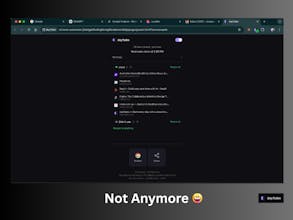
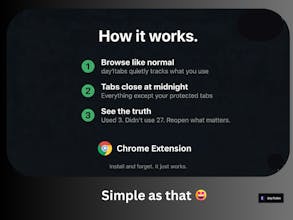
You have too many tabs open. You'll never go back to most of them. day1tabs closes your tabs at midnight and shows you which ones you actually used — sorted into "Used" and "Didn't use." Reopen what matters. Let the rest go. → Never-close domains stay open (Gmail, Docs, Salesforce) → Pinned tabs and active tab always protected → Everything recoverable until next auto-close Zero data collection. Everything local. Free forever. Built by a solo dev with too many tabs and not enough discipline.




day1tabs
Krisp
@aalabs yeah I am also a victim of 30+ tabs :)
Some of them are open to read later. Most of the times I don't go back :) but the hope, the hope is still there
day1tabs
@asti_pili ha ha.. you are not alone... we are a community :) and I just built something to help ourselves!
I'm a bit of an "a-type" personality, so my tab hygiene is pretty clean, but I can definitely see how this could be useful for a ton of folks I screenshare with and notice the spiderweb mess of tabs they have open. How do they even live like that?!
Curious if you have any plans for the next version of the extension?
day1tabs
@dkofoed
Ha! You're the person everyone wishes they could be.
The rest of us need day1tabs to do what you do naturally.
For what's next — the biggest thing I'm hearing is
the fear of "will I lose something?" That anxiety
haunts people even though 90% of their tabs are noise.
So I'm working on smart filtering (more AIing the product): instead of closing
everything, only close tabs you didn't use and keep
the ones you did. That way even the messiest hoarder
gets a clean browser without the fear.
And if you know anyone living in that spiderweb mess —
send them our way 😄
day1tabs
As a bit of a messy person when it comes to opened tabs, I find it interesting, however, some of them I keep open to use as reminders. that I will check in the upcoming hours or days. I think that we should be able to sort of manually edit or ask for specific pages not to be closed, for example when you started a draft but did not finish it(did not press on save), on a website that you do not use daily. Would I lose that "draft"?
day1tabs
@viktorgems
Great question Victor — and totally valid concern!
It's not as bad as what you are imagining, the good news is there are actually multiple safety nets built in 😊
Never-close domain — just add the domain once (e.g. notion.so) and day1tabs will never touch it, even tabs you rarely visit
Pin it — Chrome pinned tabs are always protected, midnight or not (this takes precedence over my extension settings)
Reopen everything — even if it closes, one click in the panel restores everything back exactly as it was — within 24 hours those tabs are never truly gone
Morning recap — day1tabs opens automatically every morning showing exactly what was closed the night before (so this will be the first thing you will see every morning), so as long as you catch it within before scheduled run you're completely safe 🙌
Chrome history — worst case of all, it'll always be there in history
day1tabs isn't a tab organiser — it's a declutterer (if that's even a word ;))
It's a small behaviour shift but once it clicks, you'll notice Chrome stops grinding, your machine feels faster, and most importantly you start each day fresh.
I ran a beta with 20 testers before launch and retention was 90%+ — most people hit the same fear you described in week 1, then never looked back. I use it myself every day.
The tab-as-reminder idea is genuinely noted though — added to the backlog to think through. Thanks for the thoughtful feedback! 🙏 and looking forward to your feedback after few days of usage, we built it for users like yourself, and if you still think I have to add something, please let me know.
Nice idea, the morning summary sounds like the most interesting part. If a tab gets closed but I suddenly need it later, is there an easy way to restore it from previous days?
day1tabs
@vik_sh
Yes!
Hit 'Reopen Everything' and you're back to yesterday's state instantly — or
pick individual tabs from reopen just what you need 🙌
short demo 👉 [here]
As a solo founder building a desktop app, I constantly find myself buried in dozens of research tabs. Day1Tabs looks like a breath of fresh air for clearing that mental clutter! I especially love the 'Day 1' concept. Do you have plans to add a search or tagging feature within the saved tabs for even faster access later? Great launch!
day1tabs
@aalabs I really admire that you're staying deliberate with the product philosophy—sometimes 'less is more' is exactly what we need for deep work. As a solo builder currently in a pre-launch sprint for my own project on March 24th, I truly value that focus! I've bookmarked Day1Tabs for my post-launch sessions. Cheers to a successful launch!
day1tabs
@linapok Thank you!
I had a look at this product - will use it too - Don't forget to tag me on your launch! All the best!
@aalabs That means a lot coming from you! I’m so glad you resonate with Gridance Studio. I will absolutely tag you on March 24th—having a fellow maker’s support really boosts my confidence! Wishing you massive success with Day1Tabs until then. Let’s keep in touch!
Hey @aalabs congrats on the launch! This is a super useful extension 🚀 and I've already gone and added it to Chrome! Thank you for making it free, but honestly I would pay for something like this. Maybe not recurring haha but definitely as a one-time purchase.
One thing I would recommend is in the daily summary, is there a way to see how many times you visited a tab within a day? I could see on the video, you define what's popular by usage but would it be good to also see how many times a tab was visited or if it was re-visited a number of times each day?
day1tabs
@minhajulll Thank you for installing — that means a lot! 🚀 And noted on the one-time purchase, good to know (Please remember you can still buy me a coffee ;) )
The visit count idea is genuinely interesting — right now it's binary (used/didn't use) but tracking frequency within a day is a natural next step. Adding it to the v3.1 list. Thanks for watching the demo closely enough to spot that!
day1tabs
@minhajulll I am working on this very feature right now (as at least 20% of my users asked for it) you will see it in a week's time in your browser
This is awesome and I have like a lot of tabs and I have really clean UI later and Its perfectly archived. super.
day1tabs