
Beautifully powerful streaming. Astonishingly easy. DualStream brings Desktop and Mobile audiences your content at the same time, from a single patent-pending engine. DualStream Relay carries your broadcast to every platform from our servers — and if your connection blinks, disconnection protection keeps your stream alive. Native Alerts, Per-Source audio control, VTuber support, instant replay clips, cinema grade effects, pop-out multi-platform chat and so much more is all built in.


Hey Product Hunt! 👋 MD here, founder of DualStream, with my co-founder John (Tangent on Twitch where he's been Partner for over 13 years). Quick story on how this got built, because the origin actually matters:
I have spent 20+ years building digital products. For a big chunk of that time I've watch streamers as a sort of background environment while I code or design, I love chat and being a lurker. For most of that time, I watched streamers I know describe their setups in horror: plugin duct tape, multi-streaming nightmares, software so complex they'd lose entire weekends to it. The same stories, year after year.
A while back I reached out to Tangent - I'd been a chatter of his since the days of No Man's Sky drops - and asked if he'd be willing to test out some prototypes I was playing with about a better way to multi-stream. He said yes, and then walked me through everything streamers actually deal with. The list was long. We started talking to other streamers. The list got longer. Their wish lists were specific, repeated, and almost never met by the tools on the market.
Those conversations became DualStream.
A note before the pitch: OBS is one of the greatest open-source projects of the last 20 years and the foundation that taught most of the streaming world how this all works, we have nothing but love and respect for OBS and the dedicated team behind it. DualStream isn't here to replace it. We're here to be the next thing - for creators who want a different path. Every creative field got its intuitive layer (Squarespace, Canva, CapCut). Streaming was the last one waiting.
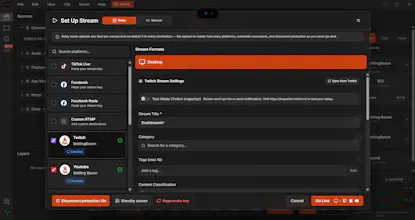
DualStream is one studio that streams to your Desktop and Mobile audiences at the same time - same sources, arranged for each scene, live everywhere in one click. The DualStream Relay - one upload from your PC, live on every platform from our servers. And if your connection drops mid-broadcast, Relay keeps every platform live on your standby screen and picks back up the moment you reconnect. Native Alerts, Per-Source audio control, VTuber support, instant replay clips (horizontal and vertical), cinema grade effects, pop-out multi-platform chat and so much more is all built in.
The app is free to download - build everything, test offline, go live to one channel. Premium is $9.99/month for access to the DualStream Relay, multi-format recording, water-mark free clips and streaming to more then one channel at a time.
🎁 For Product Hunt: use code PH-3M-HI6NIX at checkout and your first 3 months of Premium are free (or just go to dualstream.gg/ph, its applied automatically that way).
We're a three-person team shipping every two weeks, and we genuinely build what users ask for. We'll all be here all day in the comments. Ask us anything, about the product, the build, the streaming category, the design process, the streamer feedback that shaped it, whatever. Genuinely grateful for your time!
// MD & Tangent
Oh! Fun little P.S. ~ We also just released our first Open Source project for DualStream: An MCP server! This server lets AI assistants like Claude operate your DualStream studio: switch scenes, save instant-replay clips, build entire scene layouts from scratch, restyle your alerts and widgets, and react to what happens on stream. Everything runs locally on your machine, with your explicit approval, and every change renders on both your desktop and mobile canvases. Check it out here.
the disconnection protection line is the one I'd want more detail on before switching my setup over. when my home connection actually blinks mid-stream, is the relay buffering and replaying the missed seconds so viewers see a smooth catch-up, or does it just keep the stream 'alive' on the platform side while viewers still see a freeze/skip locally? those are pretty different experiences even if both count as 'staying live'.
@omri_ben_shoham1 Hey Omri, great question! The disconnect protection takes over on any internet blip and plays a standby slate - a video, gif or image of your choosing (or our default). No buffering or looping, the stream stays live, just playing your standby slate. The moment your connection comes back, your stream takes over from the standby slate and you're back online. I'm also working on modules like chat and widgets like our ClipReel widget that plays your twitch clips stitched together, as part of arrangeable "Standby Scenes" - so you have more control of the experience.
Simultaneous desktop + mobile streaming is a great use case for hybrid content creators. Does it sync audio/video timing automatically, or is manual alignment still needed?
@ark_y_k Hey there! Audio is synced by default, and DualStream allows you to set every audio source manually! If you are audio savvy you will find a lot of flexibility in how you can be selective with your sources. If you want a more simple approach, you can do catch all audio with desktop audio as well.
One more great feature is that every audio track can be selected to be excluded from VOD's so that when fans are watching your videos you won't get hit with DMCA's for playing copyright music because it will not save or appear in the recording, enabling you to enjoy music with your live audience and not risk your videos being taken down after your platform of choice saves them for casual viewing!
@tangenttv Appreciate the detailed answer! Manual control over every audio source sounds powerful for people who need precision. Is there a "safe default" setup you'd recommend for someone just getting started, before diving into manual tweaks?
@tangenttv @ark_y_k Hey Yuki! DS is designed to have really reliable defaults, my goal is to have it so you can just open it up and start streaming and not have to worry about manual controls (but they're all there if you want them!). So the "safe default" is honestly, just the default haha :)
@tangenttv @mdavidlow Good defaults with manual override available is honestly the right balance — a lot of tools force you to configure everything before you can even start. Nice to hear the streaming side is designed with that philosophy too.
How does the disconnection protection actually work? Does it buffer on your servers or keep something local? That's genuinely useful if it can hold a stream alive for even 30 seconds, but I'm curious what happens if someone loses internet completely.
@talhakhalidmtk Great question! Right now what happens when internet drops is we play a "Standby" slate - a looping video. You can define what media (image, gif, video) is played or use our default. Your stream actually never goes down, we maintain your connection to the platforms via our relay system and the moment your connection is back, we start broadcasting your stream again. I'm actively working on improving this system to include components like live chat and clips playback automatically, so all the stream would lose while you're disconnected is your actual live A/V, but the rest could remain up while you sort out your internet.
The cross-platform streaming idea is solid, especially with that disconnection protection built into Relay. One thing that would really level it up is a built-in collaborative editor where co-hosts can queue clips, soundboard cues, or scene changes in real time without needing a third-party tool like Streamdeck. It would make multi-person streams feel way smoother.
@gkhanyurdam5oq We have streamdeck integration and it is growing in features every day! We also have an incredible portal system that allows you to connect to another DualStream user and pipe their camera and audio directly into YOUR stream! It will make everything from podcasts to collabs incredibly easy.
A collaborative co host itself is something we have been considering as well, so we are of a similar mind!
@gkhanyurdam5oq Great feedback and idea Gökhan! We have a beta system we call Portal built into DualStream that allows users to send their A/V to other DualStream users via a shortcode, sort of like joining someones co-op game. Adding in collab edit tools would be a great addition, we'll be looking into this!
honestly this looks really solid, the simultaneous desktop and mobile push is a great angle. one thing i'd love to see is built in collaborative moderation for chats across all linked platforms, basically a shared mod queue so my team can handle trolls without jumping between five tabs. would make running a bigger stream way less chaotic
@semihajmuo I'm actually in the middle of designing collab/shared control for mods, its been a goalpost feature for a while and now with the core systems in place, it's on the nearer term roadmap :) Appreciate the note!
Congrats on the launch. The desktop + mobile audience split feels very practical for creators who need one live setup to work across formats. The part I would be most curious about is sync: when the same stream is laid out differently for desktop and mobile, how do you handle audio timing, alert timing, and per-source audio control? Also, can creators keep separate recordings for post-editing after the stream?
@simon_dao Hey Simon, appreciate the comment and congrats! I built a patent-pending "zero-copy" engine that runs primarily on the GPU. The sources that are added are captured once and replicated in real time to both canvases, making it nearly impossible for audio-desync - same for all video. Alerts are native, not browser sources, so they are also gpu rendered and all things follow the same gpu clock and stay in sync.
Regarding recordings - yes, we have two types - Clips and Full Session Recording. Clips are instant replay, you set how far back the buffer runs, say 45seconds, and any time you clip it saves the last 45 seconds of video from both desktop and mobile. Full recording records both formats and the saved sessions include per-stem audio sources.
@mdavidlow That zero-copy setup is a great answer to the sync concern. Saving both formats plus per-stem audio in the full session recording is especially useful for creators who want the stream live but still need editable material afterward. The native-alerts detail also makes sense: avoiding browser-source timing drift probably removes a whole class of headaches.