Launching today

Exodus for Google Cloud Run
Upgrade any app to Cloud Run, with your coding agent
68 followers
Upgrade any app to Cloud Run, with your coding agent
68 followers
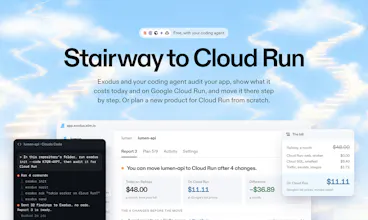
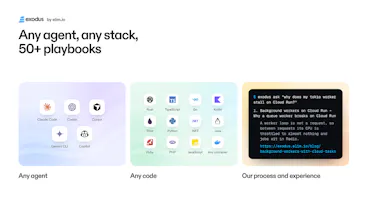
Cloud Run is Google's managed platform: no servers to look after, new copies in seconds under load, a bill only while your code works. Exodus takes your app there with your coding agent (Claude Code, Codex, Cursor): it checks the app on your machine, shows what you pay today and on Cloud Run and what to change, by 50+ playbooks from real moves. Then the agent makes the move, task by task, or designs a new app for Cloud Run. Free and open source. Try it on your repo today.






Free
Launch Team / Built With


Framer AI AgentsDesign and publish professional sites with AI
Promoted
Hey Product Hunt! I'm Abdugafur, co-founder of elim.io, here with Alex.
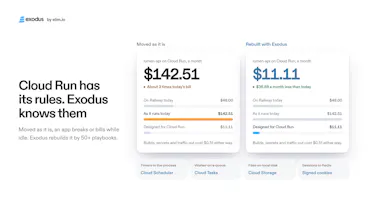
Google Cloud Run is one of the best places to run an app: it scales to zero, bills only while your code works, and runs on Google's own network. Getting in is the hard part. It has its own rules, and many common architectures break on them quietly: a cron inside the process fires late or twice, a worker waiting on a queue stalls, uploads on local disk vanish, sessions in memory sign people out. So most teams stay on a PaaS and keep paying for hours their app sleeps, because the path there isn't clear.
We moved our own apps this year and wrote down every step. Exodus turns that into a path your coding agent follows, to upgrade any app to Cloud Run:
→ Is your app ready? One line to your agent installs our open-source CLI and checks the repository on your machine: processes, data, settings and every pattern that breaks or bills while idle.
→ What will it cost? Today's bill against Cloud Run at Google's list prices, with your traffic, 16 regions and a 12-month forecast.
→ How should it be built? Your app drawn on Google Cloud, rebuilt by our 50+ playbooks: each change with the reason, the replacement and the order.
→ Then move. Your agent works the plan, a commit per task, and the report ticks itself. exodus check in CI keeps it that way.
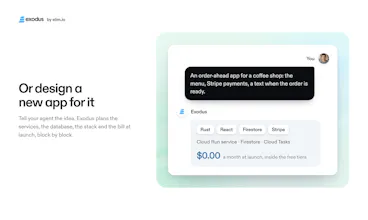
→ Starting from zero? Describe the idea and Exodus designs it for Cloud Run block by block: services, database, stack, and the bill at launch and in a year.
Your code never leaves your machine, we run no AI of our own, and we never sign in to your Google Cloud. For the Cloud Run team: Exodus runs on Cloud Run itself, one Rust service with Firestore, scaling 0 to 3.
Free, no paid tier, and the CLI is open source. A real report, no sign-up: https://exodus.elim.io/demo
What keeps your app off Cloud Run today? We're here all day.
A bit more on how Exodus works.
The audit
→ Processes: web, workers, scheduled jobs, release steps
→ Data: databases, caches, files on disk, outside services
→ Settings: env variable names, Dockerfile, CI, domains
→ Every pattern that behaves differently on Cloud Run
The questions
Only what the repo can't answer: traffic, where your users are, what you pay today. Your agent checks first and asks you the rest.
The report
→ A verdict with its reason
→ Cost per part of your app, today vs Cloud Run
→ The target architecture
→ Changes in order, each with its effort
Share it by link or download as Markdown / JSON.
The move
→ One task, one commit, one test
→ Data copied and compared before the switch
→ Steps only you can do (sign-in, billing, DNS) come to you with instructions
After a month
Your agent reads the real Google bill and the report sets it against the estimate, part by part.
Your data
Findings go to the cabinet. Code, secrets, and env values stay on your machine.
When it says "stay"
Heavy 24/7 load or a persistent disk usually fit Cloud Run poorly. The report tells you.
Works with Claude Code, Codex, Cursor and others · macOS and Linux
Hi Exodus team! I have a few questions:
Can you tell me more about what Exodus scans for? Based on the video, it seems to be looking for dependencies, like what database the app is using, etc?
Does Exodus assume the app is already running in a serverless architecture, or does it scan for statefulness as well?
Does Exodus help setup spend caps, budgets, etc related to billing?
And lastly, how does Exodus know what the user is paying for currently? Does the user provide that information directly?
Good luck with today's launch!
Thanks, Sara. Point by point:
1. What it scans: the CLI (Rust, deterministic) reads the deploy files (Procfile, railway.json, render.yaml, fly.toml, app.json, docker-compose, the Dockerfile) and the code. It lists the processes (web, workers, scheduled jobs, release and migrations), the data (Postgres, MySQL, Redis, SQLite, local files, external services), the env names, and the patterns that break or keep billing on Cloud Run, each with its file and line.
2. It does not assume the app is serverless already. State is the main thing it looks for: sessions and caches kept in memory, files written to local disk, timers and loops inside the process, workers waiting on a queue, long-lived connections, work after the response. Each finding comes with its replacement: Cloud Tasks or a worker pool, Cloud Scheduler with a job, a Cloud Storage bucket, signed cookies or the database. For a stateful service or a steady heavy load the verdict can be "stay".
3. Billing: Exodus never changes billing or IAM itself; anything that costs money waits for the person's yes. It does not create budgets today. The knowledge base the agent reads through `exodus ask` has a guide on budgets, alerts and the billing export, and a budget step in the plan is a fair gap, thanks for raising it. After a month on Cloud Run, `exodus bill` reads the real bill from the BigQuery billing export, read only, and the cabinet compares it with the estimate.
4. Today's cost: the agent reads it from the platform's CLI or the invoice where it can (railway status, fly scale show, heroku addons) and asks the person only for what it cannot find, per part or as one total. The report marks who gave each answer. The Cloud Run side is priced from Google's Cloud Billing Catalog list prices.
A sample report, no sign-up: https://exodus.elim.io/demo
Following up on budgets: Exodus now adds a "Budget and alerts" step to every plan. It sets a Cloud Billing budget on the project at the report's Cloud Run estimate, with email alerts at 50%, 90% and 100% of spend and on the forecast; your agent shows the gcloud command and runs it with your own gcloud once you approve. Released in v0.2.10. How budgets work: https://exodus.elim.io/blog/budg...
This is an interesting concept. I've been in situations where I've wanted to move an app or system out from another cloud onto GCP, so this sort of a migration service is helpful.
How does this handle large, no-downtime data migrations?
Thanks, Andrew. Short version: a dump and restore needs a write freeze as long as the copy takes, so for a large database the plan uses continuous replication instead.
Small database: rehearse pg_dump and pg_restore while the old app runs, time it, compare row counts, checksums of the key tables and sequences, then freeze writes, copy again and compare again. The freeze is the rehearsed time.
Large database or no downtime allowed: Google's Database Migration Service (no extra charge for Postgres to Cloud SQL) replicates continuously while the old app keeps serving. At the switch you stop writes, wait for zero replication delay, promote Cloud SQL and point the app at it, so the pause is only the time to drain the last changes and promote.
Its limits are worth checking first: schema changes are not replicated, sequence values must be set after the copy, tables without a primary key only get inserts, large objects are not migrated, and the source needs logical replication (on Heroku that is the Advanced tier, on Render a Pro workspace).
In every case the old database stays as the way back until the new side has run clean. The full order with commands: https://exodus.elim.io/blog/movi...
@abdugafur Got it, thanks for the explanation!
Lovely products. Congrats on launch & best wishes ahead to the team. @alexeynovikov 😄
Thank you, Shivam.