
A default handler for multiple file types that opens the right editor — Velja/Choosy for files. Full control of any file type and what editor(s) open it, with radial picker and custom rules.




What's great
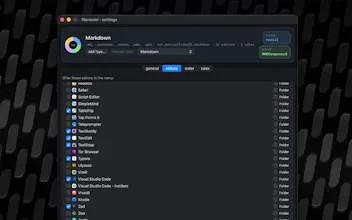
Set up one folder rule for markdown files (blog drafts go to one editor, docs go to another) and it's just worked since. The radial picker is a nice touch for the file types I didn't bother making a permanent rule for - image files especially, where I genuinely want to choose per file.
What needs improvement
When I had a folder rule and a broader extension rule that could both apply to the same file, it wasn't obvious from the rule list alone which one would actually win - had to test it by opening the file rather than being able to just read the answer off the settings screen.
vs Alternatives
Before this I just lived with macOS's one-default-app-per-extension limit and manually right-click "Open With" every time it wasn't the app I wanted. Velja/Choosy cover browsers and links well but I hadn't seen the same idea applied to general files until this.
Ratings
Ease of use
Reliability
Value for money
Customization
Report
10 views
Hey Product Hunt! I've long wanted to have more control over which files open where. In my blog drafts folder, I want my Markdown files to open in nvUltra, in my documentation folders I want them to open in VS Code. When I double click an image file, I want to be offered a menu of Preview, Affinity, and Acorn. So I built a tool to do that. I hope you enjoy it!