
FreqWave EQ
Customize your web audio with a real-time EQ
119 followers
Customize your web audio with a real-time EQ
119 followers
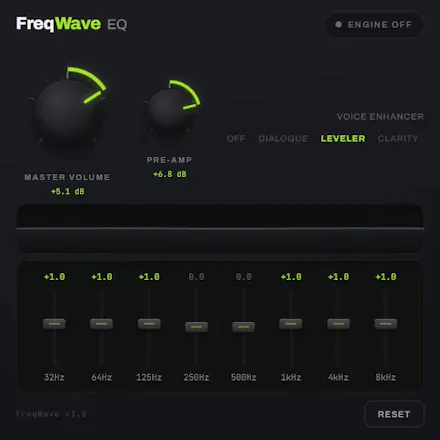
8-band Web Audio Equalizer - fixing muddy podcasts, harsh streams and quiet dialogue. Featuring EQ modes and DSP Compression.




Hey Product Hunt!
I built my own tool to solve an annoying problem. And it works!
It's called FreqWave EQ and it brings the audio control I need straight to my browser.
Key features:
- 8-band parametric equalizer
- Voice Enhancer - four modes for speech and dialogue
- Real-time spectrum visualizer
It’s completely free on the Chrome Web Store.
I'd love to get your feedback and feature suggestions!
P.S.
If you're interested in the building process, some bugs I've encountered, technical decisions etc. - you can read my post here:
https://dev.to/bob3x/i-solved-an-annoying-issue-by-building-my-own-real-time-audio-chrome-extension-3c9k
Thanks!
Real-time EQ in the browser runs into the same wall every extension in this space hits: sites using EME for protected playback block extension access to the audio graph entirely.
Which tabs does it actually work in? I'd want to know the boundary before installing rather than discovering it on the one site I care about. Since it's open source, is that documented anywhere, or is it more "try it and see"?
@ark_y_k Spot on! Because FreqWave EQ uses chrome.tabCapture via the Web Audio API, it inherits the standard browser boundaries - it works great on standard media like YouTube, Twitch, SoundCloud, podcast, etc., but hits the web platform wall on DRM/EME-protected streams (like Netflix or Spotify Web).
You make a great point about documenting this upfront. I'm updating the README right away to list these technical boundaries clearly so users know what to expect before installing.
Thanks for the callout!
nice, this is the kind of thing that should've been built into Chrome years ago. question on the day-to-day workflow: does it remember a preset per-site automatically (podcast site gets the voice mode, music site gets flat/whatever I set once), or is it a global setting I'd be re-adjusting every time I switch between a podcast tab and a music tab? that persistence detail is usually what decides whether I actually keep using an EQ extension after the first week or forget it exists.
@galdayan Thanks a lot! You're right about missing cool features in Chrome.
Sure nobody wants to re-tune an EQ every time they open their browser. FreqWave EQ retains your last-configured EQ state globally and across browser restarts. So when you open Chrome or spin up a new video tab, your active preset and custom sliders are right where you left them - you just toggle it on.
True per-domain persistence (automatically auto-switching to 'Voice' on podcast URLs and 'Flat' on music sites) is on my list to be included in the next update. Which is on its way really soon!
So if you still want to give it a try, let me know how it feels.
@borislav_ginov makes sense, global persistence already solves the annoying part. the per-domain auto-switching would be the thing that pushes it from nice-to-have to actually sticky for me though, since podcast/music switching is basically my whole day. will keep using it in the meantime and check back when that ships.
The tabCapture approach makes sense for the DRM boundary. What I'd want to know before leaving it on all day: how much CPU or battery does continuous real-time EQ processing add on a laptop, especially with the compressor running too? That's usually the tradeoff nobody mentions until the fan spins up halfway through a long podcast.
@raffay_sajjadThat's a super valid concern - nobody wants their laptop fan sounding like a jet engine halfway through a podcast!
There're few ways how FreqWave EQ keeps overhead extremely low. First it uses an isolated offscreen engine - the entire audio processing is offloaded from the active webpage thread into an isolated Manifest V3 offscreen worker. Then the audio processing with its heavy math for the 8-band EQ and compressor runs on Chrome's underlying C++ audio engine and not in JavaScript loop. In addition what could impact performance is the spectrum visualizer, but it pauses completely when the popup window is closed. In testing, battery drain is negligible and comparable to standard HTML5 playback. Give it a try on a long podcast episode and let me know how your fans are sounding.
Hey Product Hunt community! 👋
Thanks again for all the feedback on the initial release of FreqWave EQ. Based directly on how people were using the extension, I just shipped version 1.1.0! 🚀
Here’s what’s new:
Site-Specific Profiles: FreqWave now remembers your EQ per site. Set a Vocal preset for YouTube and Bass Boost for Spotify - it switches automatically as you change tabs.
Built-in & Custom Presets: You can choose a preset from the list or create and manage your own custom 8-band EQ configurations.
Peak Guard with Compressor: Integrated dynamic compression to prevent digital clipping/distortion when boosting gains.
The update is live on the Chrome Web Store now. I’d love to hear what you think of the new release!