Launched this week

Glint
Claude Code activity, right where you want it.
94 followers
Claude Code activity, right where you want it.
94 followers
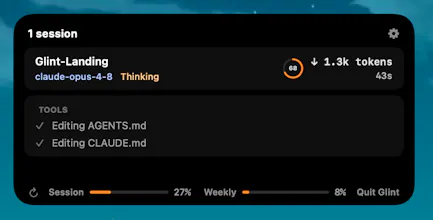
Glint is a lightweight macOS menu-bar app that surfaces what your Claude Code sessions are doing - live status, the current tool, token spend, the plan, subagents, usage meters, and context window - in a glanceable island near your notch, a floating pill, or beside the Dock. Reads ~/.claude locally; your session data never leaves your Mac. Support for other providers like Codex, Kiro and etc are on the roadmap to be release ASAP!




The thing I never solved is the alt-tab tax... I kick off a Claude Code run, switch windows, then keep flipping back to see if it's done or just stuck waiting on me. Does it flag when Claude's blocked on a question vs still working? That gap is what actually eats my evenings.
@luca_capone That gap is the whole reason I built Glint. It tells the states apart: Thinking (still working, with the live tool) vs Awaiting - needs you (blocked on your answer), right in the notch/pill/dock. And there's an optional sound output (which can be configured in app settings) which will trigger when a run finishes or needs input, so you can stay in another window and get pinged only when you're the bottleneck. Would love your feedback if you give it a go.
Most of my claude code sessions run in the background while i'm doing something else. watching a video, handling emails, whatever. glint is the thing that actually tells you when it needs your attention without you having to go check. the subagent view is a nice bonus too - parallel sessions get chaotic fast. been using it every day since i stumbled on it
@truekasun Glad it's been useful! That background workflow was exactly the problem I built Glint to solve. Thanks!
Sessions sitting blocked for 20 minutes because I forgot is exactly my problem too, except I'm on Windows so I can't try this. The "waiting for input" priority view is the feature I'd actually want most — that's the moment that costs the most time. Hope this comes to other platforms eventually.
@josedamian Thanks José, that "waiting for input" priority view is the heart of Glint, and Windows is firmly on the roadmap (the lifetime license even includes the Windows and Linux versions free when they land), so hang tight.
Claude Code activity surfaced where i'm already working is the kind of utility that becomes invisible in the best way once it's there. curious what the most common surfaces have been so far. is it editor adjacent (sidebar, status bar) or more in the team layer (slack, pr review). and is the activity feed read only or actionable from inside it?
@thenameisarian Right now Glint can live on the notch, a draggable floating pill, and a dock-side bar showing status, plan, tokens, and sub-agents - but by the end of this week we're shipping the actionable bit like jumping straight to a session's terminal from the expanded view and support for other providers as well.
memi
Claude Code in the menu bar is exactly the tiny status layer I want. Half my agent anxiety is just wondering if it is cooking or asleep.
@sarveshsea Thanks! That's great to hear. Glint gives you that glance so you always know if it's thinking, idle, or waiting on you, without breaking flow.
Glint roadmap already includes building support for other providers like Codex, Kiro and etc.