
Kogvio
Understand anything online without leaving the page.
154 followers
Understand anything online without leaving the page.
154 followers
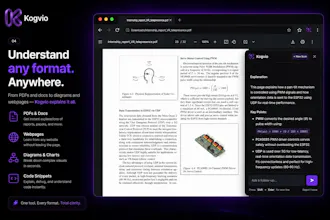
Every time I didn't understand something online, I had the same workflow: Copy. Open ChatGPT. Paste. Come back. It completely broke my focus. So I built Kogvio. Highlight anything on a webpage or PDF, ask questions instantly in context, and continue learning without leaving the page. Whether it's documentation, research papers, medical textbooks, or technical diagrams, Kogvio helps you understand—not just search.




Free Options
Launch Team / Built With

@harshit_kataria1 I like that this is solving a real friction point rather than adding another AI destination. Keeping context while learning is a much better experience than constantly bouncing between tabs.
@stephanie_mangos Hey Stephanie! Thanks so much for the feedback!
You nailed the exact vision behind Kogvio. We built this specifically because context-switching destroys focus-every time you copy-paste text or screenshots into a separate tab, you lose momentum. Keeping the AI right on top of the active page ensures you stay in the flow. Really appreciate you highlighting that! 🚀
As someone who lives in research papers and medical textbooks all day, that copy → open ChatGPT → paste → lose-my-place loop is painfully familiar, so this clicks immediately. Two things I'm curious about: when I highlight a passage in a dense PDF, does Kogvio pull in the surrounding context (or the whole document), or only the exact selection? And for the technical-diagram case like the Kalman filter example in your demo, is it reading the figure itself or the caption and text around it? That's usually where in-page tools fall short for me.
@hung_tran_from_notebook_os This is exactly the use-case I built it for! The copy-paste-lose-your-place loop is the worst. To answer your questions:
Right now, Kogvio focuses strictly on the exact text or screenshot you capture. This keeps the processing fast and hyper-focused. However, 'full-page context' awareness is high on the roadmap specifically for dense research papers!
For technical diagrams like the Kalman filter, it uses a pure vision model. It is actually 'seeing' and analyzing the pixels of the figure itself, not just scraping the DOM for nearby text. If you include the caption in your snip, it will synthesize both together to give you a complete breakdown.
I'd love for you to test it out on some of those medical textbooks and let me know how it handles them.
The highlight-in-context flow on a PDF or docs page is the part I would actually keep installed — that copy, open ChatGPT, paste, come back loop is exactly the focus-killer you describe. Before trusting it on technical or medical material I would want to know the data boundary: when I highlight a selection, does it send just that selection to the model or grab the surrounding page/PDF context too, and is any of that page content retained server-side per query or is it stateless? For sensitive docs that is the difference between leaving it always-on and only enabling it on tabs I trust.
@hi_i_am_mimo Spot on, Valeria! Breaking that 'focus-killer' loop is exactly why Kogvio exists. To answer your data boundary questions with full transparency:
The Boundary: It strictly captures only the specific bounding box you draw. It takes a localized visual crop and does not scrape the DOM, read the surrounding text, or feed the rest of the PDF to the model.
Retention: The underlying AI model processing is stateless and your data is never used for training. However, Kogvio does save your scans to your private, encrypted web dashboard (Vault) so you can access your history and ask follow-up questions later.
You have full control to permanently delete any scan from your dashboard at any time. Hope this gives you the peace of mind to keep it always-on for your trusted tabs!
That bounding-box-only crop plus stateless processing is the right default — thanks for being concrete. Two boundaries I would still want pinned before always-on for sensitive docs: is the Vault encrypted zero-knowledge (keys derived client-side so Kogvio staff cannot decrypt a scan) or encrypted at rest with keys you hold? And since the crop is sent to a model, does the stateless, no-training guarantee cover the actual inference providers terms if you are routing to a third-party API, or only your own handling?
Thank you so much, Valeria, this really means a lot! Appreciate the deep-dive technical questions. Here is the exact breakdown of our security stack:
Vault Encryption: The Vault is encrypted at rest at our server and database layer (using industry-standard AES-256 with managed keys), rather than client-side zero-knowledge E2EE. This architecture is what allows for seamless cross-device syncing and instant history search in your workspace.
Inference Provider TOS: Yes, the zero-training guarantee covers the entire pipeline end-to-end. We route requests strictly through commercial enterprise API endpoints (e.g., OpenAI / Anthropic APIs). Under their commercial API Terms of Service, data sent via API is strictly prohibited from being used to train underlying models.
Transparency is everything when building tools for daily workflows, so hopefully this gives you the exact picture you need to set your trust boundaries with Kogvio.
Appreciate the straight answer — managed-key AES-256 at rest is a reasonable tradeoff for cross-device sync, but it does mean the vault isn't zero-knowledge. So where does that leave the threat model: is there any client-held or envelope key so that a server/DB compromise (or an insider with KMS access) can't read a vault in plaintext, or does it all come down to protecting the managed keys? For genuinely sensitive docs that's the line I'd want pinned before turning capture always-on.
Congrats on the launch. One question tough, does this integrate with any note taking apps or can you save the explanations you got in some way? I think saving this for later review would be really useful for studying.
@jn263 Hey Janez, thank you so much! Yes, everything is automatically saved to your workspace dashboard on the website. You can easily review past scans and even jump back into the chat to ask follow-up questions anytime. I love the idea of integrating directly with note-taking apps too. Which app do you personally use the most for studying?
@harshit_kataria1 That's great. Are workspace organized by topic or website? Can I have one workspace and save to it from different websites as I research things? I started using Obsidian recently. But something has always been missing with the note taking apps. I'll try Kogvio.
@jn263 Hey! Right now, you can scan from any website and it all funnels into one main Vault. But you actually caught me right in the middle of coding a 'Folders' feature, so very soon you'll be able to organize everything by specific topics!
I totally hear you on the note-taking apps—they can sometimes add too much friction when you're in the middle of deep research. I'm hoping Kogvio feels much faster for your workflow.
Also, just a quick transparent heads-up: if you run into any snags with upgrading, our international payment gateway is currently in the final approval stage and should be fully live in about a day. Let me know what you think of the tool!
the copy-paste-back workflow is such a small tax but it adds up over a day of reading docs. how does it handle technical diagrams specifically, is it reading the image content too or mostly working off the surrounding text
@galdayan Exactly! That tiny bit of friction adds up fast. For diagrams, Kogvio doesn't rely on the surrounding text at all. It uses a pure vision model to actually 'see' and read the pixels of the image or chart you highlight. Give it a shot on some of your technical docs and let me know what you think!
@harshit_kataria1 a pure vision model for that is the right call, most tools cheat by just grabbing nearby text and it falls apart the second the diagram has no caption at all. I'll try it on a couple of architecture diagrams from some internal docs and see how it does with arrows and labels crammed close together
@galdayan Exactly! Relying on text scraping completely defeats the purpose if the diagram is standalone. Architecture diagrams are a fantastic benchmark for this—I'd love to hear your feedback on how it handles those crammed labels once you put it through its paces!
@harshit_kataria1 will do - I'll grab a couple of dense architecture diagrams from internal docs this week and report back on the crammed-labels case specifically, that's usually where these tools quietly fall back to guessing.
the highlight-and-ask-in-context flow is exactly the kind of friction removal that actually gets used daily instead of abandoned after a week. for something like a long research paper, does it feed the whole document as context or just the surrounding section you highlighted? that tradeoff between accuracy and cost seems like the hard part to get right.
@omri_ben_shoham1 You've identified the hardest part of building in this space, Omri. The accuracy vs. cost (and speed) tradeoff is brutal.
To answer your question: Kogvio strictly feeds the exact section you highlight. Under the hood, it captures a localized visual crop of your bounding box and passes that directly to a vision model.
By keeping it hyper-focused on the user's specific selection instead of dumping a massive 100-page document into the context window, it keeps the explanation lightning fast, completely eliminates background token noise, and keeps operating costs low. Appreciate the thoughtful question.
Neat idea! Does it work on pages with mixed languages? I work a lot with Arabic + English content and most "understand this page" tools break on RTL text. Would love to know if that's handled.
@rashad_builds Hey Rashad! Great question.
Yes! Because Kogvio captures on-screen visual regions directly and feeds them to advanced vision models, it isn't dependent on traditional DOM text scraping. That means it seamlessly decodes mixed-language pages-including Arabic + English and right-to-left (RTL) layouts-without breaking the layout or context.
Give it a spin on your Arabic/English docs and let me know how it performs for your workflow! Would love to hear your feedback. 🙌