
Memoria
Search photos by text, speech, object & faces. 100% offline.
205 followers
Search photos by text, speech, object & faces. 100% offline.
205 followers
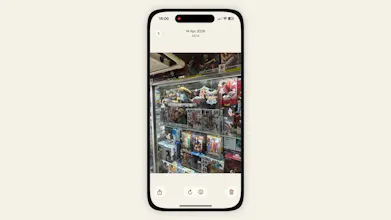
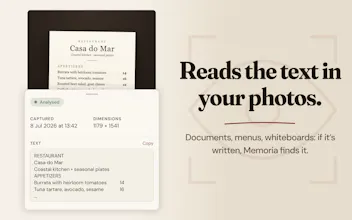
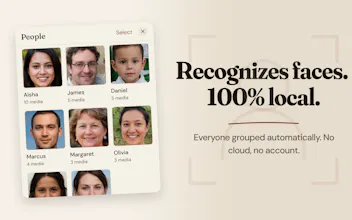
Tired of endless scrolling? Memoria is a local search engine for your camera roll. It uses on-device AI to transcribe video audio, read text in screenshots, and recognize faces and objects. No cloud, no subscriptions. Type what was said or written, it finds the media.


Hey everyone! I'm Anas, the maker of Memoria.
I always found myself scrolling for 10 minutes just to find a specific meme, a receipt, or a video clip of a friend saying a specific word. You know the exact image or video is in your phone, but you just can't find it.
Apple Photos is limited when you want to search for text or audio. Google Photos works, but it requires a monthly subscription and forces you to upload your personal life to the cloud.
I wanted a private alternative. Memoria indexes your camera roll locally.
On-device AI: It transcribes video audio and reads text in your screenshots. Just type a word spoken in a video or a sentence written on a receipt, and the app finds the media.
100% private: Everything runs locally. There is no cloud processing and you don't even need to create an account. Your data never leaves your phone.
No subscriptions: It's completely free to test on your first 250 media. If you love it, the unlimited version is a one-time purchase heavily discounted for the launch period!
It's free to test on your first 250 media. If you love it, the unlimited version is a one-time purchase, and it's heavily discounted for the launch period!
I will be here all day to answer your questions. I’d be curious to know what is the hardest type of media for you to find in your camera roll right now?
How much space does the data take up? Is it reuploading the photos and videos to the app? I have a lot of media in my Photos app. Could it handle large libraries?
Great question @mattbinder. The short answer is no, Memoria does not duplicate or re-save your media!
It simply reads your existing camera roll in place and builds a lightweight text index to make everything searchable. Because this index is strictly text and metadata, the storage footprint is tiny (just a few dozen megabytes), even for massive libraries of 20,000+ items. So yes, it handles large libraries easily!
Full transparency though: that initial indexing scan will take some time and battery power since your phone's chip is doing all the heavy lifting. Once that first scan is done, day-to-day updates are practically invisible.
I hear you @hannahawitan, having all your cloud storage searchable in one place would be incredibly convenient.
However, the main goal of Memoria is to ensure your private photos and data never touch a third-party server. Because of this strict privacy choice, the app cannot connect directly to Google Photos or OneDrive APIs.
Memoria only indexes the media that is physically saved in your phone's local camera roll.
If you want a workaround, you can download your cloud albums directly to your device's local storage, Memoria will pick them up and index them right away.
It's a useful feature in theory. But why can't I cancel a model download (if it seems like it's taking a long time to download) The overall download progress isn't visible. Although there is an onboarding process, I don't understand why the app couldn't find the photo... It's not very clear how to use it—I didn't want to delve into it.
@maxim100000 Thanks for the honest feedback. If the download progress and cancel options were hard to find, that means I need to make the UI clearer in the next update.
To answer your questions directly:
Download progress: On iOS, the progress bar sits at the bottom of the main home screen after onboarding. On Android, it appears on the final "Recap" step of the onboarding.
Canceling the download: You can cancel it at any time. Just go to the app settings and toggle off "Speech Transcription".
Missing photos: Memoria relies on recognized text (OCR), objects, or faces to surface an image. If the photo didn't contain readable text, object or faces, or if the background indexing process was still running ¹ and the photo not yet indexed ², the search will turn up empty.
I appreciate you trying it out despite the friction. Adding a more prominent "cancel download" button is now on my to-do list.
¹ The progress of the indexing process is displayed on the bar at the bottom of the home screen.
² You can also view photos that has already been indexed by selecting “Analysed” from the filter bar at the top.
I'd be happy to help you. Can you tell me if you're using Android or iOS?
honestly, screenshots of text conversations - I take one to remember an address or a plan someone mentioned, then a week later I can't find it because I don't remember which app it came from or what day. video audio search is the feature that would actually solve that for me since half the time it was said out loud, not typed. question on the on-device part: does the model that does the transcription/face recognition ship with the app, or does it pull something down on first launch? asking because I've got an older iPhone and "100% offline" sometimes quietly means "downloads a few hundred MB the first time you open it."
@galdayan Spot on regarding text conversations - that exact scenario is why I built this.
To answer your question about the model size: you have two choices in the settings depending on your storage and privacy needs:
Apple Speech: Uses native system transcription. Zero extra download, but Apple doesn't give full transparency on what stays on-device versus what goes to their servers.
Whisper: Downloads a ~460MB model on first launch. It runs 100% locally on your hardware, handles edge cases better, and keeps everything completely offline.
If you are on an older iPhone and want to save space, you can use Apple's engine. If you want absolute local execution without touching external servers, the Whisper model downloads once during setup and stays put.
that's a genuinely useful tradeoff to expose as a setting rather than picking one for me. 460MB once for full offline accuracy is a fair price. going with Whisper.
@galdayan Awesome, glad the tradeoff makes sense! I'd love to hear how the Whisper model performs on your older iPhone once the initial indexing is done. Feedback from older hardware is super valuable for me to keep optimizing.
The receipt example sold me, that is the exact search Apple Photos fails at. Doing it fully on device is also the harder engineering path, and the one that means I never have to wonder what a server saw. Where does the offline model start to struggle, handwriting or accents?
Thanks so much @yelyzaveta_kibets! You're spot on about the engineering path, getting these models to run locally without melting the phone was a huge challenge, but zero server anxiety makes it 100% worth it.
To answer your question transparently: the on-device models do have limits.
For OCR, it handles printed text and standard block handwriting beautifully, but it will absolutely struggle with messy cursive.
For audio, since we are running the Whisper 'Small' model locally to protect your battery and storage, it handles accents surprisingly well, but its real kryptonite is mumbling. If a person isn't articulating clearly, the local model will definitely struggle to transcribe it accurately.
@anasouh Naming where it breaks earns more trust than claiming everything works, so thanks for answering it straight. Printed and block handwriting covers the receipts and screenshots people actually search for. Zero server anxiety is the right phrase for the whole thing.
Hey @anasouh , one thing I keep thinking about with local search: if the OCR or the transcription doesn't get a clean read, the media is still indexed, just with nothing useful attached to it. So the user searches, gets zero results, and can't tell whether the media isn't there or whether the text just didn't come through. Have you found a way to surface that difference, or does it mostly not come up in practice?
Hey @guillermoescobar, good question!
The app actually handles this directly in the UI. Every file gets a visible status. If the model processes a media and finds zero readable text or audio, it labels it as "no text". If the file just hasn't been processed yet, it says "not analysed". You never have to guess what is happening under the hood.
In practice, a complete read failure is rare. If one specific word is too blurry, you can usually just search for another word from that same image. If the text fails completely, the fallback is simple. The app also indexes by object, location, and faces. You can just search for the object (like "receipt" or "screenshot"), the city the photo was taken in to find it or the faces of the people in it.
@anasouh nice! the visible status and the fallback solve it. Thank's for the complete answer
@guillermoescobar glad that clears it up! Let me know if you run into anything else while testing it out. Enjoy the app!