Funny story: Microflow started as a small tool I built for my design students so they could prototype with hardware without getting stuck in Arduino code.
I kept adding features, students kept pushing it further, and somewhere along the way it grew into a genuinely useful no-code prototyping tool.
What was supposed to be a teaching aid got a little out of hand, oops 😅
Would love to hear what you think!
Report
The "prototype hardware without getting stuck in Arduino code" wedge is the right one - the C++/toolchain setup is exactly where beginners bail. When you outgrow the no-code layer, can you eject to editable Arduino/C++ (or at least read the generated firmware), or are you locked into Microflow's runtime? And does it flash boards straight from the browser over WebSerial, or does it need a local daemon installed?
And yes, once you are done prototyping, you can eject editable Arduino/C++. This feature is still in beta as this comes with all kinds of challenges. But it is something I am exploring now since you eventually would like to run standalone and not tethered to your laptop.
It does flash boards straight from the browser over WebSerial (Chrome only) using WebAssembly; you can check out the GitHub to find the hoops we had to jump through to make this work :)
For more complex flows, I’d recommend running Microflow Studio, where the engine runs directly in Rust and gives you more performance!
Report
The drag and drop interface felt really intuitive, set up a basic prototype in about 10 minutes without touching any code. Nice to see it stays open source too.
The goal was to make it as plug-and-play as possible as my students have never touched code or Arduinos. It took some time to get there, but I think the effort paid off.
And yes, keeping it open source was important from day one. Thanks for having a look (or have giving it a try?)!
Report
love that the whole thing is open source and free forever, that kind of commitment to keeping tools accessible is honestly rare. also the focus on prototyping specifically is a nice change from all the bloated "do everything" platforms out there.
Keeping Microflow open source and free was a deliberate choice!
And I agree on the “do everything” platforms. I've tried to keep Microflow focused on one thing: getting interactive ideas up and running quickly, without unnecessary complexity.
I think it sits in the sweet spot between Scratch and TouchDesigner.
Report
@semasf8r@xiduzo Makes sense that standalone/untethered is the goal, that is usually where the WASM-in-browser path hits a wall. When would you say I outgrow the WebSerial+WASM flow and actually need Microflow Studio native Rust engine: is it about flashing bigger firmware, timing-sensitive I/O, or just throughput? And when I eject to Arduino/C++, is the generated code readable and hand-editable, or more of a compiled artifact I should not touch?
The Arduino gets flashed with Firmata, which is doing most of the heavy lifting. So no matter how big your flow gets, the firmare stays the same.
It is, indeed, mostly about time-sensitive I/O that works better in the native Rust runtime engine that connects the flow to Firmata.
In the screenshots, you can see a glimpse of the generated code. It is still in beta, but I'd say okay-ish and readable for someone who does have programming experience.
Play around, either on the web or in Microflow studio, and connect multiple nodes and let me know what you think!
Report
Thanks, Firmata staying constant while the Rust engine owns the timing-sensitive part clears up where the complexity actually lives. On the eject: once I export to standalone Arduino/C++ and hand-edit it, is that a one-way door, or can I still round-trip back into the visual flow without Microflow overwriting my manual edits? For anything past a prototype I need to know whether touching the generated code forks me off the tool permanently.


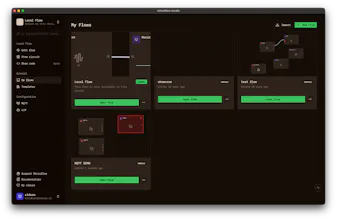


Hey Product Hunt 👋,
Funny story: Microflow started as a small tool I built for my design students so they could prototype with hardware without getting stuck in Arduino code.
I kept adding features, students kept pushing it further, and somewhere along the way it grew into a genuinely useful no-code prototyping tool.
What was supposed to be a teaching aid got a little out of hand, oops 😅
Would love to hear what you think!
The "prototype hardware without getting stuck in Arduino code" wedge is the right one - the C++/toolchain setup is exactly where beginners bail. When you outgrow the no-code layer, can you eject to editable Arduino/C++ (or at least read the generated firmware), or are you locked into Microflow's runtime? And does it flash boards straight from the browser over WebSerial, or does it need a local daemon installed?
@hi_i_am_mimo Thank you for taking a look!
And yes, once you are done prototyping, you can eject editable Arduino/C++. This feature is still in beta as this comes with all kinds of challenges. But it is something I am exploring now since you eventually would like to run standalone and not tethered to your laptop.
It does flash boards straight from the browser over WebSerial (Chrome only) using WebAssembly; you can check out the GitHub to find the hoops we had to jump through to make this work :)
For more complex flows, I’d recommend running Microflow Studio, where the engine runs directly in Rust and gives you more performance!
The drag and drop interface felt really intuitive, set up a basic prototype in about 10 minutes without touching any code. Nice to see it stays open source too.
@meralyemw Thank you so much!
The goal was to make it as plug-and-play as possible as my students have never touched code or Arduinos. It took some time to get there, but I think the effort paid off.
And yes, keeping it open source was important from day one. Thanks for having a look (or have giving it a try?)!
love that the whole thing is open source and free forever, that kind of commitment to keeping tools accessible is honestly rare. also the focus on prototyping specifically is a nice change from all the bloated "do everything" platforms out there.
@semasf8r Thank you, I truly appreciate that.
Keeping Microflow open source and free was a deliberate choice!
And I agree on the “do everything” platforms. I've tried to keep Microflow focused on one thing: getting interactive ideas up and running quickly, without unnecessary complexity.
I think it sits in the sweet spot between Scratch and TouchDesigner.
@semasf8r @xiduzo Makes sense that standalone/untethered is the goal, that is usually where the WASM-in-browser path hits a wall. When would you say I outgrow the WebSerial+WASM flow and actually need Microflow Studio native Rust engine: is it about flashing bigger firmware, timing-sensitive I/O, or just throughput? And when I eject to Arduino/C++, is the generated code readable and hand-editable, or more of a compiled artifact I should not touch?
@semasf8r @hi_i_am_mimo
The Arduino gets flashed with Firmata, which is doing most of the heavy lifting. So no matter how big your flow gets, the firmare stays the same.
It is, indeed, mostly about time-sensitive I/O that works better in the native Rust runtime engine that connects the flow to Firmata.
In the screenshots, you can see a glimpse of the generated code. It is still in beta, but I'd say okay-ish and readable for someone who does have programming experience.
Play around, either on the web or in Microflow studio, and connect multiple nodes and let me know what you think!
Thanks, Firmata staying constant while the Rust engine owns the timing-sensitive part clears up where the complexity actually lives. On the eject: once I export to standalone Arduino/C++ and hand-edit it, is that a one-way door, or can I still round-trip back into the visual flow without Microflow overwriting my manual edits? For anything past a prototype I need to know whether touching the generated code forks me off the tool permanently.