Launched this week

Mudroom
Run coding agents in a VM, review changes like a PR
51 followers
Run coding agents in a VM, review changes like a PR
51 followers
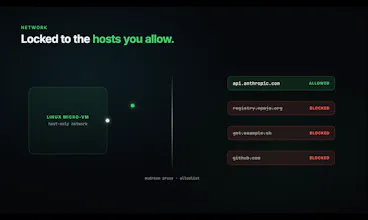
Mudroom runs Claude Code, Codex, Gemini CLI and other agents in a Linux sandbox on a copy of your project, behind a network allowlist. Review the diff like a PR and apply only what you want, with undo. Mac app, plus a CLI for Linux and Windows. Free, MIT.


Launch Team

AWS Activate CreditsCredits that fuel your startup’s next milestone
Promoted
we've got a few agent sessions working in the same repo on my Mac in the evening, so each one commits only its own file since the others have stuff in progress. If I run two agents in two Mudroom copies and they both touch the same file, what happens when I apply the second one?
@julien_zammit The second apply stops at that file. Before writing a path, Mudroom checks that the project still has exactly what that session started from (or what an earlier apply of the same session wrote). After the first apply the shared file is different, so the second session reports it as a conflict and leaves it alone. Its other files still apply. If both agents happened to write the same content, it counts as already applied. Right now you merge the conflicting file by hand. Each session keeps the version it started from, so a proper three-way merge is possible, and I opened an issue for it: https://github.com/Kernel-Hunter...
@julien_zammit Mudroom 0.7.0 is out and changes this. When the second session's apply finds that the shared file changed, it now does a three-way merge. If the two agents edited different lines, both changes go in, and undo puts the file back as it was before that apply. If they touched the same or neighbouring lines, it's still a conflict and that file is left alone. Installed copies get the update from inside the app.
so .env files end up in the copy too, can you exclude those
@bbueno Yes, since 0.4.0. New sessions leave .env files (but not .env.example), .envrc, files ending in .pem or .key, SSH keys like id_rsa, and .netrc out of the copy. Apply never writes those paths back, even if the agent creates them. The mudroom exclude command changes the list per project, and a committed .mudroomignore can add your own patterns. Thanks for pointing it out.
@karim_masmoudi got it, thanks Karim
Reviewing the diff like a PR, with undo, on a copy of the project behind a network allowlist is the part that stands out to me. Do files the agent creates from scratch, or renames, show up in that same review, or does it only cover changes to files that already exist?
@jcbuilds Yes, they're in the same review. Mudroom compares the whole copy with the state the agent started from, so new files show up under Added and removed ones under Deleted, next to the modified ones. That includes untracked and ignored files, not only what git tracks. A rename shows up as the old path deleted and the new path added, and you can apply the two together.