
Novi Notes
Your notes become AI memory. Local-only, no subscription.
187 followers
Your notes become AI memory. Local-only, no subscription.
187 followers
Novi Notes isn't just a note app — it's a local AI memory layer for your Mac.
Any AI on your machine can instantly read and write your notes. Open Claude or any MCP client and ask. No API keys, no cloud, no config.
Rich block editor with 15 block types, wiki links, backlinks, daily notes, manuals, and post-its. Knowledge flows from quick capture to polished reference — AI works across the entire lifecycle.
One-time purchase. No subscription, ever. Your data never leaves your Mac.
This is the 2nd launch from Novi Notes. View more
Novi Notes 1.1
Launched this week
Novi is your Mac's AI memory layer — a fast block editor for daily notes, docs, and post-its. Claude, Codex, or Gemini read and write your notes directly through MCP. No API keys, no cloud, no setup.
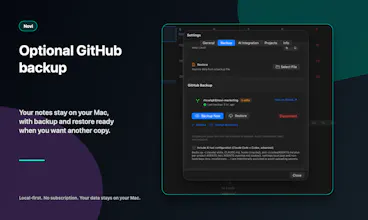
New in 1.1 — AI Skills: turn a repeated prompt into a one-click slash command. Write it in Markdown, deploy to Claude Code, Codex, or Gemini. Plus GitHub backup and Markdown reading modes.
Local-only. One-time purchase. No subscription.


Payment Required
Launch Team / Built With


Novi Notes
Hey again, PH! 👋 I'm Hojong, the solo dev behind Novi Notes — back with launch #2.
Where 1.0 left off
My first launch fixed one mess: my notes — and all my `CLAUDE.md` files, skills, and agent configs — were scattered across dozens of repos, and version-controlling them was a nightmare. So I built one local place where Claude could read and write everything over MCP. No cloud, no API keys.
That solved reading. But two itches stuck around: I was still retyping the same long prompts every session, and my Claude setup was still spread across project folders. So 1.1 closes both loops — let you build your own AI commands, and pull all your Claude assets into one place.
What's new in 1.1:
- 🤖 AI Skills — Turn a repeated prompt into a one-click slash command. "Write this week's review" becomes `/weekly-review`. Write it once in Markdown, deploy the same skill to Claude Code, Codex, or Gemini.
- 🗂️ Workspace — Every Claude and Codex project on your Mac in one tree. Read and edit `CLAUDE.md`, skills, and hooks right inside Novi Notes — no more digging through old folders.
- 🎙️ Meeting recording — Capture mic and system audio together; WhisperKit transcribes it on-device, then your AI shapes it into notes. Nothing leaves your Mac.
- 🔌 Zero-config MCP — Node is bundled in, so connecting is genuinely one click. 1.0 started with Claude; 1.1 adds Codex and Gemini.
- 💾 GitHub backup — Your notes, version-controlled in your own private repo. Your data stays yours.
And the promises haven't changed: one-time purchase, no subscription ever, everything stays on your Mac.
The funny part — making one skill deploy cleanly to three different AI clients in one click turned into its own rabbit hole 😅. But it's the thing I reach for most now.
I built 1.1 for the same person 1.0 was for — someone who lives in the terminal and IDE, leans on AI all day, and just wants one private, local place where their notes and their AI finally meet. Would love your thoughts: if you could turn one repeated prompt into a slash command today, what would it be?
Congrats on the iteration! As an iOS dev keeping a CLAUDE.md file in my repo right alongside the markdown chaos you described, the missing piece for me is mobile. Daily notes on Mac all day, but the moments I most want to dump thoughts into the memory layer are in transit. Is an iOS companion in the depth-vs-breadth tradeoff zone, or does the Mac-only constraint stay deliberate because cross-device sync would compromise the local-first promise?
Novi Notes
@ferdi_sigona Thanks for raising this — it's something I've been thinking about a lot, so let me give you the honest answer.
iOS isn't on the roadmap right now, mostly because of depth over breadth. I'm using the Mac app every day for my own work, and there's still a long list of rough edges I want to address before splitting focus across platforms. Sync is the other half of it — I actually shipped iCloud Sync early on and ended up removing it entirely, because any real fix means putting a server or account system between your devices, which is the exact thing Novi exists to avoid. So instead I've leaned toward markdown export + your-own-git-repo as the portability story. That seems to fit the way you already work, keeping CLAUDE.md right next to the code.
That said, what you described — "I'm in transit and I want to dump a thought into the memory layer" — is a narrower problem than full iOS parity, and probably the more interesting one. A write-only quick capture (Drafts-style: open app, type, it lands in today's Daily Note or an Inbox) is a much smaller sync surface and keeps the Mac as the source of truth. If iOS ever happens, it'll almost certainly look like that rather than a port.
Thanks for the framing — that depth/breadth lens is exactly how I think about it too.
The AI Skills feature is the part that caught me. Turning a repeated prompt into a slash command that deploys to Claude Code, Codex, or Gemini from one place is a real workflow fix. Curious how skill versioning works: if you iterate on a /weekly-review prompt, does the old version get overwritten everywhere, or is there any history? Also interested in whether the MCP server exposes a 'list all skills' tool so agents can discover what commands are available without you telling them first.
Novi Notes
@bhuvika_mehta
Thanks — that "deploy from one place" bit is exactly the itch I was trying to scratch.
On versioning: there's no built-in revision history today. Editing a skill updates it in
place, and re-deploying overwrites the SKILL.md in each target you've pushed to (Claude
Code, Codex, Gemini) — so the previous version isn't snapshotted automatically. The upside
is that a deployed skill is just a plain SKILL.md file, so if you want history you can keep
it under git, which works especially well for project-scoped skills in your repo's
.claude/skills. A built-in version history isn't there yet — I'll note it as a request.
On discovery: the MCP server is scoped to your notes and documents, so it doesn't expose a
"list all skills" tool — and it doesn't need to. Skills deploy as native SKILL.md files into
each agent's own skills directory (e.g. ~/.claude/skills/), so Claude Code / Codex / Gemini
pick them up and list them through their own native skill loading. The agent already sees
what's available without a separate call.
The other direction is covered by a Refresh Skills button: it re-scans the on-disk skill
directories and reconciles them with Novi's list — importing skills that were added outside
Novi, detecting edits via a SHA-256 fingerprint, and flagging files that went missing or
conflict across roots (it marks them, never deletes). So Novi stays honest about what's
actually deployed, even for skills it didn't create.
mailX by mailwarm
Can you share a skill with teammates, or is everything intentionally local?
Novi Notes
@naimz Honestly: I haven't built a dedicated team-sharing solution. It's local-first by design —
no Novi account or server in the middle — so there's no "share with your team" feature as
such.
What the current setup lets you do is lean on the fact that a skill is just a plain file:
- "Export to File…" writes it out as a standard SKILL.md that you can hand to a teammate to
import on their end.
- Project-scoped skills live in your repo's .claude/skills/, so if you already share that
repo, committing them means teammates pull via git and Refresh Skills picks them up.
But to be clear, those are general file/git workflows, not something I built specifically
for teams — and they're a copy, not a live link, so once imported each person manages their
own. A purpose-built sharing flow isn't there today; it's a fair gap to flag.