Launching today

offstage
Your computer-use agent gets a Mac account, not your screen
39 followers
Your computer-use agent gets a Mac account, not your screen
39 followers
offstage gives Claude Code, Codex and opencode a second, logged-in macOS account to work in. Simulators, Xcode UI tests and the app your agent just built open on that account's desktop, so your screen, keyboard and mouse stay yours. Free and open source: https://github.com/viraatdas/offstage
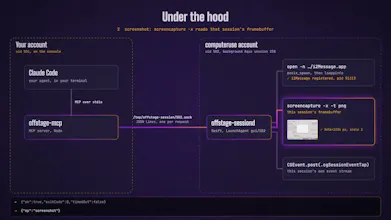


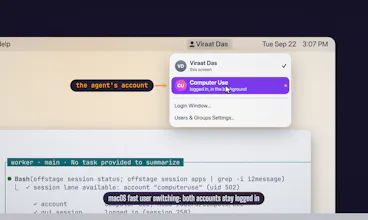
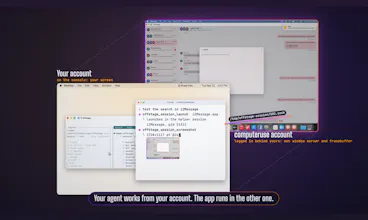


Hi Product Hunt! I'm Viraat, and I built offstage.
Every time my coding agent tested the Mac app it had just built, it took over my screen: windows jumping to the front, the mouse moving on its own, a Simulator booting in the middle of whatever I was doing.
offstage gives the agent its own macOS account instead. It's a second user, logged in behind yours with fast user switching, so it has its own window server, framebuffer, and keyboard and mouse stream. A small Swift daemon inside that account launches apps, takes screenshots and posts clicks through CGEvent's per-session tap, so input can't land on your screen. It refuses to send input at all if its session is ever the one on the console.
It also routes everything else your agent runs. Headless commands run in place, headed browsers go to a Linux container with a virtual display, macOS GUI work goes to the second account, and installers are refused outright. It isn't a VM: the helper account takes about 3 GB and there's nothing to boot.
Try it: paste this into your coding agent
Codex and opencode work too; the README has their configs. It's free and MIT licensed, for Macs on Apple Silicon. I'd love to hear what you'd point your agent at first, and where it breaks.
Hi, congrats on the launch! It's a very smart idea.
I have one question: what happens when the agent has to act on a website where only my local browser is logged in? The second user account and the Linux container start from scratch, without cookies and without access to my Apple Keychain.
Is there a way to share an existing session, or do we need to log in again on the agent's side, with the two-factor authentication that comes with it?
Thanks Wandrille! You’re right, and it’s deliberate - neither side gets your logins.
The helper account is a separate macOS user with its own login keychain and its own browser profiles. Setup skips the Apple ID step, so it isn’t signed into iCloud and your Keychain never reaches it. It also can’t open your ~/Library, which is where your browser profiles and keychain files live. Copying a Chrome profile across wouldn’t help either, because Chrome encrypts cookies with a key kept in your own keychain. The Linux container starts clean on every run.
I left session sharing out on purpose. An agent that can reuse your browser can act as you on every site you’re signed into.
So yes, you log in on the agent’s side, but only once. You already switch into the helper account once during setup. While you’re there, open its browser, sign in and do the 2FA yourself. The account persists, so those cookies stay until the site expires them. A separate test account for that site is safer still.
For Playwright tests, run npx playwright codegen --save-storage=auth.json, log in by hand, and load the file with storageState. The container mounts your repo read-only, so the tests can read it. Keep the file out of git, since it holds a live session.
Giving the agent its own desktop makes a lot of sense. The bit about refusing input if its account becomes the active session is a thoughtful touch. Congrats on getting this out, Viraat!
@oleksii_sekundant Thank you!
the refuse-if-console-is-active check is the detail that sells it, most "runs in the background" tools just assume the background stays the background. what happens on the agent's side when that refusal fires though, does the task just fail and the agent reports it couldn't click, or does it sit and retry until you switch away from the console again