
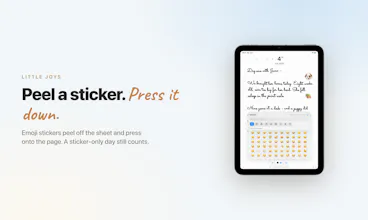
Pennen is a calm, private, handwriting-first daily journal for iPad and Apple Pencil. One dated page per day, in real ink: past pages seal and become read-only, emoji stickers peel and press on, and the streak forgives — a one-line night still counts. Your pages live only on your iPad and in your own iCloud: no accounts, no ads, no analytics, no AI reading a word. Priced like a notebook — yearly with a 7-day free trial, or a one-time lifetime that costs less than a Moleskine.




Free Options
Launch Team

ArticosYour audience, ready to react to your messaging in minutes. Try free
Promoted

Hi, I'm Ishaan, the one person behind Pennen.
I built it because every journal app I tried eventually made me feel like I was feeding it. Infinite documents I never finished. Streaks that shamed me after one missed day. And lately: AI "insights" reading my most private sentences back to me. I didn't want insights. I wanted a page.
So Pennen is built on three stubborn principles:
A page has a bottom. One dated page per day. You write it, you close it, you live your life.
Written is written. Yesterday seals and becomes read-only, a place you can visit, not edit.
An audience of one. No accounts, no Pennen servers, no AI. Your handwriting is never OCR'd into machine-readable text, your words stay ink. Pages live only on your iPad and in your own iCloud.
Craft bits for the curious: it's all native PencilKit with a custom stroke-merge that survives two iPads writing the same day; the emoji stickers peel off the sheet with a real GPU paper-fold (SceneKit shader) and press down with a haptic; and the tiny counter in the status bar shows how many strangers are writing right now, never who, never what. And one honest study, since "handwriting is better" gets thrown around loosely: a 2024 EEG study (Frontiers in Psychology) found handwriting produces far more widespread brain connectivity than typing. Modest, real, cited on our site.
If you've ever abandoned notebook number four in a drawer, I built this for you. Tell me about it and I'll tell you which of Pennen's decisions came from mine. I'm here all day.
this is a nice contrast to basically everything else on here today. "the streak forgives, a one-line night still counts" is such a small detail but it's the difference between a habit tool and a guilt machine. every other journaling app i've tried eventually adds some AI summary feature nobody asked for, so keeping that out on purpose is the actual selling point, not a missing feature. only question is what happens if you lose the iPad, is there any backup path beyond iCloud or is that a deliberate no as well
@omri_ben_shoham1 Thank you, and the AI summary line is exactly right. I've watched almost every journaling app I respected eventually bolt one on, and it always reads like a feature nobody in the room actually asked for except a growth metric.
On backup, no, that one isn't a deliberate no the way the others are. No AI, no search, no tags, those are principles I'll defend. The lack of an export path outside iCloud is just a real gap, not a stance, and it's honestly the one piece of feedback from this launch that's actually changed my roadmap. Right now your pages live in two places, the device itself and your own private iCloud database, but both of those sit inside your Apple account, nothing independent you could pull out and keep yourself. I want to fix that, probably some kind of periodic export you could save wherever you want, I just don't have a date on it yet.
that's a genuinely good answer, honestly more than I expected from a reply to a random comment. a periodic export you control yourself is the right fix, way better than just adding a second cloud provider as a backup. good luck getting it shipped
@omri_ben_shoham1 Thank you :). This is exactly why I've spent the whole day replying to every comment instead of just posting and walking away, conversations like this are the actual point. I'll try to make sure "probably" turns into something shipped, not just a nice thing I said in a reply.
no worries, and genuinely appreciate you being real about it instead of giving a canned answer. rooting for probably to become shipped
The "no feed, no AI" positioning is clear and honestly refreshing for a journaling app. I also like the constraint of one dated page per day; it makes the product feel closer to a real notebook than another notes database.
The sealing choice is brave. Since you deliberately avoided edit exceptions, do you think of follow-up thoughts as today's page referring back to yesterday, rather than corrections on the old page?
@sergbmw That's exactly the mental model, yes, though I want to be honest that there's no actual feature behind it. There's no linking, no backlink, no "jump to the day this refers to" button. If you want continuity, you write "yesterday I..." in today's page, in your own words, the same way a paper notebook has no hyperlinks either.
I did think about building a real reference system early on, something like tapping a sentence and jumping to the day it's about. I didn't, for the same reason I skipped search and tags: the moment the app understands what your entries are about instead of just holding them, it stops being a blank page and starts being a database with handwriting on top. So the honest answer is that follow-up thoughts live entirely in your own memory and your own words on today's page, and the app just stays out of the way.
@ishaanrawat
That makes sense. I actually like that constraint: it keeps the product honest as a daily page instead of slowly becoming another notes database. The absence of backlinks/jump buttons may be part of the calmness here, even if it trades off power-user convenience.
This is a genuinely nice idea, no accounts and no AI reading my journal is a real selling point these days, not just marketing copy. One thing that'd worry me a little as a single point of failure: if my iPad dies or I switch to a new one and iCloud sync hiccups for whatever reason, is there any way to export or back up the pages outside of iCloud, or is iCloud the only copy that exists? Years of daily pages feels like something I'd want a belt-and-suspenders backup for.
@galdayan Fair worry, and the honest answer right now is no, there isn't an export or backup option outside of iCloud. Your pages live in two places technically, the local Core Data store on the device itself and your own private CloudKit database, so it's not literally a single copy, but both of those are tied to your Apple ID and iCloud, not somewhere independent you control.
I don't love that answer, especially for something meant to hold years of pages. It's genuinely on my list to think through properly, something like a periodic export, even as basic as a PDF or image dump you could save to Files or a drive of your own choosing, so a real belt-and-suspenders copy exists outside Apple's ecosystem entirely. I don't have a timeline for it yet, but you're right that it matters more here than in almost any other kind of app, since this isn't data you can just regenerate if it's gone.
@ishaanrawat Appreciate the straight answer instead of a marketing dodge. A basic export-to-Files option would probably put a lot of people's minds at ease without you having to touch the no-accounts, no-AI premise at all. Wishing you a good launch day.
@galdayan Yes, the whole point of putting it out is for everyone to benefit and get feedback on improving the product. This has been the only concern people are having. Although, iCloud is very secure and the backup happens with the app open and moving to background, still, I will plan for a secure way for people to feel more secure.
How does the page sealing work exactly — does it happen automatically at midnight based on your time zone, or do you have to manually close it out?
@alsac_zafe13716 Automatic, no button, no manual close-out. It's based on your device's local time zone, not UTC, so it seals exactly at midnight wherever you actually are, not midnight somewhere else. The moment the calendar day changes, that page becomes read only and a fresh blank page opens for the new day.
One small exception: if you're mid-stroke exactly at midnight, the app waits until you lift the pencil before rolling the day over, so a sentence you started before midnight finishes on the day it started instead of getting cut off mid-word. Other than that edge case, there's no way to force it back open once the day turns. That's deliberate, not a missing feature.
the pencil feel is genuinely nice, ink weight feels just right under the apple pencil and the dated daily page keeps me from overthinking what to write
@recep763495 Thank you, that means a lot, especially the ink weight comment. Honestly that's mostly PencilKit's own pressure response, I picked one pen style and stayed out of its way rather than trying to over-engineer the feel.
The dated page doing that for you is exactly the reaction I was hoping for. A blank canvas asks "what should this be," a dated page just asks "what happened today," which is a much smaller question to actually answer. Glad it's working the way I meant it to.
the past-pages-seal-as-read-only detail is a quietly brilliant UX choice, makes it feel like a real notebook rather than an endless editable surface
@ayenurhalaqfmb Thank you. I think about it more as "a page has a bottom" than as read only, if that distinction makes sense, the read-only part is really just what enforces the bottom actually existing.
Every note-taking app I used before this had infinite documents, which sounds like a feature until you notice you never actually finish anything. There's always more room, so there's always a reason to go back and keep adjusting instead of closing the day and moving on. A real notebook page just runs out of space and ends. This is me borrowing that.