Chrome extensions are the fastest way to bend the web to your will but building one means wrestling with manifest.json, service workers, content scripts, and a build pipeline. Most people with a great idea never get past "I wish my browser could just "
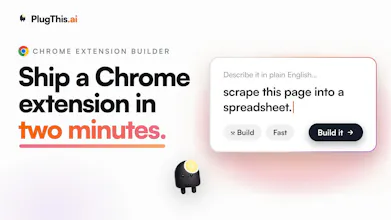
Plugthis fixes that. Describe the extension you want in plain English, and Plugthis generates a real, working, installable Chrome extension: code, manifest, assets, and all. No command line. No boilerplate. No dev setup.
How it works:
1. Describe your extension ("Summarize the article I'm reading and let me ask questions about it")
1/ (hook)
Most people don't realize this: you no longer need to know JavaScript to build a Chrome extension.
With PlugThis, you describe what you want your browser to do and it builds a real, installable extension for you.
Here's what that actually unlocks
Hey folks
Instead of another feature list, let's make this useful. If you have a Chrome extension idea sitting in your notes app, one you keep meaning to build but the setup always kills the momentum, drop it in the comments. I'll reply with how PlugThis would actually approach it: the structure it would generate, the permissions it would need, and where the tricky parts are.
No idea is too small or too weird. Some things people have already been describing:
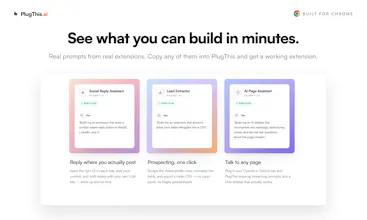
- Alert me when I've spent too much time on a certain website
- Score a Twitter or LinkedIn profile against my own criteria, inline
- One-click clean up and export the current page
Generating boilerplate for Chrome extensions is a repetitive chore, especially when dealing with manifest v3 configurations and permission structures. PlugThis solves this by handling the initial architecture and generating a clean, structured starting point. It significantly reduces the time spent setting up background scripts, content scripts, and popups, allowing developers to jump straight into implementing core functionality. The stand-out feature here is the seamless, two-way state synchronization between the chat refinement interface and local, hand-edited code modifications—it completely eliminates the version overwrite issues that typically plaque generalist code models.
While it is great for basic boilerplates, it needs to handle more complex architecture patterns out of the box—such as secure OAuth2 user authentication flows or deeply integrated content script injections on highly dynamic, shadow-DOM-heavy web frameworks. The code modularity could also be improved by allowing users to select specific build configurations (like bundling with React, TypeScript, or Tailwind CSS) directly inside the initialization prompt, rather than outputting plain vanilla HTML and JavaScript files by default.
I’ve previously relied on manual setups, custom GitHub boilerplates, or prompting generic LLMs like ChatGPT or Claude to write the extension parts piece by piece. The problem with general LLMs is that they frequently hallucinate manifest configurations or provide outdated code structures because they aren't dedicated solely to browser infrastructure. While larger full-stack app builders like Lovable or Bolt.new are incredible for web apps, they genuinely fall apart once you hit complex cross-context message passing or specialized background service worker cycles. I opted to try PlugThis because it's purpose-built for this specific ecosystem, resulting in zero vendor lock-in, immediate local .zip downloads, and 100% code ownership.
Generating boilerplate for Chrome extensions is a repetitive chore, especially when dealing with manifest v3 configurations and permission structures. PlugThis solves this by handling the initial architecture and generating a clean, structured starting point. It significantly reduces the time spent setting up background scripts, content scripts, and popups, allowing developers to jump straight into implementing core functionality.
While it is great for basic boilerplates, it needs to handle more complex architecture patterns out of the box—such as complex storage synchronization, secure OAuth2 authentication flows, or deeply integrated content script injection. The code modularity could also be improved, allowing users to select specific frameworks (like React or Tailwind) to be pre-configured in the generated extension bundle rather than just outputting plain HTML/JS.
I’ve previously relied on manual setups, custom GitHub boilerplates, or prompting generic LLMs like ChatGPT or Claude to write the extension parts piece by piece. The problem with general LLMs is that they frequently hallucinate manifest configurations or provide outdated code structures. I opted to try PlugThis because it's purpose-built for this specific framework, leading to fewer context-switching errors and less time spent debugging basic setup issues.
Thank you Ulykbek. You nailed why we exist: purpose-built beats a generic LLM hallucinating manifest configs.
Quick good news though, the framework part is already there. PlugThis generates React with TypeScript and Tailwind pre-configured and bundled, not just plain HTML/JS. If yours came out vanilla, send me the prompt, that tells me our default isn't kicking in often enough, which we can fix.
The deeper asks (secure OAuth2, complex storage sync, first-class content-script injection) are exactly where we're investing next. Would love to hear the specific architecture you were building, cases like yours are what push us past clean boilerplate. Appreciate the precision
I have developed two apps using PlugThis and I must say it is the most easiest tools to use by far. Every bit of my experience was really lovable :)
If there are APIs, I can include this product inside Indexly.
Chrome extensions act as "always-on" marketing channels, operating directly in the user's browser, increasing brand recall, and serving as content funnels. This way Indexly customers can create Chrome Extensions and build organic presence for their brands.
I wanted to build a chrome extension for my customers so that they can better use my product Indexly.ai. All the other alternatives are very generic, PlugThis did the work with in an hour with good quality.
Chetan, this made our day, thank you 🙏 Two apps already and calling it the easiest tool you've used means a lot.
Great call on the API too. Letting Indexly customers spin up branded extensions as always-on marketing channels is exactly the kind of direction we want to grow into. Would you want a generate-and-publish API, or an embeddable white-label builder? Let's take it to a real conversation, reach out directly and we'll scope an Indexly integration. This is the kind of partnership we want to build early.

Hey PH 👋 Udaya here, founder of PlugThis. We're a team of four in Bangalore.
Till last year we were building AI products for large enterprises. Then the AI builder wave hit, and tools like Lovable, Bolt, and v0 genuinely inspired us. I built web apps, dashboards, and visualisations with them, and they performed incredibly well.
But when I tried building Chrome extensions with them, it just didn't work. Extensions have a completely different architecture (manifests, content scripts, service workers) and these tools weren't designed for that.
I've been building extensions since 2015 in my first startup, so I know this pain personally. Extensions are the most personal software there is 🧩
We spend 7 hours a day in a browser, and everyone of us has some 15 minute repetitive task they wish would disappear. But there was nowhere to go to build a simple extension for ourself.
We searched the market for something like this. Couldn't find it, so we built it.
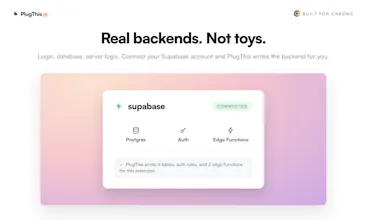
PlugThis builds Chrome extensions from a plain English prompt. Real Manifest V3 code that you own, and you can wire up a Supabase backend to make it full stack.
One from my own browser: an extension that reads a Twitter profile as I scroll, researches the person, and scores how close they are to my ICP. Took a few prompts ⚡
For launch week, the Builder plan is at the Starter price, 3 days only 🎁
We are here through the day. Try it out, and tell us what you liked and what you wish it did.
And if you build an extension for yourself today, please share it in the comments. That's honestly the whole point of this product 🙌
@nefer_ai Congrats on the launch 🚀
As someone who has built Chrome extensions, I know they're a very different beast from web apps. The architecture alone can be a hurdle, so I love that you're making this accessible through plain English prompts.
I'm curious, after watching people build with PlugThis, what's the most creative or unexpected extension someone has created that made you think, "We didn't see that coming"?
Excited to see what the community builds with this! 🔥
@md_khayruzzaman My current favourite is Touch Grass It was created by one of our users, its a very well thought and crafted game parading as a extension. Which rewards behaviour like drinking water performing stretches and so on.
Honestly was super impressed and everyone at our office, loves it.

@powell_parker Great question, and the right thing to scrutinize for a doc-signing product.
What it handles well: it keeps the session in chrome.storage.local (not a JS variable), so users stay logged in across popup close, worker sleep, and restart. It wires token refresh so expired tokens renew instead of forcing re-login. And sensitive values like tokens are encrypted at rest and decrypted only at point of use, not left in plaintext.
Where I'd keep a human in the loop: the exact trust contract with your backend, short-lived vs long-lived tokens, scoping, rotation, CSRF. Those are system-specific and a generic prompt shouldn't assume them.
So: session persistence, refresh, and no-plaintext-at-rest work out of the box. For an auth layer that signs documents, treat the generated version as a strong first draft and do a security review before shipping. Happy to go deeper on the token pattern if useful.
The focus on one narrow thing is what stands out here, since Lovable and Bolt genuinely do fall apart once you hit manifest files and content scripts. Curious how it handles permission scoping, since that's usually where generated extensions either ask for way more access than they need or break silently when Chrome tightens something. Also, since the code is yours to download, does switching between chat refinement and hand editing the code directly cause any drift, or does it stay in sync both ways.
@elhart05 Two good questions, both hit the parts that usually rot.
On permission scoping: it's need-based at generation time, so broad host access and content scripts only get added when the feature actually injects into pages, not by default. And because generation and validation run server-side against current Chrome rules, when Google tightens something we update it in one place and every new build follows. So it leans toward minimal rather than the usual "request everything to be safe," and it doesn't silently rot when Chrome shifts.
On the sync question, this is the part I'm actually happy about. There's no separate "chat copy" and "your copy" that drift apart. Both modes read and write the same single source of truth.
- When you hand-edit the code directly and save, that's stored as a normal tracked version.
- When you go back to chat refinement, the AI pulls the current saved files, including your hand edits, not some stale earlier snapshot. So it refines on top of your manual changes instead of clobbering them.
We actually hit that drift bug early and fixed it deliberately: enhancement now prefers the database as the source of truth, specifically so a stale client-side copy after an undo or restore can't make the model edit and then overwrite the wrong version. So it stays in sync both ways, and every switch between chat and hand editing is its own version you can roll back to.
Basically you can bounce between "talk to it" and "just fix the line myself" freely, and it holds together. Curious if that back and forth is how you'd actually want to work.
@saurabh_dey1 That's a genuinely satisfying answer, most tools just say "yeah it's synced" without explaining the mechanism. The database as source of truth over a client side snapshot makes sense, that's exactly the kind of bug that only shows up after someone hits undo mid session and then keeps working.
To answer your question, yeah that back and forth is exactly how I'd want to work. Chat for the boilerplate and the annoying manifest stuff, then drop into the code directly for the one line that's easier to just fix by hand than describe in a prompt. If that stays reliable under real use I'd actually trust it for something beyond a weekend project.
@elhart05 This is exactly the workflow we optimized for, so it means a lot that it matches how you'd actually want to build. Chat for the boilerplate and manifest pain, drop into the code for the one line that's faster to just fix by hand, and not have either mode clobber the other.
And you nailed the bar that matters: "if it stays reliable under real use." That's the right way to judge it, not the demo, the tenth edit after an undo.
That reliability is precisely what we keep hardening, so if you ever push it past a weekend project and something drifts, send it straight to me. That feedback is what makes it trustworthy for the bigger stuff.
+1 to @thenameisarian on the browser-plumbing wall — that manifest/service-worker gap is exactly where the web-app builders stall. @nefer_ai your distribution answer already covers the Web Store side, so I'll ask the two things next to it:
Extensions can't be previewed in an iframe the way a web app can — you load them unpacked and click through real pages. How does PlugThis close the build→see-it-actually-working loop while you're iterating?
And on review: does the generator scope host/API permissions down to just what the feature needs, or is trimming an over-broad manifest still on the human before submitting? Least-privilege is usually what makes or breaks that first review 👌
@akbar_b Both are the right questions, so here's the honest answer with the edges included.
On the build to see-it-working loop: an extension can't live in an iframe like a web app, so we don't fake that. What PlugThis does is render a live preview of your extension's real UI surfaces, popup, side panel, new tab, and options page, right in the browser as it generates, with the chrome APIs mocked so things like opening the options page actually behave. So while you iterate you're clicking a real rendering of the interface, not reading code and picturing it. For the parts a preview genuinely can't reproduce, content scripts firing on real third-party pages and the service worker's live behavior, we make the last mile trivial instead: you get a ready-to-load unpacked build, so "load unpacked and click through real pages" is one drop into chrome://extensions rather than a setup chore. I would rather be upfront that the true runtime still runs in Chrome than pretend a sandbox reproduces service-worker behavior it doesn't.
On least-privilege: scoping happens at generation, so the generator only pulls in host and API permissions when the feature actually needs them, rather than the usual "ask for everything to be safe" manifest. On top of that, PlugThis scans the actual code and detects permissions the manifest declares but nothing ever calls. Instead of writing a justification for a dead permission, which is exactly what gets extensions rejected, it flags it as "no code usage found, consider removing." It's deliberately conservative, so anything it can't attribute with confidence it leaves alone rather than risk telling you to drop something you need. Add the pre-flight checklist and privacy analyzer on top, and the manifest that reaches submission is scoped to what the feature actually uses.
@saurabh_dey1 love that you're upfront the real runtime stays in Chrome instead of faking service-worker behavior — that's the honest version I was hoping for. One edge on the dead-permission scan: does it reason about permissions requested dynamically — chrome.permissions.request() for optional perms, or an API reached via a computed path — or would those trip a false "no code usage found, remove"? Feels like the exact case for your "can't attribute → leave alone" rule.
@akbar_b You put your finger on exactly the right edge, so let me take the two cases separately.
Optional perms via chrome.permissions.request: handled two ways. optional_permissions aren't evaluated for removal at all, since they're requested on demand and won't show in a static call graph, and if a required permission is acquired through chrome.permissions.request, anything named inside that call is treated as live even without a direct chrome.api reference.
The computed path is the sharper one, and it splits in two. chrome['cookies'].getAll(...) with a bracket string is now detected as usage directly, the name is matched, not just the dot form. But chrome[api] where api is a variable is genuinely undecidable statically, so that's exactly where the "can't attribute, leave alone" rule fires: the moment there's a dynamic chrome[...] it can't resolve, it stops recommending removal for anything uncertain and drops it into leave-alone rather than remove. A false "keep" is harmless, a false "remove" that breaks a working extension is not, so it errs hard that way.
Net: bracket literals resolve to used, dynamic access disables the suggestion instead of guessing, and a genuinely dead permission with no dynamic access still gets flagged. You called the exact case the rule exists for. Good eye
@saurabh_dey1 genuinely one of the most thorough answers I've gotten on here — you split it three ways instead of hand-waving, and keeping a truly-dead perm flagged while a dynamic access disables the suggestion is exactly the right design. The "false keep is harmless, false remove breaks a working extension" asymmetry is the correct bias.
The one thing I'd watch: since a genuinely-dead permission hidden behind a dynamic chrome[var] now lands in leave-alone permanently, does that bucket surface to the user as "couldn't attribute — review manually"? Otherwise the safe default quietly becomes the thing that lets real dead perms survive the exact review it's meant to catch.
Congrats on the launch, Udaya! 🚀 You really hit the nail on the head—manifest files and background scripts are exactly where general web builders like Bolt or Lovable tend to trip up.
Since extensions rely heavily on background service workers that spin down when idle, how does PlugThis handle state persistence natively? Does the generated code lean heavily on `chrome.storage.local` , or does it automatically set up a sync structure if a user connects a Supabase backend?
@franz_briones Thank you Franz, and you're pointing right at the thing that quietly breaks most generated extensions.
On native state: yes, the generated code treats chrome.storage.local as the source of truth on purpose, precisely because the MV3 service worker sleeps. The generator is explicitly instructed to never hold state only in a JS variable or React state, since that's gone the moment the popup unloads or the worker spins down. So anything that needs to survive gets written to chrome.storage.local and rehydrated, rather than assuming the background stays alive.
On Supabase: if you enable it, it sets up a real structure, not just a key value dump. It wires auth plus CRUD against the Supabase REST API with direct fetch, and importantly it bridges the two layers: the session is persisted in chrome.storage.local so a signed-in user stays signed in across popup close, worker sleep, and browser restart, and expired access tokens get refreshed automatically via the refresh token grant instead of kicking the user back to a login screen. So chrome.storage.local is the local durability layer and Supabase is the remote persistence layer, and it connects them so state survives the worker lifecycle.
Worth being clear on scope: you get durable local state plus a real Supabase backend that survives the worker lifecycle, which covers the vast majority of extensions people actually ship. True offline-first sync, with conflict resolution and a write queue, is a heavier layer we can go deeper on if that's where you're headed. Curious what you're building, because that would tell me fast whether the current setup is enough or whether that deeper sync layer is the thing worth pushing on.
This hits different for anyone doing VC or market research day to day. Half of my job is skimming through founder profiles, pitch decks, and competitor sites, and there's always some tiny repetitive capture step (pull a founder's LinkedIn into a tracker, flag a company against a thesis, snapshot pricing pages) that's too small to justify a real dev cycle but too annoying to do by hand fifty times a week. Being able to just describe that in plain English and have it live as an actual extension I use daily is exactly the kind of 'nowhere to build this' gap you're describing.
Curious whether you're seeing people build extensions for research/data-gathering workflows like that versus more consumer-facing use cases.
Hi @andre_ajemian one of the main issues we wanted to tackle was daily repetitive workflows. You just described the uses cases, for which I have personally built an extension.
It takes in my Product profile, I define a ICP then it scores every person I see on X after doing a web search on them telling me if they are a good fit for my product.
People are building extensions across the board, the data workflows are there but the long tail is so huge. Ideas and problems, I dint even knew existed are getting solved.
Please do try to build for your exact itch, If you need any support, please reach to us via in app chat.
the manifest/content-script/service-worker mismatch is exactly why lovable and bolt hit a wall on extensions. the abstraction they picked works for pages not for browser plumbing.
real q: how does plugthis handle the distribution side? chrome web store trust is the second wall after the code works. asking because building the extension is now the easier half of shipping one.
@thenameisarian You nailed the framing. Once codegen is solved, building is the easy half and the Web Store is the second wall. That's the part we spent the most on, because "here's your zip, good luck" is where most tools stop.
Concretely, PlugThis treats distribution as a first-class step:
- It generates the listing from your actual code: long description, the 25 to 132 char short description, and the single-purpose statement Google now requires.
- It auto-drafts the compliance surface that usually triggers rejections: per-permission and host justifications, remote-code justification, and privacy disclosures mapped to Chrome's data categories.
- It packages the zip and writes the metadata into the manifest at publish time.
- Then it connects to your Chrome Web Store account over OAuth (refresh token encrypted at rest) and uploads and publishes directly. It remembers your Store item ID, so after the first listing, updates are basically one-click.
The honest boundary: we can remove the mechanical friction and the "did I fill the disclosures right" guesswork, but we can't make Google approve you. Review, trust, and the one-time developer registration are still theirs. What we kill is the part where the code works but you stall for a week because the listing and disclosures are a maze.
Curious if that matches where you have seen bolt and lovable users get stuck, at the store submission rather than the build.
With PlugThis sitting under Chrome Extensions, AI Workflow Automation, and AI Agents, how much of the extension-building process are you trying to cover? Is the goal prompt-to-working extension, or more like generating the boilerplate and helping refine pieces such as popup UI, background scripts, and permissions?
@crystalmei Great question! Prompt to working extension is the goal and not providing a boiler plate.
You describe what you want, PlugThis generates manifest, popup, content scripts, background scripts, permissions. It also verifies the build compiles before showing it to you, and auto-fixes if something breaks.
Then you refine by chatting. "Add a keyboard shortcut", "make the popup dark" etc.
You can connect your Supabase and it wires up auth and a database. For AI features you plug in your own OpenAI or Gemini key.
When you're ready to ship, it generates the icons, screenshots and listing copy the Web Store asks for. And the code is yours to download anytime, so nothing is locked in.
Will it handle every exotic extension idea perfectly? Honestly, no. But for the stuff most people actually want to build, you go from a sentence to something installed in your browser in a couple of minutes.
We have managed to build fairly complex extensions, simply by chatting and describing what we want in plain english.
If you have an browser itch, please try out the platform. I am fairly certain PlugThis will be able to solve it.


PlugThis
This is a fantastic writeup, thank you Daniyar. And you clocked the thing we're most proud of: the two-way sync between chat refinement and hand edits, precisely because that version-overwrite problem is where generalist models quietly wreck your work.
One happy correction on the improvement list: the framework part is already there. PlugThis generates React with TypeScript and Tailwind pre-configured and bundled, not vanilla HTML and JS. If your output came out plain, I'd genuinely like the prompt, because that means our default isn't reliably kicking into the richer setup, which is a fixable problem on our side rather than a missing feature.
The rest of your list is exactly where we're pushing: full secure OAuth2 flows and robust content-script injection on shadow-DOM-heavy dynamic sites are the next layer up from clean boilerplate, and they're the hard cases worth getting right. And you framed the moat better than I could: purpose-built for this ecosystem, zero lock-in, local zip, full ownership. That's the whole bet.
If you're up for it, tell me the specific auth or injection case you were building. Real ones like yours are what turn "great starting point" into "handles the hard stuff too." Appreciate the precision 🙏