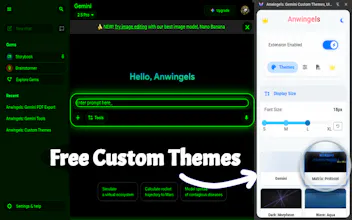
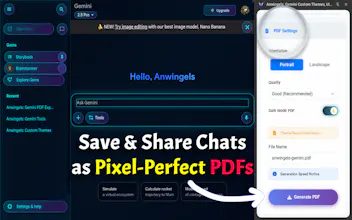
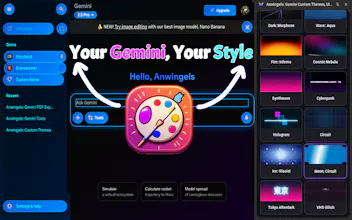
Customize Google Gemini UI with animated premium themes, a live style editor, custom dark mode colors, and adjustable font settings. Customize the Google Gemini UI, enable a custom dark mode, dynamically change font sizes, and apply breathtaking animated backgrounds with Anwingels. As the ultimate UI customizer and productivity suite, this extension empowers professionals, developers, and creatives to eliminate eye strain and take total control over their AI workspace.
Customize the Google Gemini UI, enable a custom dark mode, dynamically change font sizes, and apply breathtaking animated backgrounds with Anwingels. As the ultimate UI customizer and productivity suite, this extension empowers professionals, developers, and creatives to eliminate eye strain and take total control over their AI workspace.
Built from the ground up on the modern Manifest V3 (MV3) architecture, Anwingels utilizes hardware-accelerated animations and native CSS overrides. It delivers a stunning visual experience with absolutely zero CPU or memory bloat, ensuring your browser remains lightning-fast even during heavy coding or research sessions.
🚀 CORE FEATURES & PRODUCTIVITY TOOLS
🖌️ Live UI Style Editor (Advanced Color Picker)
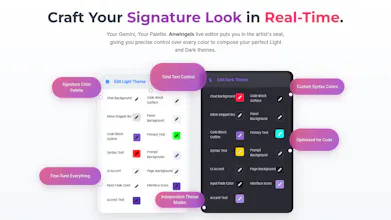
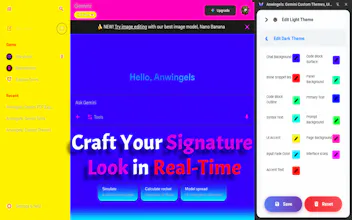
Take UI design into your own hands. The intuitive Live Style Editor allows you to meticulously craft your perfect custom dark mode or light mode. Change the main chat background, button accents, syntax highlighting, and code block surfaces in real-time. Save your unique presets with custom names and switch between them instantly.
👁️ Ergonomic Typography Controller
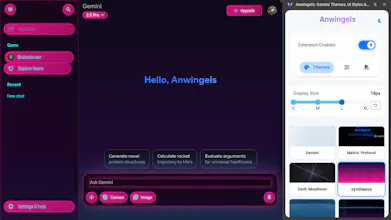
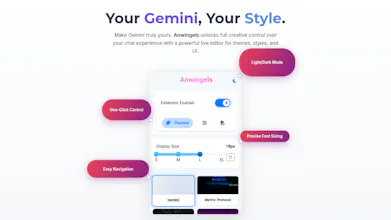
Optimize readability for any display, from massive 4K monitors to compact laptop screens. The built-in Display Size slider (ranging from Small to Extra Large) instantly scales up the text and code font size in your Gemini chats. Reduce eye fatigue and maintain deep focus without relying on the clunky native browser zoom.
🎛️ Native Side Panel Integration
Maximize your screen real estate. With a single click, dock the entire Anwingels interface directly into the native Chrome Side Panel. Tweak your colors, switch themes, and adjust text sizes comfortably in real-time without a bulky popup blocking your active prompt window.
🛑 Global Engine Toggle & Dual Interfaces
Instantly bypass all visual modifications and revert to the vanilla UI using the master "Extension Enabled" switch on the dashboard. Furthermore, the extension popup itself features an independent Dark/Light mode toggle, ensuring the control menu always matches your system preference.
🎨 THE PREMIUM GALLERY: TOP 10 THEMES DEEP DIVE
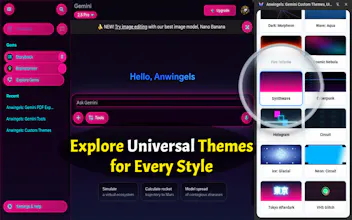
Replace the default white background by choosing from 33 unique, handcrafted themes. Every theme is powered by lightweight, hardware-accelerated CSS. Here is a closer look at our top 10 signature styles:
1. Gemini (Enhanced Default) — A highly polished, ultra-clean aesthetic that subtly improves readability and layout spacing for purists.
2. Matrix Protocol (24H Demo) — Step into the mainframe with cascading green data streams, system glitch effects, and a true cyberpunk vibe.
3. Dark Morpheon — An incredibly smooth, deep-space neural network aesthetic featuring drifting cosmic dust and pulsating purple tendrils.
4. Wave Aqua — A relaxing underwater experience complete with dynamic light caustics and gently rising air bubbles to keep your mind calm.
5. Fire Inferno — Feel the heat with multi-layered glowing embers and dynamic blazing flames anchored at the bottom of your screen.
6. Cosmic Nebula — A breathtaking journey through deep space, featuring drifting galaxies, twinkling stars, and an occasional shooting star.
7. Synthwave Retrowave — Pure 80s nostalgia with glowing neon grids, vivid pink and purple horizons, and a retro scrolling perspective.
8. Cyberpunk Neon — High-contrast scanning lines, atmospheric digital rain, and glowing magenta/cyan city aesthetics.
9. Hologram Shimmer — Futuristic 3D rotating cubes, scanning UI interfaces, and a glowing cyan projector effect.
10. Circuit Mainframe — Hardcore tech vibes with glowing data paths, running signal nodes, and pulsing motherboard energy surges.
👑 PLATINUM VIP EXPERIENCE (Premium Tier)
Anwingels offers a generous free tier featuring our core engine and a 24-hour Premium Demo (Matrix Protocol) to showcase the power of the extension. For power users ready to elevate their workspace, the Platinum VIP upgrade unlocks:
● Full access to the entire gallery of 33+ premium animated themes.
● Unrestricted access to the Live Style Editor to build and save infinite custom UI layouts.
● A prestigious Premium Verified status (blue checkmark badge) displayed on your dashboard.
● Early access to upcoming UI elements and priority customer support.
💡 PRO TIPS & WORKFLOW HACKS
● Split Your Presets: The Live Editor has independent engines for Light and Dark modes. Create a high-contrast white theme for daytime coding, and a deep-black amber theme for night sessions.
● Sidebar Workflow: Pin Anwingels to your Chrome Side Panel while working. Seamlessly scale the font size up when reading complex AI-generated code, then slide it down for general chatting.
● Instant Reset: Revert any unwanted custom color palette changes instantly by using the quick "Reset" button inside the Editor tab to restore our carefully balanced default HEX values.
💬 FREQUENTLY ASKED QUESTIONS (FAQ)
Q: How do I create a fully custom dark mode for Google Gemini?
A: Install Anwingels, open the extension, navigate to the "Editor" tab, and expand the "Edit Dark Theme" accordion. Use the color pickers to adjust the chat background, code blocks, and text colors. Click "Save" to keep your personalized layout.
Q: Is this extension safe, and does it drain my laptop battery?
A: Anwingels is incredibly safe and optimized. It uses a serverless, local-first architecture (no data collection, no telemetry). Visually, we rely strictly on hardware-accelerated CSS animations that consume virtually zero CPU, keeping your battery life unaffected.
Q: Why did my Matrix Protocol theme revert to the default look?
A: Matrix Protocol serves as our exclusive 24H Premium Demo. Once the 24-hour trial period expires, the engine seamlessly reverts to the default theme. You can unlock it permanently by upgrading to Platinum VIP.
Q: What permissions does Anwingels require?
A: We respect your privacy. We only use local "storage" to save your custom hex codes and VIP status, "host_permissions" to safely apply styles exclusively to the Gemini URL, and the "sidePanel" API for the sidebar UI. Your chat data never leaves your device.
Q: The theme didn't apply right after installation. What should I do?
A: Due to Chrome’s security policies, newly installed content scripts cannot automatically inject into tabs that were already open prior to installation. Simply refresh your active Gemini tab (F5), or click "Yes" when our smart notification prompts you to reload the page.
🎯 Stop settling for a monotonous, eye-straining interface. Transform your AI interactions into an inspiring, ergonomic, and highly organized workflow. Make your workspace truly your own with Anwingels!
⭐⭐⭐⭐⭐ If this extension boosted your productivity and made your screen look beautiful, please leave a 5-star review. Your support is the engine behind our future updates!
📧 Contact & Support: cepeshrc@gmail.com